GB
  
You are currently viewing the United Kingdom version of the site.
Would you like to switch to your local site?
9 MIN READ TIME

FIRST LOOK HOUDINI

With a new update to SideFX’s popular software just around the corner, we get to know a host of the technical revelations that await upon the release of Houdini 20
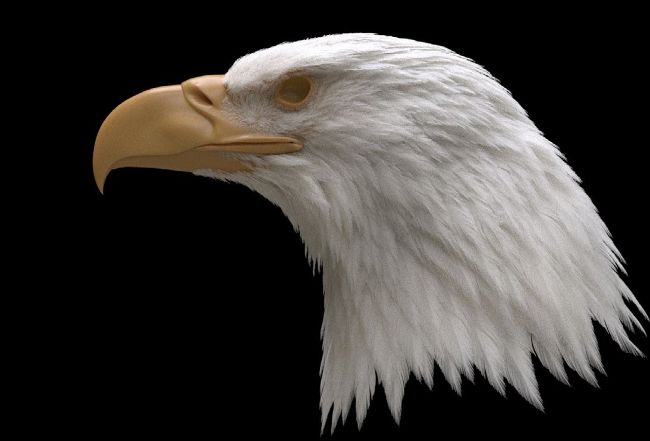
The Feather tools are just some of the exciting new features in Houdini 20

Head to page 36 to read an expert tutorial on grooming a realistic eagle

SideFX has announced its latest software update, Houdini 20. As standard S for each release, there are updates across the board that don’t get the shine of a visual spotlight, but architectural changes like the introduction of APEX lay the groundwork for what is expected to be future benefits in multiple areas of the product. But more on APEX later, as we first run down some of Houdini 20’s exciting new creative tools.

FEATHERS

The first noteworthy item for us to place in the spotlight is the brand new Feather System. It’s GPU-accelerated and enables you to create any feather shape, look and complexity that you desire. You may start by simply finding a reference image and trace the shape of the feather to recreate that exact appearance.

Check out page 36 for a walkthrough of the process of creating feathers for an eagle by Andriy Bilichenko. There you can see the level of control at each stage of creation, even down to the sculpting and orientation of individual feathers or groups. Keep in mind that you don’t have to hand-place each feather, though you could if you wanted. For the eagle, Bilichenko created key feathers that he would plant on the geometry, and then allow the feathers to be interpolated, essentially blended, and fill the spaces between those key feathers.

Worth mentioning too is the Feather Procedural, which outputs your feathers at render time. When working with creatures that boast an impressive number of feathers, you don’t want to be slowed in the Viewport by having each and every one at full fidelity. That’s why the Feather Procedural is your best friend. Lighten the load on your Viewport and get full feathers generated only at render time.

Unlock this article and much more with
You can enjoy:
Enjoy this edition in full
Instant access to 600+ titles
Thousands of back issues
No contract or commitment
Try for 99p
SUBSCRIBE NOW
30 day trial, then just £9.99 / month. Cancel anytime. New subscribers only.


Learn more
Pocketmags Plus
Pocketmags Plus

This article is from...


View Issues
3D World
Christmas 2023
VIEW IN STORE

Other Articles in this Issue


WELCOME
WELCOME
In 3D World we try to celebrate the
ARTIST SHOWCASE
The Gallery
The best digital art from the CG community
FEATURES
THE ART OF OGNYAN Z AHARIEV
Paul Hatton speaks to the lighting artist about working on AAA game franchises and what the future holds for Unreal Engine
HOW TO GROOM AN EAGLE’S HEAD WITH FEATHER TOOLS
Take flight in style with a pro workflow for avian grooming
KARMA FUR SHADER
Make realistic animals with the new addition
BOTTOMS UP WITH XPU
Making a faux commercial in a powered-up Karma
FOLDING PAPER WITH VELLUM REST BLEND
Enter the fold with a pro Houdini artist
PROCEDURALLY GENERATE GIGANTIC CLOUDSCAPES
Get a head start creating large cloud fields using Skybox and Karma Cloud Shader, the new tools available in Houdini 20
USE AN OCEAN PROCEDURAL LOP
Make a splash with a perfect sea surface thanks to Houdini 20
MAKE AN INFINITE WHITEWATER SIM
Learn how to extend your simulation and integrate it with the Ocean Procedural LOP
CREATE A DRAMATIC SHOCKWAVE EFFECT
Learn how the Ripple Solver can enhance your creations
THE PIPELINE
CREATE A STYLISED CHARACTER IN ZBRUSH
Practical tips and tutorials from pro artists to improve your CG skills
CAPTURE A PERFECT 3D SCAN EVERY TIME
Paul Hatton uses a handheld scanner to create meshes and colour data in a simple workflow
HOW TO MASTER YOUR PORTFOLIO FOR MODELLING
Helen Duckworth talks through curating a collection of projects that will set you apart from the crowd
ARTIST Q&A
ARTIST Q&A
Practical tips and tutorials from pro artists to improve your CG skills
HOW DO I USE HAIR ASSETS IN BLENDER?
SOFTWARE: BLENDER
HOW DO I MANAGE TROUBLESHOOTING WHEN UNDER A CLIENT DEADLINE?
SOFTWARE: N/A
HOW CAN I CREATE REALISTIC FIRE IN BLENDER?
SOFTWARE: BLENDER
THE HUB
DNEG: Makers of cinematic worlds
James Clarke ventures into the creative spaces explored by the studio in its work for hit biographical film Oppenheimer
Lead artist in games
James Brady shares his daily life at an ambitious video game studio, and what it takes to lead a team on AAA-quality art
REVIEWS
HANDHELD 3D SCANNERS
GROUP TEST
REGULARS
FREE RESOURCES
IN THE VAULT
Chat
X
Pocketmags Support