Está viendo la página Spain versión del sitio.
Le gustaría cambiar a su sitio local?
15 MIN TIEMPO DE LECTURA

iPhone Photography superguide

Discover how to shoot, edit and share better-looking photos

That old saying that ‘the best camera is the one you’ve got with you’ is more true than ever these days thanks to the advanced hardware and software of the iPhone range - especially in relation to Pro models such as the iPhone 14 Pro Max.

Devices such as the iPhone 11 Pro onwards enable photographers to switch from telephoto to wide to ultra-wide lenses in a few taps – capturing moments and compositions that a DSLR user might miss while they fumble to swap detachable lenses. Thanks to the Apple ProRAW format, users of the iPhone 12 Pro onwards can capture much more information about a subject’s colours and tones, narrowing the image quality gap between iPhone and DSLR even further. DSLR users need to choose a metering mode to measure the amount of light in a scene. This can lead to skies being overexposed if the incorrect mode has been selected. The iPhone has the edge when it comes to exposure thanks to Smart HDR 4, which uses machine learning to combine multiple exposures that reveal maximum colour and detail in different parts of the scene.

The iPhone is the perfect gadget for photographers. As well as being the camera that’s close to hand, it is a digital darkroom packed with tools that can fix problems with colour, tone and composition. It’s also a portable gallery that lets you display photos on a high-resolution display or share shots to thousands of screens via social media. iPhones are also effective photography tools as they draw less attention when you’re taking a photo (compared to using a bulky DSLR camera).

Although we predominantly used an iPhone 14 and iPhone 14 Pro Max for this feature, you can apply many of our shooting and editing tips, tricks and techniques to older iPhone models and produce great-looking photos.
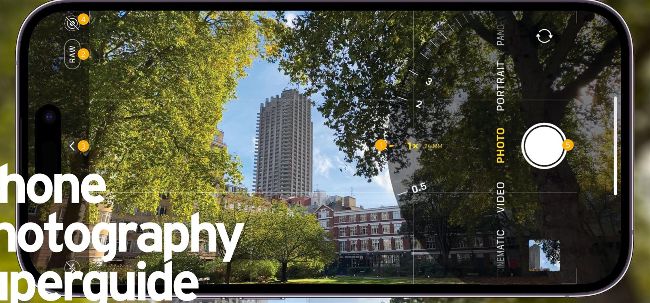
Image credit: Apple Inc

The Camera app explained

1 Camera icons

> On the iPhone 14 Pro Max tap the .5x, 1x, 2x and 3x icons to zoom in or out to compose your shot. Alternatively, swipe to summon the zoom wheel. Up to 3x is an optical zoom. Any higher is an inferior quality digital zoom.

2 Go Raw

> If you have an iPhone Pro 12 or newer then you can toggle on the higherquality Apple ProRAW format which gives you more editing control. However, in Raw format, you can’t apply Apple’s Photographic Styles to your images.

3 Chevron

> Tap here to toggle between the shooting modes (Time-lapse, Slo-Mo, Video, Photo, Cinematic, Portrait, Pano) and other settings including Flash, Night Mode, Live Photo, Photo Styles, Aspect Ratio Exposure and Self-timer.

4 Live Photo

> Tap here to toggle Live Photo on or off. A Live Photo captures a short video sequence that springs to life if you press and hold on the image in Photos. In Live Photo mode you can’t capture a higher quality Raw format file.

Desbloquea este artículo y mucho más con
Puedes disfrutar:
Disfrute de esta edición al completo
Acceso instantáneo a más de 600 títulos
Miles de números atrasados
Sin contrato ni compromiso
Inténtalo €1.09
SUSCRÍBETE AHORA
30 días de acceso, luego sólo €11,99 / mes. Cancelación en cualquier momento. Sólo para nuevos abonados.


Más información
Pocketmags Plus
Pocketmags Plus

Este artículo es de...


View Issues
MacFormat
January 2023
VER EN TIENDA

Otros artículos de este número


Mac FORMAT
hello (again)
Scan here to get the latest tech news
Meet the team
Jo Membery Operations Editor Jo’s no stranger to
What is next for Apple?
We look ahead to see what 2023 could have in store for Apple – and Apple fans
UPGRADE YOUR APPLE GEAR
Getting a new Apple device for Christmas? Here’s how to transfer everything that matters from photos to preferences
CLONE YOUR MAC
Make a copy of everything on your Mac before you start. Here’s how…
BACKUP YOUR OLD PC
Moving from a Windows machine to a Mac? Here’s what you need to know
MOVING TO YOUR NEW MAC
Everything’s ready. Now it’s time to migrate your stuff
SETTLE INTO YOUR NEW MAC HOME
Now it’s time to get Mail, Music and Messages going
BACK UP YOUR OLD iPHONE OR iPAD
Not moving to a new Mac, but to a new iPhone or iPad instead? This is what you need to know…
MOVE TO A NEW iPHONE OR iPAD
Whether you’re upgrading from Apple or switching from Android, moving on is easy
APPLE SLILLS
NEW IDEAS Your in-depth guide to getting more
APPLE CORE
iPhone 15: Everything we expect
The next iPhone line-up could look very different
Beware this Keychain stealer
T he nature of open-source software often imparts
APPLE NEWS ROUNDUP
AIRDROP GETS NEW FEATURE ‘EVERYONE FOR 10 MINUTES’
Apple’s privacy credentials face scrutiny
Data collection and use of unique identifiers come under fire
Arm Macs see market share surge
Apple leads the way but Chromebook and Surface devices contribute
Affinity suite (v2) £144.99 for all three apps
[ MAC APP]
Actions by Moleskine Studio 3
FREE (offers IAPs) Actions is Moleskine’s reminders and
Wreckfest
£8.99 (offers IAPs) The popular demolition racer has
Flat Eye
£14.49 Flat Eye sees you take charge of
Media Picks
What you should be playing and reading this month
Crave
THE GEAR WE’RE LUSTING AFTER
DJI Avata
> £1,229 > From dji.com > Aregular
Brydge ProDock
> £339.99 > From brydge.co.uk > Lacking
Bang & Olufsen Beosound Theatre
> £6,390 > From bang-olufsen.com > If
Bluesound Powernode Edge
> £599 > From bluesound.com > The
CONTACTS
Have your say on all things Apple!
THE iPAD IN NUMBERS
With the very first iPad to the latest iPad Pro, Apple’s tablet continues to impress – let’s look at the facts
MATT BOLTON…
WONDERS WHAT THE FUTURE DEVELOPMENT OF MACS LOOKS LIKE AFTER THE UNREPEATABLE REVOLUTION OF THE M CHIPS
APPLE SKILLS
Master Stage Manager
Organise your desktop with this great new window-management feature
Set up background sounds
Use your Mac’s ability to play white noise to help you focus
Use Handoff in FaceTime calls
You can now switch between iPhone, iPad, and Mac mid-call
Master System Settings
The Mac’s preferences interface has a new look and a new name
Family Sharing in iOS 16
Sharing stuff with the ones you love is easier than ever
Enhance landscape pics
Make selective adjustments to reveal more colour and detail
Learn to use dictation
iOS and iPadOS have improved the way dictation works. Here’s how…
Master complications
Complications in watchOS 9 make your Apple Watch even more ‘you’
Apple’s new passkeys
Can they really take the place of passwords? We take a look
GENIUS TIPS
EXPERT ADVICE Our resident genius solves your Mac
iOS software >
Swipe away your touchscreen troubles and rekindle your love of Apple’s mobile devices
Mac hardware >
We help to solve your hardware hassles, from interrupted upgrades to running diagnostics
macOS >
Shine a spotlight on the solutions to your most irritating Mac problems
Get started with Find My
Whether you’re trying to find people, your iPhone or your wallet, Find My can help
APPLE CHOICE
Image credits: Apple Inc, Adobe BUYING ADVICE Our
APPLE CHOICE
iPad Pro 12.9-inch (2022)
Apple’s most ‘pro’ tablet is now even better, but that comes at a price
Apple TV 4K (2022)
Apple’s black box has been given a refresh yet is cheaper than before
iPad (10th generation)
The entry-level iPad finally gets an all-new design, but at a higher price
MESH NETWORK DEVICES
Extend your Wi-Fi network to all corners of your home
ASUS ZenWiFi XT9
Power, performance, range, security – the ASUS XT9 has it all
Adobe Photoshop Elements 2023
Fix your photos and create eye-catching social media content
Notenik 10
A powerful app for a customisable note-taking experience
Cult of the Lamb
Cute character? It’s time to play merry hell…
BookFusion
Read, organise, take notes on, and share your favourite ebooks
6 apps to organise music
Clever tools to enhance your music library
STORE GUIDE
Your guide to the best Apple hardware and third-party accessories
MacFORMAT
MacFormat, Future, Quay House, The Ambury Bath, BA1 1UA
RANDOM APPLE MEMORY
Burn voyage, FireWire! The USB rival burned brightly for a while, but Graham Barlow remembers when it became a smouldering pile of ash
Chat
X
Soporte Pocketmags