GB
  
You are currently viewing the United Kingdom version of the site.
Would you like to switch to your local site?
10 MIN READ TIME

EOSS.O.S

Our technical guru is here to help. No Canon conundrum is too big or small. Get in touch today at EOSSOS@futurenet.com

Is it necessary to shoot in RAW + JPG, and worth the extra storage space?

Rob Pearson, Basildon

PHOTOPLUS EXPERT

BRIAN WORLEY CANON

Brian is a freelance photographer and photo tutor, based in Oxfordshire. He has unrivalled EOS camera knowledge, after working for Canon for over 15 years, and is on hand to answer all your EOS and photographic queriesBrian is a freelance photographer

BRIAN SAYS… In most cases, RAW + JPG shooting isn’t needed. Many cameras can create a JPG from RAW directly, or you can process on the computer. If you want to avoid post processing altogether, use JPG on the camera to store more pictures on a card, and be able to shoot longer sequences of continuous images. There are times when shooting both at the same time helps. I use RAW + JPG when shooting tethered over Wi-Fi, as a small JPG can be transferred faster than RAW for a quick preview on the laptop. Most computers are very capable of working with RAW images, so there’s little need to maintain two files for the same photo, and you save memory card space, plus computer storage as well.
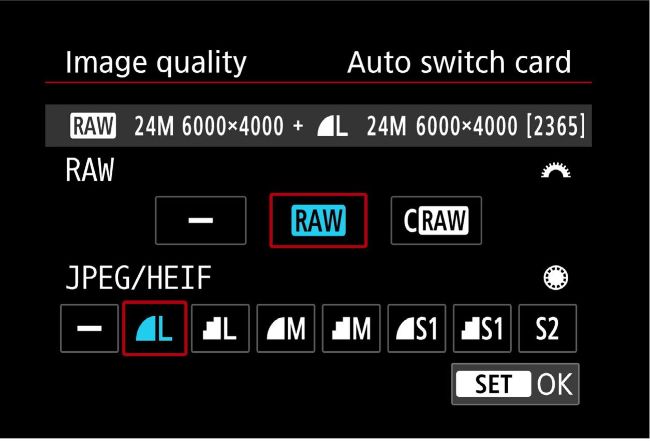
It is rarely necessary to shoot both RAW + JPG image options, and managing two files for each photo can be a challenge on a computer
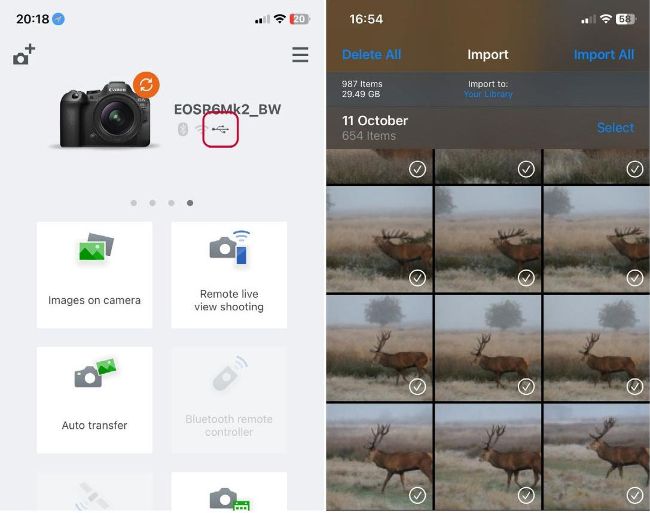
The Canon EOS R6 Mark II can connect with USB to an iPhone and use either Canon’s Camera Connect app, or the iPhone’s Photos app

Can I transfer images from an EOS R6 Mark II to an iPhone with a USB cable instead of Wi-Fi?

Tommy Gibson, Slough

BRIAN SAYS… Yes it is possible to transfer images to an iPhone with a USB cable instead of Wi-Fi, and actually for most phones and cameras it is much faster too. If you have an iPhone with a USB-C connector then you need to use a USB-C to USB-C data cable to connect a camera and phone. If you have an older device with the lightning connector you need to use an adapter to provide a USB connection to plug a cable into. This method can be used with many EOS cameras, even DSLRs. You can simply open the iPhone’s Photos app with the camera connected and switched on, and then you will see an additional icon in the lower right to import photos. Choose import to display the window where you select images to import. Your EOS R6 Mark II can also connect with the Canon Camera Connect app using a cable connection. Firstly, change the setting Choose USB Connection App to Canon app(s) for iPhone. Then, with the camera connected, you can remotely control your camera as well as transfer your images.

Unlock this article and much more with
You can enjoy:
Enjoy this edition in full
Instant access to 600+ titles
Thousands of back issues
No contract or commitment
Try for 99p
SUBSCRIBE NOW
30 day trial, then just £9.99 / month. Cancel anytime. New subscribers only.


Learn more
Pocketmags Plus
Pocketmags Plus

This article is from...


View Issues
PhotoPlus
February 2025
VIEW IN STORE

Other Articles in this Issue


PhotoPlus
Welcome
Happy new year, and welcome to the No.1
Meet the team...
Who we are and our favourite Canon content in this issue…
This issue’s contributors…
Jeremy Flint Award-winning pro Jeremy teaches our Apprentice
CANON PROS
BEAUTIFUL BUDAPEST
On a weekend workshop, Canon travel pro Jeremy Flint takes our PhotoPlus Apprentice on a tour of the Buda side of Hungary’s famously photogenic capital
TECHNIQUE ASSESSMENT
Canon pro Jeremy helps Peter set up his Canon 5D Mk IV for great photos in Budapest
Frozen in Finland
Riisitunturi National Park, Finland. 14:58pm. 15 January 2015
GUNNAR FREYR GUNNARSSON
The Icelandic Explorer and Canon Ambassador on finding flow state, why Manual mode is a must, and his thoughts on shooting with the new EOS R5 Mk II…
ESSENTIALS
INSPIRATIONS
STUNNING LANDSCAPE IMAGERY FROM THE WORLD OF CANON PHOTOGRAPHY
YOUR GUIDE TO PHOTOGRAPHING CITY SCENES
BUILDING YOUR SKILLS
PHOTO STORIES
Photo essays from PhotoPlus readers and professional photographers alike
The bird’s the word
Chiara left her job to become a full-time bird photographer and teacher. Here she documents her project ‘Between Water and Sky’
PhotoPlus THE CANON MAGAZINE app for your iPad & iPhone
GET OUR APP
FOCUSPOINT
We’d love to hear your thoughts on the magazine and all things photographic! Email us at photoplus@futurenet.com
Digital Camera World.com
The best from our brilliant website
CANON SKILLS
Welcome…
IF YOU were lucky enough to get
Capture lightning at night
PROJECT 1
TOP TIPS LIGHTNING PHOTO SKILLS
Camera tricks and shooting advice for night-time lightning photos
Get a grip!
Dan Mold shows you how to set up and start using battery grips
Old lens, new tricks!
There’s still life yet in older vintage lenses. Dan Mold shows you how to adapt film lenses to Canon’s latest mirrorless EOS R cameras...
Give black-and-white portraits extra impact
Sean McCormack shows you how to transform and enhance your portraits from colour to mighty monochrome in Lightroom or ACR
See images in a new light with HDR mode
James Paterson explains how the new HDR mode in Adobe Lightroom can reveal up to four stops of extra dynamic range in your RAW images
Master brush effects
James Paterson shows you how to create a scatter effect and get to grips with a host of powerful brush effects in Affinity Photo
CANON SCHOOL
Lens choice: RF vs EF
What features make Canon’s mirrorless lenses different?
SOFTWARE SOLUTIONS
EOS expert Brian explains how Canon’s Digital Photo Professional can make your action sports images shine
Guru Shots
We’ve joined up with online photo game GuruShots to print the winning images from Mostly Black. Over a million votes were cast and here are the best photos
NEW TESTS
CANON GEAR OF THE YEAR
Celebrate Canon’s world-leading gear as we pick the prize-winning EOS cameras, lenses and kit for beginners, enthusiasts and pros
BUYERS’ GUIDE
With prices ranging from a couple of hundred to a few thousand, Canon has an EOS camera to suit everyone, from the complete beginner to most demanding pro…
Chat
X
Pocketmags Support