Vous consultez actuellement le France version du site.
Voulez-vous passer à votre site local ?
25 TEMPS DE LECTURE MIN

Podman

MANAGE YOUR APPS!

David Rutland looks at dependency hell and the benefits of containers, and gets to grips with Podman, the newest container tool.

The concept of open source is a wonderful thing – and without it, the technological landscape in which we exist would be fundamentally different, and probably worse.

Not least because your favourite computer mag would have no reason to exist.

Its greatest feature is that if you’re building a software project, you don’t need to start completely from scratch. You don’t need to build your own stack from the ground up, and you don’t need to pay licensing fees for existing components and pass that cost on to your eventual users.

If you’re developing an app, for instance, you can say that it has dependencies – other pieces of open source software it needs to run. When the user installs your fancy toy on their home machine, they already have some of these dependencies present, and their package manager fetches the rest from the default repositories.

In many cases, this isn’t a problem. A single typed command and a password confirmation sees the fruits of your labour deployed successfully on tens of thousands of machines across the globe. Happiness and GitHub stars all round.

In real life, it doesn’t always work like that. Software is constantly being updated, and the dependencies on which your awesomely useful program relies change in functionality. Features are deprecated, and the way in which you interact with other features shifts. Read on to find out what you can do about it…

CREDIT: Magictorch

Dodging dependency hell

Containerisation can stop you drifting through these levels of hell.

Take Python – it’s one of the most popular programming languages in the world, and has T been used for millions of individual coding projects. The current version is 3.11, and while it comes with various upgrades for speed and security, it deprecates several features, functions and modules. If a Python app you wrote a few years ago uses binhex, distutils or gettext functions, it won’t run on the most up-to-date installs. While readers of Linux Format probably wouldn’t have too much of a problem specifying which Python version to use, it makes the experience more difficult than it needs to be. If you’re a developer, it means you either need to regularly go back and update your code so the app works with a broader variety of software setups, or abandon it and hope that somebody finds it useful enough to fork.

Python is an obvious example, but individual libraries can be a problem, too. If you’ve ever deployed software more than five years older than your distro release date, you’ll have run into dependency hell. Libraries and dependencies are obsolete, and you often find yourself in a labyrinth comprising dead ends, broken links, absent archives, forgotten files and, eventually, rage. In the event that you eventually find the exact version of glibstreamer you need, installing it may destroy the functionality of other apps on your system.

Historically, one way of ensuring that software will work on your system is to deploy it in a virtual machine of appropriate vintage, then create a virtual disk image (VDI). You can tote your VDI from system to system through the years, and always have a working copy of Literature & Latte’s excellent, but long abandoned, 2011 Scrivener beta for Linux.

But VMs are huge and cumbersome, and it’s ludicrous to have an entire virtual distro just to run one app.

Keep it contained

Containerisation is a different way of deploying software. It doesn’t rely on packages and dependencies you already have on your system or may need to install. Nor does it require you to spin up entire consumer-grade distros for each app you plan to use.

With Podman search, you can search for container images across as many registries as you like. Not all images are relevant.
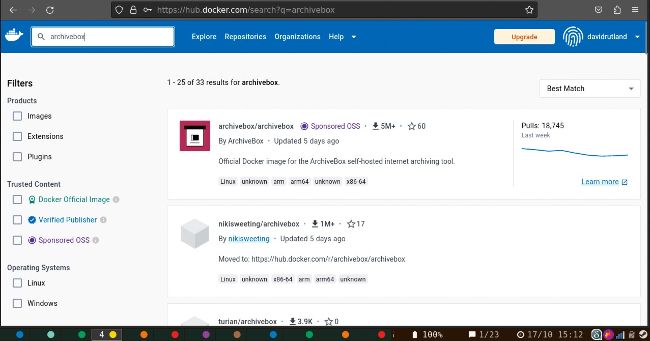
Docker Hub is one of the largest container registries. While you can access it through your web browser, some people prefer using the terminal.

Instead, containerisation offers a nice middle ground without too many compromises. Each containerised app comes with everything it needs to run – and the specific version it requires. Any libraries, dependencies and other files are a specific version, and guaranteed to work with minimal fuss.

Everything in the container is isolated from the rest of your system – so if, during an upgrade, a dependency develops a breaking change, it’s not going to affect the many and varied versions in your containers. Everything carries on as normal, and what once could have been a crisis isn’t even noticed.

Débloquez cet article et bien plus encore avec
Vous pouvez en profiter :
Découvrez l'intégralité de cette édition
Accès instantané à plus de 600 titres
Des milliers d'anciens numéros
Pas de contrat ni d'engagement
Essayer pour €1.09
S'ABONNER
30 jours d'accès, puis seulement €11,99 / mois. Résiliation à tout moment. Nouveaux abonnés uniquement.


En savoir plus
Pocketmags Plus
Pocketmags Plus

Cet article est tiré de...


View Issues
Linux Format
December 2023
VOIR EN MAGASIN

Autres articles dans ce numéro


Linux Format
Linux Format
Future Publishing Limited, Quay House, The Ambury, Bath, BA1
WELCOME
MEET THE TEAM
This issue we’re grappling with Podman to handle our services and make life easier, so what technology have you found that has made things simpler?
Docking apps…
Wasn’t technology supposed to make life easier? Sometimes
REGULARS AT A GLANCE
Newsdesk
THIS ISSUE: FOSS collaboration hit by embargo AI power use rockets KDE 6 arrives on desktops Linux boosts Cyberpunk 2077
Kernel Watch
Jon Masters keeps up with all the latest happenings in the Linux kernel, so you don’t have to.
Answers
Got a burning question about open source or the kernel? Whatever your level, email it to answers@linuxformat.com upgraded to v2.0; we’re still finding bugs…
Mailserver
Still very much supported: TurboPrint for Linux. CREDIT:
HotPicks
THE BEST NEW OPEN SOURCE SOFTWARE ON THE PLANET
REVIEWS
REVIEWS Addlink A93 4TB
Shane Downing is always cheap and usually pretty cheerful!
Intel Arc A580
Often rooting for the little guy, Jarred Walton wonders what Intel’s up to.
Tails 5.18
Shunting all his traffic through the darknet, we’re not sure whether this Nate Drake is real…
SpiralLinux 12.231008
Nate Drake gets his head in a spin over this customised version of Debian, which offers easy setup and proprietary firmware.
Pisi Linux 2.3.4
Nate Drake tastes this Turkish delight, marvelling at its originality and efficiency. Just don’t expect much help if you get stuck.
ROUNDUP
Raspberry Pi 5 killers
Industrial and professional single-board computer use can be a hairy business. Tam Hanna has seen it all, though, and guides you along.
Pi USER
CoderDojo and Code Club become global hits
The help given to young coders is reaching around the world and everyone can get involved!
Dual-Fan Heatsink
During the hot summer months, Les Pounder’s poor Raspberry Pi Zero 2W was sweating in the heat. Can this case keep it cool?
Creality Ender 3 V3 SE
A low-cost, high-speed act has swept Denise Bertacchi off her feet!
RP2040 Matrix
Les Pounder dons his trench coat and shades, journeys into The RP2040 Matrix, then realises it’s the wrong matrix and he’s now in his mid-40s.
AnkerMake M5C
It seems Denise Bertacchi is in trouble as she’s misplaced her phone…
Create a Pi Pico USB camera trigger
Les Pounder’s drawers are full of old tech. No, he’s not smuggling technology, but he is reusing it in this project!
Control your own custom robotic arm
Matt Holder discovers how to take a standard model, apply some custom electronics and enable it all to be computer-controlled!
IN DEPTH
ENTROPY ISN’T WHAT IT USED TO BE
Nate Drake provides a brief history of randomness in Linux and how the kernel uses it to keep your data safe.
TUTORIALS
Get your life organised!
Shashank Sharma knows more CLI tools than he does people, and is always looking for more. It’s why he misses deadlines. But no more!
Master printing in Linux
Unlucky Nick Peers has to untangle a cornucopia of acronyms to reveal how to get his printer working at its best and in full colour!
Customise your home WordPress site
Michael Reed provides some words to the wise and explains how to add some content to your WordPress website and customise it.
Tweak and tune your own kernel scheduler
Mats Tage Axelsson explains how Linux keeps all its plates up in the air and when it can be helpful to intervene and stop it all crashing down.
Build the ultimate Amiga PC system
Les Pounder turns a lowly 2019 Intel Celeron-based laptop into a high-end Amiga machine – 1994 Les would be so envious!
ADMINISTERIA
Artificial intelligence rules of the road
AI is great, but caution is needed to make sure that it works as expected.
AI coded Bash scripts
Use ChatGPT to make your life easier by asking it the right questions.
CDNetworks CDN Pro
A powerful, programmable CDN with a strong China presence that pleases the notoriously hard-to-please Mike Williams.
Mozilla VPN
A standalone VPN from the people behind Firefox – Mike Williams wonders what’s not to like?
WordPress vs Wix
Running a website needn’t be a technical challenge. Nik Rawlinson compares the two leading platforms that can help anyone create and manage their own pages.
CODING ACADEMY
Scan and scrape websites using Python
David Bolton shows how to safely scrape the Linux Format archives in just 70 lines of Python without incurring our wrath!
Process your smarthome sensor data
HOME ASSISTANT
Chat
X
Support Pocketmags