Ubuntu
LIGHTSPEED UBUNTU
Fitness guru Jonni Bidwell is here to trim down your Ubuntu installations for summer. Not a single star jump required.

CREDIT: Magictorch
Canonical’s latest version of Ubuntu (23.04) hit the mirrors back in April. And if you like to live on the edge, you might well already be running it. It’s an intermediate release (with only nine months of support as opposed to the five years provided to major releases), so if you’re running the last LTS release (22.04), you may well prefer to stick with that. Either way, we’re going to take this opportunity to look at how you can streamline and slimline your Ubuntu install.
We’ll start by swapping Gnome for a lighter desktop environment, such as Xfce or LXQt. If you’re running Ubuntu Server, this probably won’t be of much interest, as you’re likely already running the lightest desktop possible (ie none). So if you’d like to run Ubuntu Server, though, either at home or in the cloud. It’s a great way to make use of an old machine or cheap virtual private server (VPS), so we’ll look at setting that up and reducing its memory footprint.
Finally, we’ll combine the two tactics and explain how to run a remote desktop so smoothly you wouldn’t know it was remote. Except you would, ’cos we told you. Anyway, it works with Microsoft’s Remote Desktop Protocol (RDP) or the more traditional VNC. And it’s a good excuse for us to show off what’s new in the latest Ubuntu and to augur what might be coming in future versions.
Ubuntu Large Lobster
owards the end of the halcyon era of the LXFDVD, we started to get concerned. And not T just because of the growing threat of global annihilation (which, in hindsight, was much tamer in 2020 than it is now). No, rather by the growing sizes of the Desktop Ubuntu ISO images. In days of yore, we’d never hesitate to include a new Ubuntu release on the DVD, but where not so long ago they were around 2GB (less than half of the space on our optical media), the last LTS release weighed in at a hefty 3.4GB.
It’s not fair to dismiss all this as bloat. As the kernel supports ever more hardware, it grows out of necessity. Additional firmware is required, too. In general, it would be silly to expect individual package sizes to do anything but increase over time. And naturally to pull in more and more dependencies as they evolve. Love ’em or hate ’em, the inclusion of Snaps (Canonical’s preferred package format) have increased Ubuntu’s footprint quite markedly as well. It will come as no surprise, then, that the latest ISO is larger still – around 4.5GiB (or 4.8GB). Making it too bulky for a regular LXFDVD, if that were still at thing.
The selection of GUI applications included in a default install is already pretty minimal. And if you really don’t want LibreOffice and media players (placing you firmly in a minority camp), the Minimal Install option has been available since 18.04. This shaves around half a gigabyte off the standard install size (which we carefully measured to be 11GB in the latest Ubuntu 23.04). New in Lunar Lobster is an official mini ISO, which is only 140MB. This includes not much besides a network installer, which gives you a menu enabling you to select the latest interim or LTS release in either Desktop or Server form. So, it’s a convenience (you don’t have to make lots of different install media) rather than a way of minifying your install. What’s interesting is that it downloads those ISOs into memory and chainloads them, circumventing the time taken to write the full ISOs to USB.
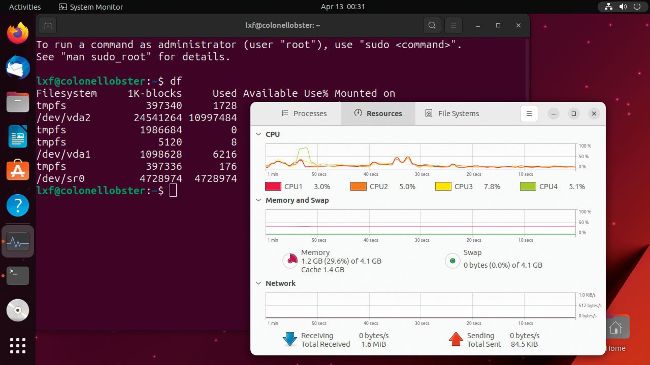
Here’s our fresh install of the flagship Gnome release of Ubuntu 23.04. It’s not bloated, but we can do better.
Two years of Wayland
Wayland has been the default display server in the flagship Ubuntu flavour since 21.04. These days, the Gnome/Wayland combination is considered fine (even on Nvidia hardware). Wayland is included in Kubuntu (although it’s not the default) and is not supported by Xfce (and hence Xubuntu) or Xfwm (and hence Lubuntu). Wayland is touted as being lighter and leaner than creaky old X.Org. Any Wayland desktop includes its own X compositor in the form of XWayland, so one might argue that the lighter setup (until XWayland is really no longer required) is to stick with X.Org (or have no GUI at all). New in this release is the use of PipeWire by default. All the flavours have adopted this change and it’s hoped that it’ll solve long-standing problems with PulseAudio and Bluetooth headsets.
NEW INSTALLER
One of the most visible new features in the Desktop edition of Ubuntu 23.04 is the installer. It uses Google’s Flutter toolkit, so looks much slicker than Ubiquity, its predecessor. Under the hood it uses Subiquity, the command-line installer used by Ubuntu Server. During installation, you can replace the nice slideshow with the Subiquity logs and see exactly what it’s doing.
The partitioning tool has seen major improvements, too, so there shouldn’t be any need to pre-partition your drive with Gparted if you’re planning to dual boot or have other exotic disk setups. We still recommend, perhaps out of an abundance of caution, using Windows to do this if you’re dual booting with Windows, though.
During early release, there was a number of bugs in the installer, some of which meant people ended up with incomplete installations. These have been fixed, but if you do run into problems, you can download an image with the legacy desktop installer from the download page.