ASSEMBLY
Coding Arm 64-bit assembly language
Continue writing 64-bit assembly code for the Pi with John Schwartzman, who calls on Linux kernel services and the C run-time library.
Part Two!
Grab the last issue to get part one, see page 74!
OUR EXPERT
John Schwartzman is a long-time engineering consultant to business and government. He also teaches computer science at a local college.
L
ast month we used assembly language to directly access the Raspberry Pi’s Linux kernel services. In this issue’s concluding instalment we’re going to use the C run-time library, glibc, instead of calling the kernel services directly. The glibc functions are in many cases thin wrappers around the Linux kernel services. But using the C library is the preferred way to access the kernel services.
Kernel system calls are limited to six arguments, but that’s not enough for the C library. We use X0 through X7 for the first eight arguments, but any number of additional arguments can be passed on the stack. We populate the registers listed above with the arguments to the function in left to right order. We then PUSH the arguments on to the stack in right to left order and remove them from the stack after the C library function has executed. You’ll see an example of this in environment.asm. When using the kernel system calls we called a common location using the software interrupt instruction SYSCALL and passed the ID of the specific service in the X8 register. When using the C library we call the specific function we want by name. X0 (or sometimes W0, the lower half of X0) is used to return a result to the caller.
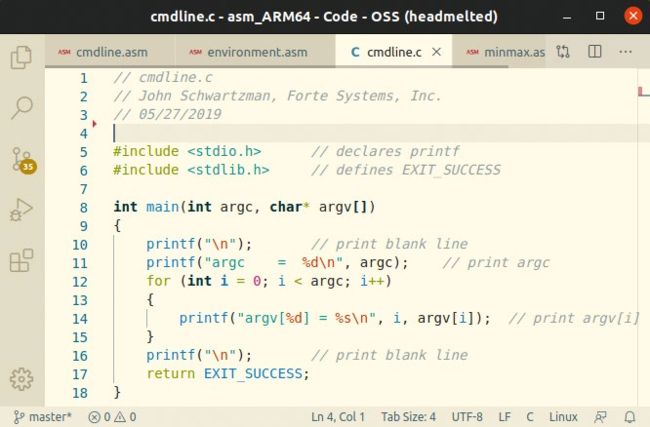
Here, the command cmdline.c lists arguments to the c program.
Our next programs are cmdline.c and cmdline.asm (see screenshots below and on page 88). When a main function is invoked it can include arguments that the user types on the command line. If you type ./cmdline alpha beta goldfish at the command prompt, Linux will execute the program cmdline. The program will receive as parameters, argc, which is the total number of string arguments (four in this case) followed by an array of pointers to the strings on the command line that are in an array of arrays called argv[]. In this case, cmdline will receive as strings ./cmdline , alpha , beta and goldfish . Cmdline.c and cmdline.asm read and print argc and argv[]. Since this is Linux, you can guess how we receive these parameters. W0 will have the integer argc (the first argument), and X1 will have the vector of pointers, **argv. cmdline.c should be easy to understand. The prototype for main is int main(int argc, char* argv[]) .