ASK
TECH SUPPORT & TECHSPLANATIONS
Hot topics right now
Make sure you check out these important support articles on Apple’s website to better understand the latest features.
NOT GETTING ANY NEW EMAILS ON YOUR MAC?
If you can’t send or receive emails in the Mail app on your Mac, there could be a variety of reasons why.
Check out this article to learn more about it:
bit.ly/ml178ask1.
REPLACING YOUR iPHONE DISPLAY
Need to fix your iPhone’s cracked or broken screen? Then do so through the appropriate channels, otherwise you might have issues with your display.
Here Apple explains what could happen, and where to get your iPhone serviced:
bit.ly/ml178ask2.
ERROR REINSTALLING MACOS ON AN M1 MAC
Getting an error when you reinstall macOS on an M1 Mac? Here’s what’s happening and what you can do about it:
bit.ly/ml178ask3.
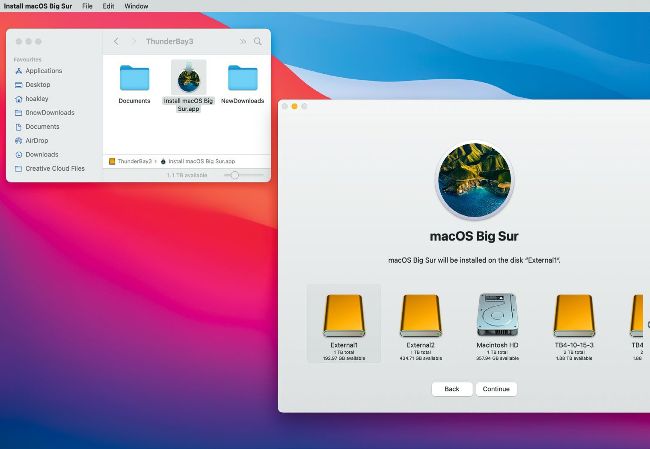
When making a giant leap with an upgrade, consider formatting your startup disk from an external disk and installing Big Sur from there.
Email Mac|Life at ask@maclife.com
Get official documentation at support.apple.com | Get help with hardware at support.apple.com/repair
> Upgrade from macOS Sierra to Big Sur
My 2017 iMac Retina 5K 27–inch has an internal SSD and is ready to be upgraded from Sierra to Big Sur. What’s the best way?
That’s a giant leap for a Mac, which requires converting your startup disk to APFS and total reorganization for Big Sur’s new Sealed System Volume. Many of your apps may also require major updates. It may be wise to perform a clean install, then migrating from a clone or backup.
To do that properly, you should install Big Sur on an external disk and copy the installer app there. Restart from that, format your internal storage, and install macOS 11.0.1 onto that. Do that with your clone or backup connected so that when the installer prompts you to migrate from another system you can select that disk as the source.
Although a direct install using the downloaded Install macOS Big Sur app should still work, it has a lot to do and the risks of it stalling somewhere are significant. Once it has completed, you’ll still have plenty of cleaning up to do. If you have problems with the installer app not completing, try making a USB bootable installer using Apple’s instructions at bit.ly/mac361osinstall. Flash memory “sticks” can be slow, and a small SSD works better. Ensure you format it first in HFS+ not APFS.
> Can’t view attached PDFs
I get regular newsletters on my iPad Pro, but fir some reason I can’t open any of them. The sender says that they’re PDFs, but when I try opening them they revert to a “MIME attachment.” How do I fix this?