ASK
TECH SUPPORT & TECHSPLANATIONS
Email Mac|Life at ask@maclife.com
Hot topics right now
Make sure you check out these important support articles on Apple’s website to better understand the latest features.
YOUR OLD MAC ISN’T VINTAGE OR OBS0LETE
Though we’ve covered the topic before, Apple has renamed its vintage and obsolete products page to “Obtaining service for your Apple product after an expired warranty”. Good to know! bit.ly/ml177ask1.
CAMERAS SUPPORTED BY iMOVIE ON macOS
Many camcorders and digital cameras are supported by iMovie for macOS, but if you want to check to see if yours is on the list, go to bit.ly/ml177ask2.
GET AN OLDER VERSION OF macOS
Earlier versions of macOS are still available to download from Apple, so you don’t have to upgrade to Big Sur (if you don’t want to, or can’t). Here’s how to get access: bit.ly/ml177ask3.
> My Mac is now unresponsive after a silent update
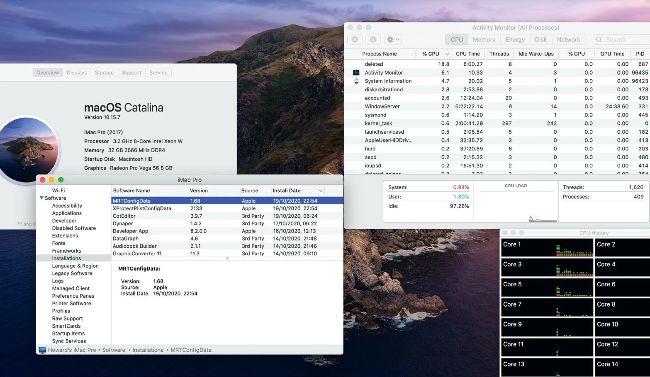
Check Activity Monitor when your Mac has performance problems. Here, a recent update to Apple’s Malware Removal Tool MRT is responsible.
Shortly after I started my iMac up, it became unresponsive. Looking in Activity Monitor, two processes, MRT and trustd, have taken over its processor. Is it infected by malware?
Almost certainly not. Open About This Mac at the top of the Apple menu, and click on the System Report button to open System Information. Select Installations at the left, then click twice on the header of the Install Date column. That lists installations in chronological order, with the latest at the top.
You will likely see a recent entry for MRTConfigData 1.68, a silent security update which has caused these problems, as it did for many before Apple pulled that update. Fixing this isn’t easy. Restart in Recovery mode, open Terminal there, disable SIP with the command: csrutil disable and restart as normal. Locate MRT.app, which is in /System/Library/CoreServices or /Library/Apple/System/Library/CoreServices in Catalina and Big Sur. With SIP disabled you can rename that to MRT.app.bak. Restart into Recovery mode again and enable SIP with the command: csrutil enable then restart.
The offending malware removal tool MRT should now be disabled, which means until it has been updated to a bug–free version again it won’t automatically remove any malware from your Mac, but at least it won’t slow it down like treacle again.
Get official documentation at support.apple.com | Get help with hardware at support.apple.com/repair
> Deactivating email tracking