Está viendo la página Spain versión del sitio.
Le gustaría cambiar a su sitio local?
19 MIN TIEMPO DE LECTURA

HotPicks

THE BEST NEW OPEN SOURCE SOFTWARE ON THE PLANET

Drawpile Ungoogled-chromium Gopeed Bitwarden Errands Tuba PDFsam Widelands Dr Robotnik’s Ring Racers Shutter Obfuscate

Mayank Sharma has accumulated a lot of bad karma driving a diesel-guzzling 4WD, which he is undoing by digging up sustainable-by-design open source software.

COLL ABORATIVE WHITEBOARD

By default, Drawpile includes your password in the invite URL, but you can uncheck the Include Password option to force your friends to manually enter the password.

Drawpile

Version: 2.2.1

Web: https://drawpile.net

Krita offers everything you need to create digital art on the Linux desktop, but what if K you need to work with other artists to conjure up your masterpiece? Drawpile is a cross-platform drawing app whose main goal is to let multiple people work on the same whiteboard simultaneously.

Drawpile is officially available as both a Flatpak and an AppImage. It’s best to use the AppImage to experience the app’s networking features. Just grab the AppImage file, then make it an executable from the file manager or with chmod +x .

The app has everything you would expect from a freehand digital drawing app, including hundreds of brushes, the ability to work with layers, and all kinds of editing tools.

However, the best part about Drawpile is that it allows the canvas to be shared between several users. Inside the app, head to Sessions > Host, and give the session a title.

If you want your session to be private, you can give it a password. That way, only people to whom you give the password can join. If you don’t assign a password to your session, it is public and anyone can join it.

You can either host your session on a public server, which is the easier option and costs nothing, or on your computer, for which you need to have necessary networking chops.

The public Drawpile server pub.drawpile.net is already preselected by default. All you need to do is click on Host. The app now prompts you to log in to your Drawpile account, or you can select the Continue Without Account option, where you only have to specify a username.

Your session is now available and others can join it. Drawpile gives you a link that you can use to invite friends. You can now pass the link to people with whom you want to collaborate. In their Drawpile instance, they have to head to Session > Join, and enter the link you’ve sent them.

LET’S EXPLORE DRAWPILE...

1 Brushes dock

This dock offers all the preset brushes. The brushes have the usual properties you’d expect, such as opacity, hardness, spacing and more.

2 Brush editor

You can use the brush editor to adjust all kinds of settings for the selected brush. Refer to Drawpile’s manual to get to grips with this most important dock.

3 Drawing toolbar

You can use this toolbar to draw some common geometric shapes, and it also enables you to switch between the freehand drawing and eraser modes.

4 Layers

You can use this dock to add multiple layers to keep different parts of your painting separate from each other, until you merge them when you’re done.

5 User control

All those connected can chat through this dock. They can also see who is connected to the app, and can even invite more users.

WEB BROWSER
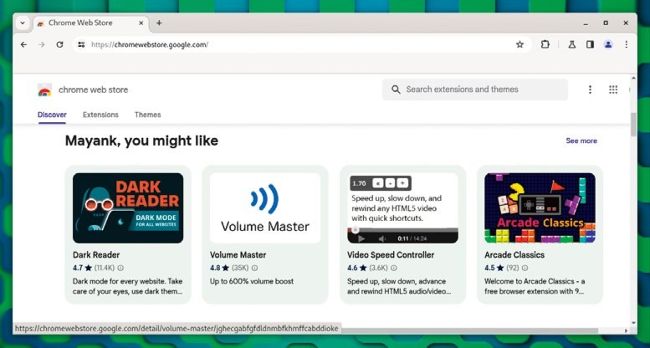
Before you can install extensions from Chrome’s web store, you must install the chromium-webstore extension in Ungoogledchromium.

Ungoogled-chromium

Version: 124.0.6367.118-1 Web: https://github.com/ungoogled-software/ungoogled-chromium

Desbloquea este artículo y mucho más con
Puedes disfrutar:
Disfrute de esta edición al completo
Acceso instantáneo a más de 600 títulos
Miles de números atrasados
Sin contrato ni compromiso
Inténtalo €1.09
SUSCRÍBETE AHORA
30 días de acceso, luego sólo €11,99 / mes. Cancelación en cualquier momento. Sólo para nuevos abonados.


Más información
Pocketmags Plus
Pocketmags Plus

Este artículo es de...


View Issues
Linux Format
August 2024
VER EN TIENDA

Otros artículos de este número


LINUX FORMAT
LINUX FORMAT
The #1 open source mag Future Publishing Limited,
WELCOME
Rescue and repair
We often like to have a little giggle
LINUX FORMAT
MEET THE TEAM
REGULARS AT A GLANCE
Distros start to ban AI code
Generative AI continues to court controversy as Gentoo and NetBSD heavily restrict its implementation.
Qualcomm on upstreaming to Linux
Patchsets for the Snapdragon X Elite SoC aim at Linux compatibility.
APT 3.0 is coming
New APT solver comes with a number of changes.
A LIBRE SUMMER
Italo Vignoli is one of the founders of LibreOffice and the Document Foundation.
THE LONG HAUL
David Stokes is a technology evangelist at Percona.
Framework optimises screen
Invisible pixels promised.
KeePassXC kerfuffle
Upcoming Debian Trixie implementation of KeePassXC won’t offer optional features like browser integration.
Neofetch is dead
Creator of utility archives repo to take up farming.
What’s behind the free software sofa?
LINUX LITE 7.0 Linux Lite has a tweaked
FEEL THE G-FORCE
Daniel Morin is a senior software developer at
Kernel Watch
Jon Masters summarises the latest happenings in the Linux kernel, so that you don’t have to.
Answers
Neil Bothwick swallowed a Got a burning question
Mailserver
Quantum Leap Seeing as Linus Torvalds wrote programs
REVIEWS
Ryzen 7 5700X3D
Paul Alcorn is feeling more powerful than ever with AMD inside!
LibreELEC 12.0
Nate Drake is impressed with the freedom that the latest version of LibreELEC (code name Omega) offers to cosy up to Kodi.
AlmaLinux 9.4
Alma is the Spanish word for soul. Nate Drake certainly feels his has been uplifted through this spiritual successor to CentOS.
SparkyLinux 2024.05
Nate Drake blinks and almost misses this zippy Debian-based distro, so light on resources it runs perfectly on ancient hardware.
Garuda Linux 240428
Nate Drake seldom applies the words ‘luxurious’ or ‘sumptuous’ to an OS, but in Garuda’s case, he makes an exception.
Nvidia GeForce Now for Steam Deck
Management is wondering where Dave Meikleham and Alex Wawro are. Perhaps those noises from the server dungeon aren’t those of hard work…
ROUNDUP
ROUNDUP
Hyper Cool Retro Term Yakuake Terminator Terminology
Save your old PC
REPAIR IT WITH LINUX
Don’t consign your old machines to the scrap heap just yet – Jonni Bidwell reckons they can still be put to work.
Time and tide
Linux can run on various machines that are plenty old, but first we really ought to manage your expectations.
Hardware refresh
Fifty British pounds (or local equivalent) and half an hour on an auction site might give your PC the shot in the arm it craves.
Introducing L MDE
We investigate the easy-to-use but powerful Linux Mint Debian Edition – like regular Mint, but with less Ubuntu, more Debian.
Vintage PC options
We look at some alternative web browsers, and summarise the ultra-lightweight distro scene for particularly old systems.
Pi USER
$40 million Raspberry Pi IPO set for June
London Stock Exchange to be hit by Pi.
Easier coding
With management tools
Get together!
Clubs are back, baby
TAKING A HAT FOR A DRIVE
The Raspberry Pi M.2 HAT+ has finally been
Ubuntu 24.04 LTS Pi
Les Pounder has been using Ubuntu since 2005, which makes him feel incredibly old. Can Ubuntu 24.04 on the Pi 5 make him young again?
QIDI Tech Q1 Pro
Getting hot under the collar, Denise Bertacchi likes this heated model.
PYTHON
Build your own fortune teller
All of your Pis are under your control
No one would say Les Pounder has gone power mad, but he’s cackling like a Bond villain now he can control all the Pis.
IN DEPTH
Virtual this, that & the other
Matt Holder delves deeper into the kernel to discover virtualisation, containerisation and virtual filesystems.
TUTORIALS
Fancy file management
While CLI purists scoff at TUI tools, Shashank Sharma has no hesitation working with wonderfully crafted utilities that do their job well.
Installing and managing software
LINUX BASICS
Install and control Flatpak software
Get installing tools with the distro-agnostic packaging system that offers all sorts of advantages. Michael Reed has come packing his hex key set.
Create a Fyne journaling app
Dressed in his programming finery, Andrew Williams shows how you can quickly build a graphical app for your computer using Fyne and Go.
Reliving the birth of the terminal
It looked like a PC but, although it wasn’t user-programmable, the display terminal had a vital role in the days of minicomputers, says Mike Bedford.
Create old-school pixel art images
Still stuck with the ancient GIMP 2, Neil Mohr decides to go even more retro and explore how you can create classic pixel art with it.
ADMINISTERIA
Use some admin-fu to master snapshots
Most users don’t much care about the underlying disk management system LVM, but Stuart Burns reveals one of its most useful features.
Root & branch
Databases, observability, open core and trashed PCs get a mention as Linux Format talks to Percona founder Peter Zaitsev.
CODING ACADEMY
Create a play-by-mail user interface
David Bolton looks further into designing play-by-mail-type games, with insights about the user interface and core game features.
Screens of fractals and complex numbers
Blowing our minds and eyes with his psychedelic demos, it looks like Ferenc Deák has a rising medical bill to pay…
Chat
X
Soporte Pocketmags