GENIUS TIPS
EDITED BY HOWARD OAKLEY
EXPERT ADVICE
Our resident genius solves your Mac and iOS problems
Contact us
Email your queries and your questions to genius@macformat.com
You have custom access
Select your Home folder, or any of the standard folders inside it like Documents, and Get Info.
In the lowest of the sections, Sharing & Permissions, does it report that “You have custom access”? Do you know what that means?
Custom access is Apple’s jargon to let you know that macOS has set an Access Control List (ACL), in this case to prevent anyone from deleting those folders. If you’re good with Terminal, you can use the command
ls -led ~
there to see the details that the Finder is too coy to reveal. But oddly Apple doesn’t explain any of this. If you’ve invested in a utility like TinkerTool System (bresink.com), you can view and change ACLs with ease. While they can get you into trouble if you’re not careful, it’s frustrating that Apple uses them but doesn’t trust us to know about them.
How a processor can reach 1,600%
Q
What d oes CPU % mean in Activity Monitor, and how can it exceed 100%?
by CHRIS PARRY
A
Although Apple doesn’t provide any explanation, this figure seems to derive from what’s known as active residency, the percentage of processor cycles that each core in the CPU is processing instructions rather than being idle. The number shown is the total of those percentages for each core, so if your Mac has eight cores, the maximum comes to 800%.
There are two complications. Intel cores can use hyper-threading to effectively double their throughput when under stress. Each core can then run up to 200%, so those eight cores could come to a total of 1,600% when the pressure is on. ARM cores in M1 chips don’t have hyper-threading, instead their frequency or clock speed can change, most often seen in Efficiency cores. Unfortunately at present no allowance is made for this, so 100% could be at a frequency of less than 1GHz, or over 2GHz, which represents a big difference in work done.
So CPU percentage is an approximate indicator of the total workload performed by your Mac’s processor, on a scale from 0 to over 200%, depending on the number of cores, and whether they’re hyper-threaded. More accurate figures are available from the expert’s command-line tool Power Metrics.
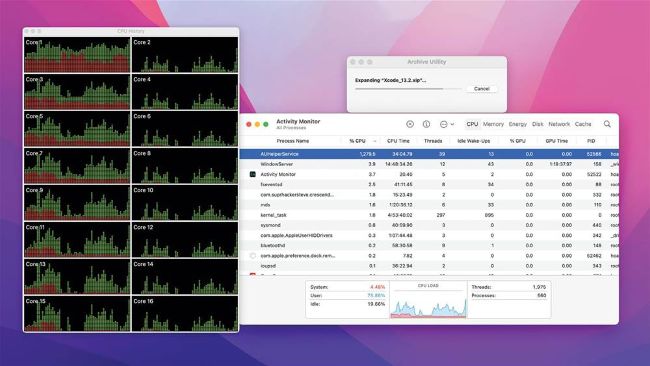
This eight-core Xeon processor in an iMac Pro has almost reached 1,300% CPU as its cores go fully hyper-threaded.