TECH SUPPORT & TECHSPLANATIONS
ASK
EXPERT ADVICE
Our resident genius solves your Mac and iOS problems
Email Mac|Life at ask@maclife.com Get official documentation at support.apple.com| Get help with hardware at support.apple.com/repair
A steady hand on the SSD
LIKE ANY NEW technology, we have much to learn about the working life of SSDs in M1 Macs. Alarming reports of rapid wear must be tempered against use. Take any low–end Intel Mac with limited memory and work it hard with high use of virtual memory, and its SSD wears out faster. Unlike rotating hard disks, which can keep spinning for a decade or more if you’re lucky, the more your Mac writes to an SSD, the shorter its life.
It’s only when we’ve gained experience with a broad range of Apple silicon and usage that we’ll have a better idea of whether their SSD’s working life is going to be any different from Intel models. Neither is there anything peculiar to Big Sur which should cause premature ageing. The SSD in our iMac Pro is still as fresh as a daisy, and it hardly ever uses virtual memory.
Better App Store updates
How do I go about updating App Store apps reliably?
These problems are widespread. Some advocate killing processes that might be involved, but it’s better to adopt a more systematic approach. Updates may appear days after they’ve been available. When you open the App Store app, select Updates and press Cmd+R to force it to refresh and offer any delayed updates now.
Rather than updating all available at once, try one at a time. In most cases, they download fairly quickly until their progress indicator reaches the 10 or 11 o’clock position, then pause for many minutes or even hours. Be patient: most should eventually complete, and you can start another updating in the meantime. If they don’t complete, quit the App Store, open it again after an hour or so and repeat the process.
Other useful checks are that your Mac is properly signed in using Apple ID, in its pane, and that there are no known problems with the App Store service identified on Apple’s System Status page at bit.ly/ml182sysstat.
If you have multiple Macs to update, run the Content Caching Server (in the Sharing pane) on one to minimize downloads. If you still can’t make any progress, contact Apple Support as it may be a server problem.
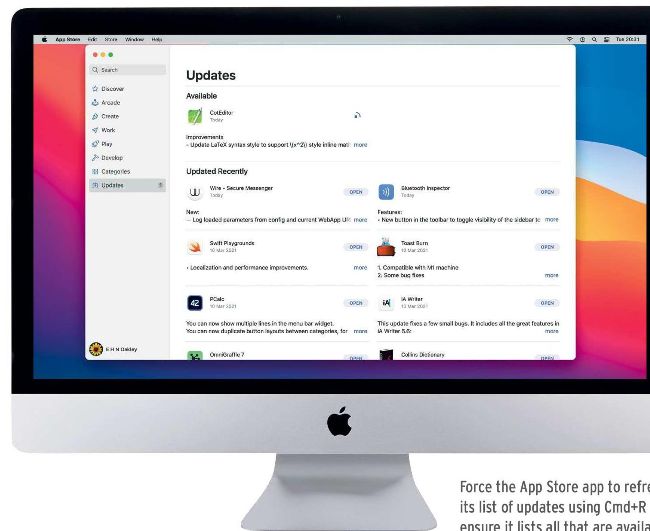
Force the App Store app to refresh its list of updates using Cmd+R to ensure it lists all that are available.