Está viendo la página Spain versión del sitio.
Le gustaría cambiar a su sitio local?
3 MIN TIEMPO DE LECTURA

Make sense of Notes

Get all your handy lists and ideas more organized on iOS

REQUIRES iOS 15 or later, Apple Notes

YOU WILL LEARN How to use tags and Smart Folders in Notes

IT WILL TAKE 10 minutes

GENIUS TIP

Tags also work on iPad. There, you don’t have to type out a tag — you can use an Apple Pencil to draw a # and handwrite the tag name.
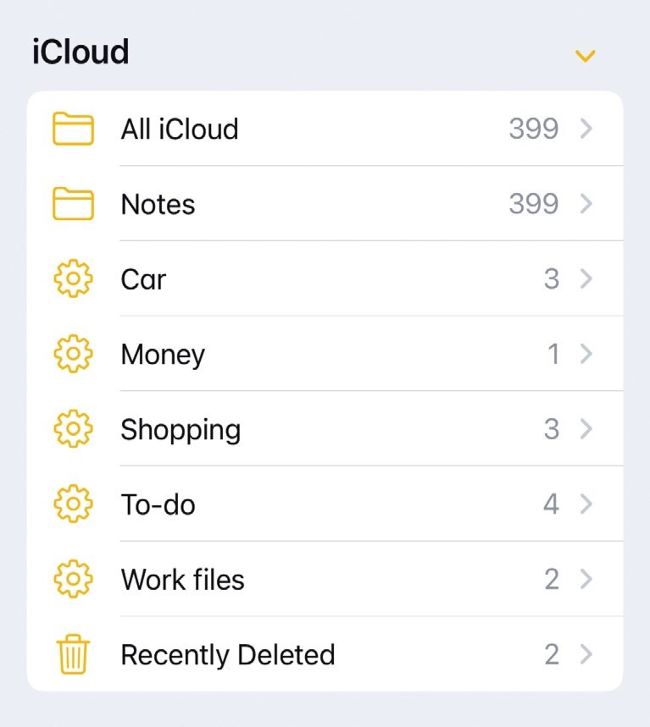
You can identify Smart Folders by the gear icon they use when viewed in the main Folders screen.
Image rights: Apple Inc.

NOTES IS A great app, but it’s very easy to lose your work amid a plethora of lists, ramblings and jotted half–ideas. You can search for notes, yes, but what if you can’t remember exactly what you need? The answer is to use tags (#) and Smart Folders. In combination, these tools make finding and organizing your notes a cinch. In fact, Smart Folders do all the organizing for you, shouldering the burden so you don’t have to.

Desbloquea este artículo y mucho más con
Puedes disfrutar:
Disfrute de esta edición al completo
Acceso instantáneo a más de 600 títulos
Miles de números atrasados
Sin contrato ni compromiso
Inténtalo €1.09
SUSCRÍBETE AHORA
30 días de acceso, luego sólo €11,99 / mes. Cancelación en cualquier momento. Sólo para nuevos abonados.


Más información
Pocketmags Plus
Pocketmags Plus

Este artículo es de...


View Issues
Mac|Life
Spring 2024
VER EN TIENDA

Otros artículos de este número


START
MACBOOK AIR GAINS M3
APPLE QUIETLY LAUNCHED a new MacBook Air earlier
THE TEAM
Andrew Cottle Art Editor Andy reckons Inkulinati (p75)
Apple axes EV project
End of the road for Apple Car development
News in brief
A bite of the Apple
> THE SHIFT
MATT BOLTON wasn’t sure about Apple’s level of control outside the App Store, but it’s better than leaving it to Meta
LETTER OF THE MONTH
I’ve been pondering the whole $3,500 price issue
FEATURES
85 must-try iPad tricks
Are you getting the most from your amazing Apple tablet?
BEST MAC UTILITIES...EVER
Improve your Mac experience and boost productivity with these awesome utility apps
BACKUP AND MAINTENANCE
Apps to improve system efficiency and security
PRODUCTIVITY BOOSTERS
Optimize your workflow with these apps
Keep your old Mac running
Do you have a legacy Mac that’s no longer updated? Don’t throw it away — there’s plenty you can still do with it
Use your 32–bit applications
Apple stopped supporting 32–bit apps, but they still run in High Sierra
CREATE
Find files faster with Finder tags
HOW TO DO ANYTHING ON YOUR MAC, iPHONE & iPAD
Master charts and graphs
Present your data as interesting graphs and colorful charts in Numbers
Edit and share your movies
Create slick–looking video content that will engage social followers
Never be late again!
Stay on schedule with Midnight Alarm Clock — the ultimate alarm organizer
Identify music & add to playlists
Use Shazam — and Apple Music — to recognize a tune and do plenty more
Share your location
Use your iPhone to let friends and family know when you’ll arrive
Master the Weather app
Is today going to be a T–shirt kind of day? Your Apple Watch can tell you
Using DockKit–compatible stands for iPhone videos
Apple’s new API can control motorized tripods and stands for subject tracking
ASK
ASK
TECH SUPPORT & TECHSPLANATIONS
REVIEWS
MacBook Air 15–inch (2024)
No quantum leap, but M3 chip is a neat upgrade
Mobile Pixels Geminos
Can this dual–screen display offer double the fun?
Soundcore Space One
Good sound and noise cancellation at a great price
Screens 5: VNC Remote Desktop
Screen sharing, remote control
Satechi SM1 Slim keyboard
Lacking customization, but a class act nonetheless
STM BagPack
The backpack that packs back
Photoshop Elements 2024
Create eye–catching social media content in only a few clicks
LaCie Rugged Mini SSD
Durable external SSD storage
Inkulinati
A bout of medieval madness, forsooth!
Best of the best
Can’t find the hardware or app you’re looking for in our reviews section? Then check in here — we’ve highlighted the best in every major category, as voted for by us
Chat
X
Soporte Pocketmags