HotPicks
Shotwell YouTube Downloader Plus Blue Recorder EncryptPad Buttercup Resources Rnote heXon EDuke32 Delta Chat Proton VPN
Mayank Sharma
can’t believe it’s already that time of year when he has to find a distraction as the F1 circus goes on hiatus. After he’s done picking HotPicks, that is.
PHOTO MANAGER
Shotwell
Version: 0.32.3 Web: https://wiki. gnome.org/Apps/Shotwell
here’s a reason why Shotwell is the default photo manager on virtually every distribution T that uses the Gnome desktop. It has all the features you would expect from an everyday photo manager, with the added benefit of some very handy photo-editing functions.
The app is now available as a Flatpak, which means you can use it on any desktop environment. Use flatpak install flathub org.gnome.Shotwell to install the app on any distro that’s set up to install Flatpaks.
On first launch, the app automatically imports photos from the ~/Pictures folder, although you can import photos from other places as well. It automatically groups photos by date and tags while importing them.
The app has a straightforward two-pane interface. The left pane helps you find images by breaking them down by details such as date, tags and such. The thumbnails for the images that meet the criteria selected in the left-panel are displayed on the right. Double-click on an image to work on it.
In addition to images, Shotwell also works with all the popular video formats. However, when you double-click on a video, the app passes it on to the external video player installed on your distro.
When you are viewing a particular photo, the bottom panel lists all the tools that you can use to edit the image. You can crop, straighten and rotate images, as well as remove red-eye from portraits. There’s a very helpful Enhance button that automatically improves the appearance of the image. However, the app also offers advanced users the option to manually adjust the colour and tone of the image.
You can also rate the images and assign tags to the photos to help sort your library. The app also enables you to mark faces
LET’S E XPLORE SHOT WELL
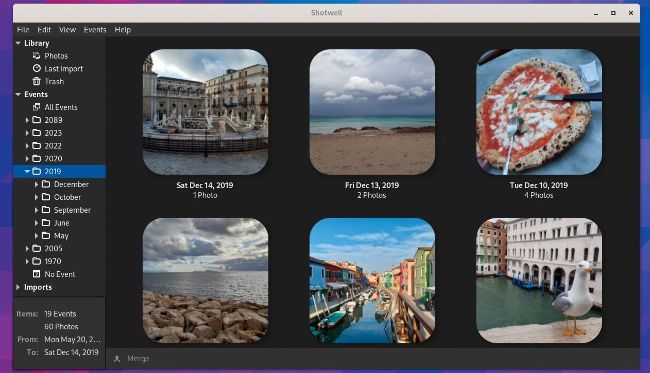
Shotwell works well for sorting through small personal image libraries, and casual image editing.
1 Image sorting toolbar
You can use the different sections
listed here to sort your images by date,
faces and tags.
2 Name and rate images
The right-click context menu offers
the option to add a title and comment
to the selected image, along with a rating.
3 Edit image
The bottom panel lists all the nondestructive image-editing tools, including
a zoom slider.
4 Image details
Here you get all the relevant metadata
about the image. Head to View > Extended
Information to view even more details.
VIDEO DOWNLOADER
YouTube Downloader Plus
Version: 3.15.1
Web: https://ytdn.netlify.app
Do you need to keep a video from a streaming website for occasions when you don’t have access to the internet? If you do, YouTube Downloader Plus will do the trick. Despite its name, the app can download videos of different qualities from hundreds of sites, including the popular ones such as YouTube, Facebook, Instagram, TikTok, Twitter (who?–ED), Twitch and so on.
The app is available as a Flatpak and can be installed with the following command: flatpak install flathub io.github.aandrew_me.ytdn .
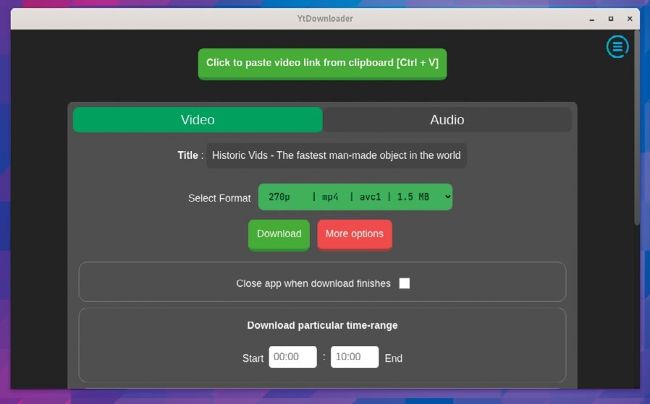
Don’t be fooled by its name – YouTube Downloader Plus can grab video from dozens of streaming services.