CODING ACADEMY Asynchronous programming
Create asynchronous code with Python
ASYNCIO
Prepare to multitask in ways you’ve never done before, as Mihalis Tsoukalos explains the uses of the asyncio Python module.
OUR EXPERT
Mihalis Tsoukalos is a systems engineer and a technical writer. He’s also the author of Go Systems Programming and Mastering Go.
QUICK TIP
The official documentation site of asyncio can be found at https://docs. python.org/3/ library/asyncio. html. You can also learn more information about asyncio at https://docs. python.org/3/ library/asynciodev.html and at https:// realpython. com/async-iopython.
Say that you have a web page that needs to load data from different servers. Now imagine that some of these servers aren’t responding immediately, which delays the loading of the entire web page. Not good, right? Now, imagine that you’re writing a Python script that needs to interact with multiple machines/servers. Do you want your entire script to wait for a specific server to become available, instead of continuing with its operation while keeping an eye on that server? Generally speaking, it’s always better to do something than waiting for something else to become available, because it’s how you take a better advantage of your available resources.
On a web page, you can solve that issue by writing asynchronous JavaScript code. In Python, the answer is asynchronous programming. This tutorial shows how to write asynchronous code in Python 3 with the asyncio module, a library for writing concurrent code that follows the async/await paradigm. Asyncio has been part of the Python standard library since Python version 3.4; however, this tutorial assumes that you’re using Python version 3.8 or newer.
Because asyncio contains some advanced concepts and features, we’ll cover some simple working examples. Once you understand them, you can modify them and use them for solving your own problems.
Introducing asyncio
It’s important to understand the purpose of the asyncio library, which is to have only one thread run an event loop. In this loop, which is the core of every asyncio application, tasks are switched when the programmer writes the await keyword. So, it’s the developer who decides when to switch tasks instead of the operating system scheduler, based on the await signals.
As a result, asyncio isn’t efficient for CPU intensive tasks because it doesn’t run multiple threads in parallel. It’s better suited for asynchronous input and output operations such as working with network sockets, because of how sockets are implemented in Python (they’re written in C and use different resources than Python). In this tutorial we simulate delays with calls that put a function to sleep.
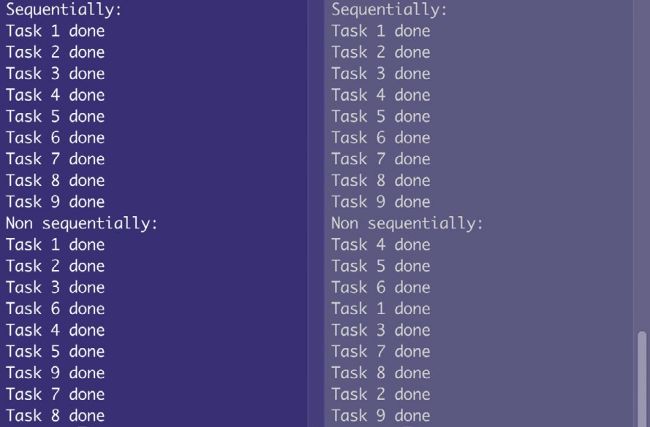
This is the output of
order.py that illustrates sequential and asynchronous execution of functions and coroutines, respectively. Coroutines are executed in a random order.
Because asyncio is part of the Python 3 library, there’s no need to install additional libraries to use it. Just include a import asyncio statement in your Python 3 code and you’re ready to go.