EU
  
You are currently viewing the European Union version of the site.
Would you like to switch to your local site?
14 MIN READ TIME

CODING ACADEMY Asynchronous programming

Create asynchronous code with Python

ASYNCIO

Prepare to multitask in ways you’ve never done before, as Mihalis Tsoukalos explains the uses of the asyncio Python module.

OUR EXPERT

Mihalis Tsoukalos is a systems engineer and a technical writer. He’s also the author of Go Systems Programming and Mastering Go.

QUICK TIP

The official documentation site of asyncio can be found at https://docs. python.org/3/ library/asyncio. html. You can also learn more information about asyncio at https://docs. python.org/3/ library/asynciodev.html and at https:// realpython. com/async-iopython.

Say that you have a web page that needs to load data from different servers. Now imagine that some of these servers aren’t responding immediately, which delays the loading of the entire web page. Not good, right? Now, imagine that you’re writing a Python script that needs to interact with multiple machines/servers. Do you want your entire script to wait for a specific server to become available, instead of continuing with its operation while keeping an eye on that server? Generally speaking, it’s always better to do something than waiting for something else to become available, because it’s how you take a better advantage of your available resources.

On a web page, you can solve that issue by writing asynchronous JavaScript code. In Python, the answer is asynchronous programming. This tutorial shows how to write asynchronous code in Python 3 with the asyncio module, a library for writing concurrent code that follows the async/await paradigm. Asyncio has been part of the Python standard library since Python version 3.4; however, this tutorial assumes that you’re using Python version 3.8 or newer.

Because asyncio contains some advanced concepts and features, we’ll cover some simple working examples. Once you understand them, you can modify them and use them for solving your own problems.

Introducing asyncio

It’s important to understand the purpose of the asyncio library, which is to have only one thread run an event loop. In this loop, which is the core of every asyncio application, tasks are switched when the programmer writes the await keyword. So, it’s the developer who decides when to switch tasks instead of the operating system scheduler, based on the await signals.

As a result, asyncio isn’t efficient for CPU intensive tasks because it doesn’t run multiple threads in parallel. It’s better suited for asynchronous input and output operations such as working with network sockets, because of how sockets are implemented in Python (they’re written in C and use different resources than Python). In this tutorial we simulate delays with calls that put a function to sleep.
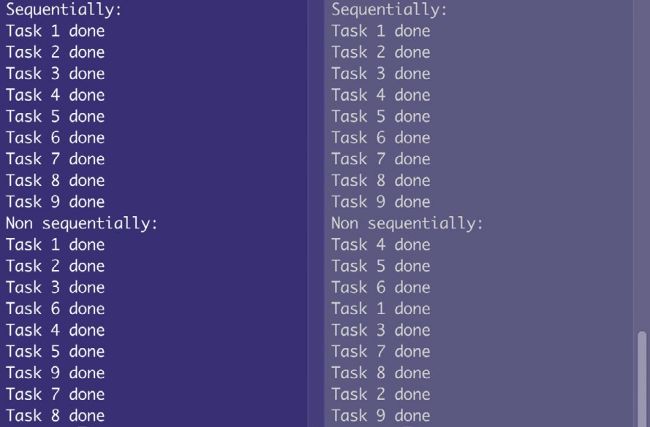
This is the output of order.py that illustrates sequential and asynchronous execution of functions and coroutines, respectively. Coroutines are executed in a random order.

Because asyncio is part of the Python 3 library, there’s no need to install additional libraries to use it. Just include a import asyncio statement in your Python 3 code and you’re ready to go.

Unlock this article and much more with
You can enjoy:
Enjoy this edition in full
Instant access to 600+ titles
Thousands of back issues
No contract or commitment
Try for €1.09
SUBSCRIBE NOW
30 day trial, then just €11,99 / month. Cancel anytime. New subscribers only.


Learn more
Pocketmags Plus
Pocketmags Plus

This article is from...


View Issues
Linux Format
August 2021
VIEW IN STORE

Other Articles in this Issue


WELCOME
MEET THE TEAM
We’re all about building a better server this issue, what tip would you give to our readers if they were setting up a home server?
You’ve been served
I suspect that many readers, whenever Linux is
REGULARS AT A GLANCE
Wi-Fi networks vulnerable to new FragAttacks
SECURITY
Freenode’s ownership drama sees users switch to Libera Chat
Numerous open source projects ditch the Freenode chat network after claims of a hostile takeover
Audacity shelves telemetry plans
Outcry from users prompts rethink from Muse Group
UNDER A CLOUD
Matt Yonkovit is Percona’s head of open source strategy and a member of SHA (Silly Hats Anonymous)
OUT OF TIME…
Keith Edmunds is MD of Tiger Computing Ltd, which provides support for businesses using Linux
Nvidia brings AI tech DLSS to Linux
Could result in performance gains – as long as you have the hardware
Light ’em up!
OpenRGB is the one-stop solution for PC lighting
Year of the office!
Annual report reveals huge appreciation for LibreOffice
Distro watch
What’s down the side of the free software sofa?
BRIDGING THE DIVIDE
Rohan Garg is a software engineer at Collabora
STRAIGHT TALKING
Jon Masters has been involved with Linux for more than 22 years
KERNEL WATCH
Jon Masters summarises the latest happenings in the Linux kernel, so that you don’t have to
Answers
Got a burning question about open source or the kernel? Whatever your level, email it to lxf.answers@futurenet.com
Mailserver
WRITE TO US Do you have a burning
LETTER OF THE MONTH
More maps Thank you for the article on
KDFM
THE BEST NEW OPEN SOURCE SOFTWARE ON THE PLANET
Oil
Version: 0.8.9 Web: www.oilshell.org E veryone knows Bash,
Mousemic
Version: GIT Web: https://github.com/ ortegaalfredo/mousemic S ome things
Diskgraph
Version: GIT Web: https://github.com/ stolk/diskgraph M onitoring hard
Mergerfs
Version: 2.32.4 Web: https://github . com/trapexit/mergerfs O rganising
Fedy
Version: 5.0.12 Web: https://github . com/rpmfusion-infra/fedy T his
Autokey
Version: 0.95.10 Web: https://github . com/autokey/autokey F or
Eggvance
Version: 1.0 Web: https://github.com/ jsmolka/eggvance L inux is
URL Snake
Version: GIT Web: https://github.com/ epidemian/snake W e’ve seen
Pacstall
Version: 1.2 Web: https://github.com/ Henryws/pacstall P acstall is
Xbrzscale
Version: GIT Web: https://github.com/ atheros/xbrzscale S cale up
On the disc
Discover the highlights from this month’s packed DVD!
REVIEWS
Aorus Gen4 7000s
Gigabyte’s SSD is the fastest storage this side of Sean Webster’s oiled drawers
OSGeoLive 14.0
Being cooped up in his home office, Mayank Sharma’s quest to travel the world leads him to a distro that brings the world to him
Bodhi Linux 6.0
Mayank Sharma isn’t embarrassed to admit that there’s something about Enlightenment-based distros that makes him go weak in the knees
GeckoLinux Rolling
With openSUSE being the only real KDE distro that he’s ever found tolerable, Mayank Sharma wonders if a spin can add anything to that experience
NomadBSD 130R
While Mayank Sharma has tried a couple of BSD desktop spins, none of them has offered a compelling reason for him to keep them around… until now
Silicon Dreams
Management loves to treat the staff like robots. A defiant Luke Kemp can confirm that they’re certainly not human…
ROUNDUP
Roundup
WE COMPARE TONS OF STUFF SO YOU DON’T HAVE TO!
Desktop virtualisation
Need to run a different distro without rebooting, or run Windows without your friends knowing? Neil Bothwick looks at some virtual options for you
Talking to your guests
Communicating across the divide
Happy snaps
Keeping your guests safe
Ease of setup
Installing the software and a guest OS
Documentation
You know you’ll only look for it when you’re stuck
Compatibility
Will it fit in with your computer system and beliefs?
Useful extras
Additional titbits to tempt you…
Host interactions
How the guest uses the hardware
The Verdict
Desktop virtualisation
FASTER, BETTER SERVERS!
As the dust settles following Red Hat’s winding down of CentOS, Jonni Bidwell looks for alternative server distributions
CentOS remembered
Delve into the illustrious history behind one of the most respected server-targeting Linux distributions
Behold CentOS Stream
Red Hat’s new vision is CentOS Stream and caused a family feud, but would a CentOS by any other name smell so sweet?
Rocky Linux
CentOS’s co-founder has made his own RHELdownstream, and the community is behind him
Building better servers
Want to shift to CentOS Stream? Done with RPM-distros entirely? We have options that will ensure your boxes are firmly ticked
IN-DEPTH
THE X FILES
Jonni Bidwell wants to know why a middle-aged display server is still at the heart of the Linux desktop
WEB APP SECURITY
Former Dark lord of network operations Tim Armstrong teaches the mystical arts of systems, security and keeping your stuff secret and safe
Pi USER
》SALUTE TO THE MAKERS
Pete Lomas is the co-founder of the Raspberry Pi Foundation and co-creator of the Raspberry Pi
Huge demand pushes up RP2040 SoC sales
A silicon-starved world demands its integrated circuits and Raspberry Pi is trying to play catch-up
Pico robot board
A Cytron for sore eyes
All-access fun
Breakout RP2040 board
Ubuntu 21.04
IN BRIEF The latest Ubuntu release and the
Scratch sound and motion detection
SCRATCH
Getting to grips with breadboards
MAKER BASICS
Back up and clone your Raspberry Pi
BACKUPS
Turn a Raspberry Pi into a Chromebook
FYDE
TUTORIALS
Recovering deleted files
Shashank Sharma knows from experience that recovering deleted files is far easier than growing hair over a bald patch
Use your mobile as a secondary display
DESKREEN
Import and convert images to 3D models
BLENDER
Emulating the classic Altair 8800
EMUL ATION
Mastering the smallest Linux desktop distro
POKY LINUX
CODING ACADEMY
RABBITMQ Exchange messages between tasks
Sending messages and rabbits are Mihalis Tsoukalos favourite things, so he’s in Python heaven explaining how to use both
Chat
X
Pocketmags Support