Vous consultez actuellement le France version du site.
Voulez-vous passer à votre site local ?
4 TEMPS DE LECTURE MIN

macOS

Shine a spotlight on the solutions to your most irritating Mac problems
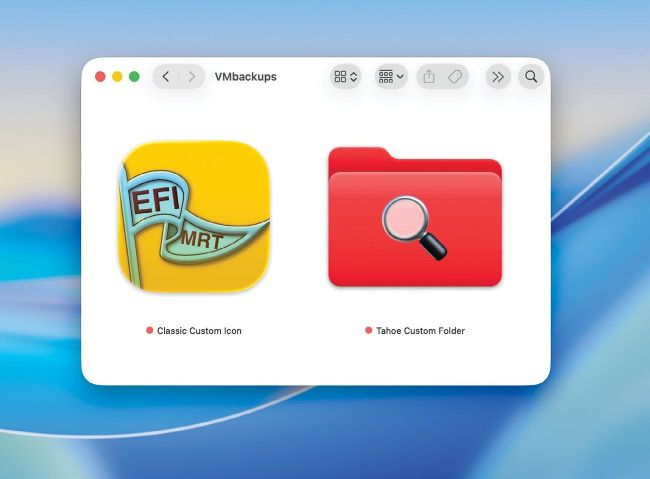
A classic custom icon (left) can still be used in Tahoe, and behaves differently from its new custom folders.

Q

Add custom icons

Can I still add my own custom icons to files and folders in Tahoe?

A

Yes, you can. Although they’re more fiddly to create and fragile in use, they can have advantages over macOS 26 (Tahoe)’s new custom folders.

To do this using an existing icon from an app, select the app in the Finder and Get Info for it. Select its icon at the top left of that dialog and copy it. Then Get Info on the file or folder, select its icon at the top left, and paste the new icon in as its replacement. You can also create your own designs as 1024x1024 PNG images.

Those traditional custom icons use a different mechanism from Tahoe’s custom folders. For a file, the custom icon is attached as a Resource Fork extended attribute, which goes right back to classic Mac OS in the 1980s. For a folder, it’s saved to a hidden file inside that particular folder.

Débloquez cet article et bien plus encore avec
Vous pouvez en profiter :
Découvrez l'intégralité de cette édition
Accès instantané à plus de 600 titres
Des milliers d'anciens numéros
Pas de contrat ni d'engagement
Essayer pour €1.09
S'ABONNER
30 jours d'accès, puis seulement €11,99 / mois. Résiliation à tout moment. Nouveaux abonnés uniquement.


En savoir plus
Pocketmags Plus
Pocketmags Plus

Cet article est tiré de...


View Issues
MacFormat
December 2025
VOIR EN MAGASIN

Autres articles dans ce numéro


Mac FORMAT
Mac FORMAT
It’s starting to feel a lot like Christmas,
Mac FORMAT
APPLE CORE
APPLE CORE
The latest news & rumours from Cupertino and beyond
APPLE NEWS ROUNDUP
DUAL-MODE AR GLASSES APPLE’S FLEXIBLE APPROACH > Excited
Apps & games
APP OF THE MONTH [ MAC APP] Bartender
Media Picks
What you should be playing and reading this month
Crave
THE GEAR WE’RE LUSTING AFTER
John-Anthony Disotto…
ATLAS IS THE NEXT STEP IN CHATGPT TAKING OVER THE WORLD… WITH ALL THINGS ARTIFICIAL INTELLIGENCE, IT’S BOTH BRILLIANT AND A BIT SCARY
The M5 in NUMBERS
The key facts and stats behind the latest Apple silicon
MACFORMAT INVESTIGATES
Apple and the Right to Repair
Apple has made huge efforts to make its devices more repairable. Has it fixed the situation?
101 amazing Apple hacks!
Must-try tips for Mac, iPhone, iPad & Apple Watch
Master Apple shortcuts
The modifier keys enable you to use shortcuts
APPLE SKILLS
PART 1 OF 3 Edit and share movies
Get to grips with basic editing tips, tricks and techniques
Power up your Mac with Alfred
Use its Powerpack to browse and manage your files and their contents
Master the new Games app
Level up your gaming experience and blast off with Apple’s new games hub
Meet the new menu bar
The familiar and functional menu bar now comes with added control
Try the new-look Camera app
Discover what’s new and what’s changed in latest iOS 26 version
Create a custom Lock Screen
With the arrival of iOS 26, your iPhone has never been so customisable
Make your iPhone more accessible
Customise your iPhone to suit your needs
Get fit with Workout Buddy
Be more elite athlete than couch potato with Apple Intelligence
The iPhone 17 Pro camera system
HOW IT WORKS
GENIUS TIPS
GENIUS TIPS
EXPERT ADVICE Our resident genius solves your Mac
iOS software
Swipe away your touchscreen troubles and rekindle your love of Apple’s mobile devices
Networking
We help to solve your Wi-Fi woes and connection conundrums
The Ultimate CHRISTMAS Gift Guide
Spoil yourself and your loved ones this Christmas with these must-have tech treats and gadget gifts
Can man live by iPad alone?
Could you really ditch your Mac in favour of Apple’s tablet?
BACK ISSUES
Missed an issue?
Complete your collection of the UK’s No 1 magazine for Apple fans
APPLE CHOICE
The best portable SSDs
Compact but speedy storage drives that won’t keep you waiting
LaCie Rugged Pro5
Excellent all-rounder with the best bang for your buck
MacBook Pro 14in (2025)
Now equipped with an Apple silicon M5 chip, but little else has changed
iPhone 17 Pro
It may not be as flashy as the Air, but this is the iPhone to own
Parallels Desktop 26
Run Windows and more on your Mac with ease
Renpho LYNX Smart Ring
Monitor your essential health statistics
Wokyis Retro Docking Station
A delightful blast from the past meets the latest Mac mini
Raycast
Access any AI service from your phone
Time Flies
Feeling the buzz of trying to live life to the max
Cambridge Audio Melomania A100
Affordable earbuds with tons of tech
Plugable UD-7400PD USB-C
A clever way to get lots of extra screens connected to your MacBook
6 apps for Improving your mental health
Calm stress with these mindfulness and meditation apps
STORE GUIDE
Your guide to the best Apple hardware and third-party accessories
BEST BUYS…
Third-party iPhone, iPad & Watch apps
BEST BUYS…
> EXTERNAL DRIVE SanDisk Desk Drive From £319.99
ONE MORE THING
Apple Vision Pro M5
One more thing
Chat
X
Support Pocketmags