Está viendo la página Spain versión del sitio.
Le gustaría cambiar a su sitio local?
17 MIN TIEMPO DE LECTURA

DOCKER

Getting to grips with Docker

People think of Docker as a server-room only tool, but as Michael Reed demonstrates, the platform has a lot to offer the general user, too.

Credit: www.docker.com

OUR EXPERT

Michael Reed has been playing around with Linux since first trying Slackware back in 1996.

QUICK TIP

Go to https:// hub.docker.com, click Explore and check out the fascinating array of premade images. The Hub is organised into categories, so you should be able to find anything that you’re looking for, or perhaps, you’ll come up with some crafty ideas you’d never considered before?

This month’s tutorial will hopefully show you that Docker is nothing to be afraid of, and once it’s installed you can start doing some cool stuff using just a handful of commands. You can use it for hosting your own servers, but it’s also handy for quickly summoning up an isolated shell for experimentation. For the uninitiated among you, let’s get into what Docker is and why it’s such a useful tool for all Linux users.

Docker manages so-called containers. These containers are sandboxed processes that seem, to the applications and services within them, to be complete Linux systems. So far, this might sound like we’re describing virtual machines (VMs), but there are important differences between containerisation and virtualisation. In the case of virtualisation, the virtualiser emulates the hardware of an entire computer, and this is resource intensive.

With containerisation, a process contains the applications and services, and is separated from the rest of your system. By employing the features of the CPU and the Linux kernel, the host system is protected from whatever’s going on inside the container. You’re typically running the container as a normal user rather than as the system super-user, despite the fact you’re doing things like editing system files and installing Linux packages within the container.

This approach takes a lot of the stress out of experimenting with servers and other projects, because containers mean you don’t have to make any changes to your host system. Docker containers are fast to deploy and use as well. If you know the right command, you could set up a shell in a fresh container and have it up and running in a few seconds.

Beyond security and speed of deployment, there are other advantages of containerisation such as performance benefits. Imagine an application, perhaps a server, that requires around, at peak, 500MB of RAM to run. If this is running inside a virtual machine, the virtualiser has to emulate an entire computer running an operating system of its own. However, when using a Docker container instead of a virtual machine, the memory overhead would consist of merely the application itself along with its dependencies and a small amount for the container.
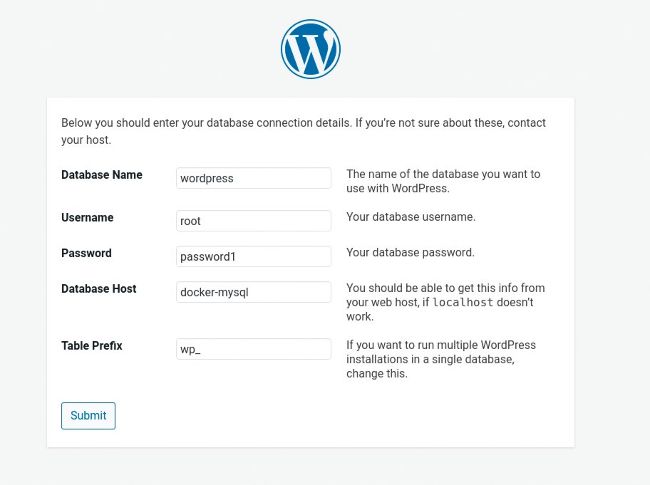
The WordPress installation page. Docker is an excellent environment for hosting a content management system (CMS) such as WordPress.

The final important Docker concept we’re going to cover here is that of packaging images. You can customise the environment inside a container and install software, as with any other Linux environment, and then package it. This makes it possible to make a useful setup available to other people, via the cloud or file downloads, and then it can be deployed, by them, with a single command. But before we get onto the heady heights of doing that (and we will), let’s play around with Docker itself…

Desbloquea este artículo y mucho más con
Puedes disfrutar:
Disfrute de esta edición al completo
Acceso instantáneo a más de 600 títulos
Miles de números atrasados
Sin contrato ni compromiso
Inténtalo €1.09
SUSCRÍBETE AHORA
30 días de acceso, luego sólo €11,99 / mes. Cancelación en cualquier momento. Sólo para nuevos abonados.


Más información
Pocketmags Plus
Pocketmags Plus

Este artículo es de...


View Issues
Linux Format
February 2021
VER EN TIENDA

Otros artículos de este número


WELCOME
Year of the Linux…?
2021 is the year everyone can blast off
REGULARS AT A GLANCE
Red Hat kills off CentOS eight years early
DISTRO DRAMA
Google changes sign-ins
Google account sign-ins from embedded browser frames will be blocked from 4 January 2021
What now for 32-bit Linux?
Companies, distros and manufacturers are moving to 64-bit only support, so where does that leave 32-bit systems?
PAY THE MAN!
Keith Edmunds is MD of Tiger Computing Ltd,
INSTANT BIFROST
Alyssa Rosenzweig Software engineer, Collabora Since our previous
RISC-V smashes records
Micro Magic’s RISC-V-based CPU generates record-breaking results
Boost to Vulkan
Advanced lighting rolling out to the Vulkan graphics API
New NTFS driver
NTFS 3 kernel driver gets better compression features
Distro watch
What’s down the side of the free software sofa?
OPEN-ISH SOURCE?
Matt Yonkovit is Percona’s chief experience officer and
Kernel Watch
Jon Masters summarises the latest happenings in the Linux kernel, so you don’t have to
LOOKING FORWARD
Jon Masters has been involved with Linux for
Answers
Got a burning question about open source or the kernel? Whatever your level, email it to lxf.answers@futurenet.com
A QUICK REFERENCE TO… CRON
Computers are supposed to make life easier for
GET HELP NOW!
We’d love to try and answer any questions
Helpdex
shane_collinge@yahoo.com WRITE TO US Do you have a
Mailserver
Write to us at Linux Format, Future Publishing, Quay House, The Ambury, Bath BA1 1UA or lxf.letters@futurenet.com
BACK ISSUES
HotPicks
THE BEST NEW OPEN SOURCE SOFTWARE ON THE PLANET
SongRec
SHAZAM CLIENT
Xsuspender
PERFORMANCE TUNE-UP
WinApps
WINDOWS INTEGRATION
Dog
DNS CLIENT
AFTL
FILE TRANSFER TOOL
YUView
VIDEO PLAYER & ANALYSER
Micro-racing
RACING GAME
PixelDefence
TOWER DEFENCE GAME
Distribyted
TORRENT CLIENT
Topalias
ALIAS GENERATOR
On the disc
Ubuntu 20.04.1
START HERE
USING THE LXFDVD Using Linux for the first
Bodhi 5.1
DESKTOP SATORI MIN SPECS: 500MHZ CPU >> 512MB
AND MORE!
THE LXF LIBRARY
POWER-UP YOUR VMs
Orchestral (Virtual) Machines in the Docker is a terrible pun but here we are… we look at VM orchestration
REVIEWS
AMD Rade on RX 6800
The RX 6800 not only delivers 1,440p performance, it demolishes the RTX 2080 Ti at 4K, too says Jacob Ridley
Guix System v1.2.0
Strap in for this wild tour of the distro designed for the uber-geeks with your knowledgeable guide Mayank Sharma
Edge on Linux (dev)
Microsoft’s shiny new browser touches down on Linux. Mayank Sharma fires it up for a test drive… or will it become a voyage of discovery?
Feren OS 2020.11
Mayank Sharma discovers that this distribution is one of the best options to introduce new users to Linux. It’s time to spread the word!
Amnesia: Rebirth
Management refuses to go into the server dungeon, and for good reason – Leana Hafer has returned a changed woman
ROUNDUP
Astronomy software
If you’re a novice stargazer but clueless about how to feed your passion, Shashank Sharma knows a few tools to help you get started…
Customisations
Kicking things up a notch with even more databases and catalogues
Features
What can you do with and learn from these applications?
Usability
Balancing ease of use with functionality
Unique selling points
What makes these programs special?
Platform and hardware support
Will they work on your Linux distribution and device?
Search options
Can you look up coordinates and space objects?
Support and documentation
Is that a new star you’ve found, or just a speck of dust?
Astronomy software
The Verdict
Blast off with Linux
BLAST OFF
WITH LINUX!
Solid foundations
Start 2021 off on the right foot with a fresh install of Ubuntu 20.04 LTS, codename Focal Fossa
Install Ubuntu
Get Focal Fossa running on your machine, set up an incremental back-up regimen and start installing the huge free software ecosystem
Setting up disks
Keep your SSD cells tidy with regular trimming, then set up a RAID array for your static files and enjoy the simple pleasure of filesystem labels
Solve problems
In Linux, the best-laid schemes, to decontextualise Robbie Burns, gang aft a-gley. Get yer scheme gang glorious with oor troubleshooting guide
IN-DEPTH
RISE OF THE ROBOTS
Mats Tage Axelsson presents the basics of a robotics operating system and reveals what components can be used…
Next-gen terminals
Discover the next-gen terminal tools with David Rutland that will transform your command-line life
Pi USER
Elementary OS lands on the Raspberry Pi
The world is getting armed and dangerous, as another distro joins the Raspberry Pi army
Raspberry Pi OS updates
The final update of 2020 offers many improvements
SEEING IS BELIEVING
Andrew Gale produces a range of educational electronic
RetroPie 4.7.1
Les Pounder loves retrogaming and Raspberry Pi, so with RetroPie and the new Raspberry Pi 400 the question is: will he find his Nirvana?
Quickly install Manjaro on the Pi 4
MANJARO
Host Nextcloud 20 on a Raspberry Pi
NEXTCLOUD
TUTORIALS
Manipulate and work with PDF files
TERMINAL
Optimise your videos and free up HDD space
Nick Peers reveals how to convert your videos into H.264 and H.265 codec formats to help save drive space and maximise playback compatibility
Enhance your photos by stacking them
Combining multiple photos of the same scene using a stacking technique can result in some spectacular results, reveals Mike Bedford
Emulate classic Apple computers
Les Pounder goes back to his distant college days and reveals how to emulate the Apple desktop machines that he used for work and play
CODING ACADEMY
Get coding on the Raspberry Pi 64-bit
John Schwartzman demos using assembly language code for the 64-bit Raspberry Pi to call Linux kernel services and the C run-time library
Remaking Angry Birds in Python
PYTHON
Chat
X
Soporte Pocketmags