HotPicks
Darktable GPU Screen Recorder Ksnip Koodo Reader Ghostery WeekToDo Kodi Tanks of Freedom II Granatier Czkawka Encrypt0r

Mayank Sharmab
can tell a beta release from a stable one just by swirling and whiffing a glassful of USB sticks. He picks another 11 fine vintage open source apps.
IMAGE EDITOR
Darktable
Version: 4.6.1 Web: www.darktable.org
If you’re a shutterbug, chances are you’ve got a camera that can save RAW images. I And with Darktable, you can create a professional digital darkroom to convert and process your digital negatives.
The app is available as a Flatpak, so you can install it with flatpak install flathub org.darktable.
Darktable .
Darktable loads straight into the interface, asking you to use the Import module to point it to some images. As with everything in Darktable, you get lots of options in the Import dialog as well.
First up, you need a mechanism to sort your images. You can do so by either rating the images, or colour coding them. You can then use the Sort By menu to sort images by rating or colour, which are just two of the 15 sorting options.
To run through the process a little faster, you can use keyboard shortcuts. Hold down the h key to view the shortcuts for popular actions.
To edit a photo, double-click it, which switches you to the darkroom view. This interface has the image in the centre and menus on either side, which contain everything you need to work on the image. These will make sense to someone used to the digital imageediting workflow. For everyone else, the app has an extensive multilingual user manual.
The good thing about Darktable is that it does nondestructive image editing. This means that instead of modifying the actual image while you edit it, the app records the changes in an XMP file, which are then applied to the image when you export it.
Once you’ve prepared the image, you can head back to the lighttable view and use the Export module. By default, files are saved on disk and as JPEGs. But you can choose to send the exported images to your Piwigo gallery, or as email attachments and more. Similarly, you can export them in any of the dozen image formats.
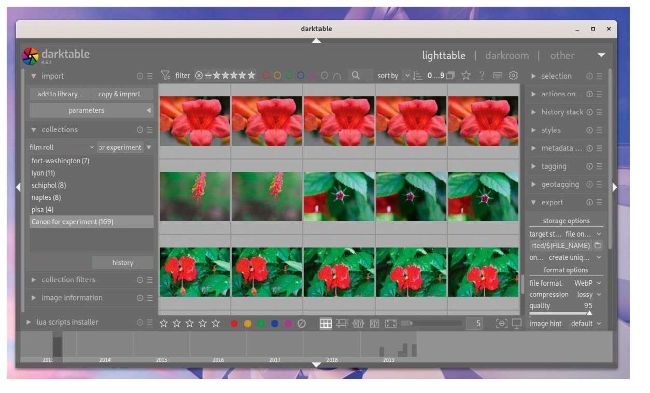
Darktable is just as good as, if not better than, other popular but proprietary (and expensive) image-editing apps designed for professionals.
LET’S EXPLORE DARKTABLE
1 Left panel
You can use the modules in this area
to find information about the image, take
snapshots, export the image, and more.
2 Top panel
This area houses modules for common
functions, such as the ability to filter and sort
the images. It also gives you access to global
settings and shortcuts.
3 Central area
The content here varies depending on
the current view. It shows thumbnails in thelighttable view, and the selected image in the
darkroom view.
4 Right panel
In addition to the histogram, this is where
you can find all the modules that you need to
edit your images.
5 Bottom panel
Another view-specific area, this area
either shows a timeline of the image (lighttable
view), or a filmstrip of images (darkroom view).
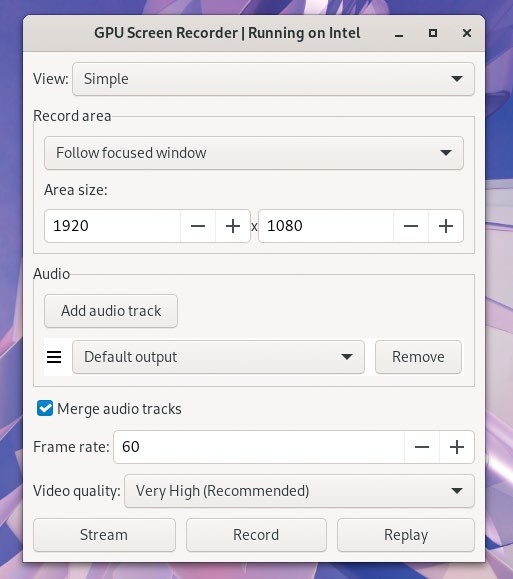
Besides streaming and recording, GPU Screen Recorder can also save Nvidia ShadowPlay-like instant replays of a specified duration.
SCREEN RECORDER
GPU Screen Recorder
Version: 3.3.0
Web: https://git.dec05eba.com/gpu-screen-recorder/about/
T here are screen recorders aplenty for Linux, but what’s different about GPU Screen Recorder is that it can go about its business without taxing your CPU. The app claims to be the fastest screen recording tool available for Linux, thanks to its minimal impact on system performance.