US
18 MIN READ TIME

HotPicks

Darktable GPU Screen Recorder Ksnip Koodo Reader Ghostery WeekToDo Kodi Tanks of Freedom II Granatier Czkawka Encrypt0r

Mayank Sharmab can tell a beta release from a stable one just by swirling and whiffing a glassful of USB sticks. He picks another 11 fine vintage open source apps.

IMAGE EDITOR

Darktable

Version: 4.6.1 Web: www.darktable.org

If you’re a shutterbug, chances are you’ve got a camera that can save RAW images. I And with Darktable, you can create a professional digital darkroom to convert and process your digital negatives.

The app is available as a Flatpak, so you can install it with flatpak install flathub org.darktable.

Darktable .

Darktable loads straight into the interface, asking you to use the Import module to point it to some images. As with everything in Darktable, you get lots of options in the Import dialog as well.

First up, you need a mechanism to sort your images. You can do so by either rating the images, or colour coding them. You can then use the Sort By menu to sort images by rating or colour, which are just two of the 15 sorting options.

To run through the process a little faster, you can use keyboard shortcuts. Hold down the h key to view the shortcuts for popular actions.

To edit a photo, double-click it, which switches you to the darkroom view. This interface has the image in the centre and menus on either side, which contain everything you need to work on the image. These will make sense to someone used to the digital imageediting workflow. For everyone else, the app has an extensive multilingual user manual.

The good thing about Darktable is that it does nondestructive image editing. This means that instead of modifying the actual image while you edit it, the app records the changes in an XMP file, which are then applied to the image when you export it.

Once you’ve prepared the image, you can head back to the lighttable view and use the Export module. By default, files are saved on disk and as JPEGs. But you can choose to send the exported images to your Piwigo gallery, or as email attachments and more. Similarly, you can export them in any of the dozen image formats.
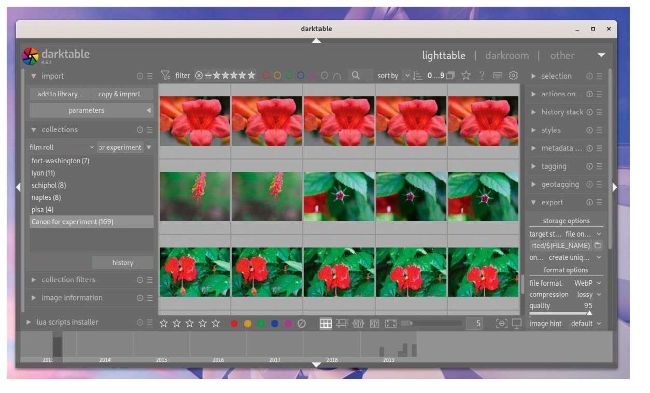
Darktable is just as good as, if not better than, other popular but proprietary (and expensive) image-editing apps designed for professionals.

LET’S EXPLORE DARKTABLE

1 Left panel You can use the modules in this area to find information about the image, take snapshots, export the image, and more.

2 Top panel This area houses modules for common functions, such as the ability to filter and sort the images. It also gives you access to global settings and shortcuts.

3 Central area The content here varies depending on the current view. It shows thumbnails in thelighttable view, and the selected image in the darkroom view.

4 Right panel In addition to the histogram, this is where you can find all the modules that you need to edit your images.

5 Bottom panel Another view-specific area, this area either shows a timeline of the image (lighttable view), or a filmstrip of images (darkroom view).
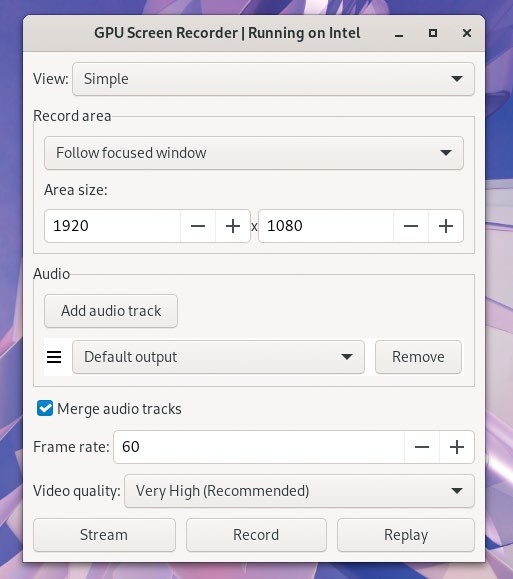
Besides streaming and recording, GPU Screen Recorder can also save Nvidia ShadowPlay-like instant replays of a specified duration.

SCREEN RECORDER

GPU Screen Recorder

Version: 3.3.0

Web: https://git.dec05eba.com/gpu-screen-recorder/about/

T here are screen recorders aplenty for Linux, but what’s different about GPU Screen Recorder is that it can go about its business without taxing your CPU. The app claims to be the fastest screen recording tool available for Linux, thanks to its minimal impact on system performance.

Unlock this article and much more with
You can enjoy:
Enjoy this edition in full
Instant access to 600+ titles
Thousands of back issues
No contract or commitment
Try for 99c
SUBSCRIBE NOW
30 day trial, then just $9.99 / month. Cancel anytime. New subscribers only.


Learn more
Pocketmags Plus
Pocketmags Plus

This article is from...


View Issues
Linux Format
June 2024
VIEW IN STORE

Other Articles in this Issue


LINUX FORMAT
LINUX
The #1 open source mag Future Publishing Limited,
WELCOME
Orange hero
You either die a hero or live long
REGULARS AT A GLANCE
Microsoft engineer spots Linux back door
In late March, Microsoft software engineer Andres Freund noticed a tiny delay when logging in via SSH, and uncovered a mysterious back door.
Nvidia Rusty RedHat driver
Red Hat has started work on a Rust-based GSP-only driver for Nvidia GPUs.
Oh, Snap! Crypto malware ahoy!
More malware is discovered in Ubuntu Snap Store.
SQL AT FIFTY
Dave Stokes is a technology evangelist at Percona.
ACCESS ALL AREAS
Italo Vignoli is a founder of LibreOffice and
FlyOS offers Linux subsystem on Android
The FlyOS project claims to transform a phone into a pocket-sized computer.
Turkey bans Distrowatch
Website is banned, supposedly for offering dangerous software.
Redis licence drama
In-memory database vendor switches to more restrictive dual licence.
Distro watch
What’s behind the free software sofa?
NVK IS GO!
Faith Ekstrand is an engineering fellow at Collabora.
THE X TO Z OF EXPLOIT
Jon Masters is a kernel hacker who’s been
Kernel Watch
Jon Masters keeps up with all the latest happenings in the Linux kernel, so you don’t have to.
Answers
Got a burning question about open source or the kernel? Whatever your level, email it to answers@linuxformat.com
Mailserver
WRITE TO US Do you have a burning
ULTIMATE DESKTOP UPGRADE!
KDE Plasma 6 is out. We take a look at the latest and greatest desktop upgrade and what it can do for you.
REVIEWS
Lichee Console 4A
Les Pounder finds a fun, if flawed, tiny laptop that caters to RISC-V fans.
Regata OS 24
Let’s hope Neil Mohr doesn’t make any gags he’ll regata. Damn it!
Cachy OS 240401
Nate Drake peers underneath the hood to find Arch-based Cachy is flashy – but is it also a solid distro to use?
Ubuntu 24.04 LTS
Nate Drake goes comfortably numb at the vast number of improvements introduced in Ubuntu 24.04 Noble Numbat.
ROUNDUP
Hacker distros
Kali Linux Parrot OS BackBox Linux BlackArch Linux Pentoo Linux
Installation and setup options
How easy is it to get the distribution installed and running?
Platform support and editions
Multiple editions for different scenarios and a variety of platforms.
The desktop experience
How does it look and feel in use?
The reading stuff!
Instructions to get the distribution up and running and to use it.
Forums and other support
Vitally important when learning the system or if you run into trouble.
Specialist tool organisation
With hundreds of tools, it helps if you can find the one you need.
Suitability for beginners
If you are beginning your compsec career, can you get started?
Hacker distros
Kali has it all if you want a
Upgrade to Ubuntu 24.04 LTS
The latest Ubuntu is here. Jonni Bidwell has come out of hibernation just to celebrate and (in between beverages) tell you all about it.
Make way for nobility
Prepare yourself, mentally and digitally, for Ubuntu’s latest and greatest outing, Noble Numbat.
CREATE AND BOOT INSTALL ATION MEDIA
You can download the Ubuntu 24.04 ISO image
Install Ubuntu 24.04
Get Ubuntu loaded on to your machine, without messing with any incumbent operating system.
INSTALL SOF TWARE
Besides the lack of Start menu, one of
Explore Ubuntu
Get to grips with your new favourite operating system and diagnose any hardware or software issues.
Add some customisation
Make Ubuntu your own by installing the applications you need and tweaking some pertinent settings.
IN DEPTH
Ubuntu at 20
A decade on from celebrating a decade of Ubuntu, Neil Mohr wonders where all the time has gone.
Pi USER
Raspberry Pi OS 5.2 has plenty on offer
Interface speed improvements arrive alongside plenty of software updates.
Diet Pi v9.1
Feeling bloated, Les Pounder tries another Diet, but this is no fad – he is sticking with Diet Pi this time.
Original Prusa XL
The race for colour is on and Denise Bertacchi with her colourful personality is certainly leading the pack on testing.
Build your own Pi Pico based oscilloscope
Discover how to build an oscilloscope with a Raspberry Pi Pico, an old Android device and a spare Les Pounder.
TUTORIALS
Live-stream audio
Shashank Sharma often finds himself with song lyrics stuck in his head. After all, no one ever got in trouble for going gaga for radio.
Enhance the Gnome desktop
Fond of standing in the garden wearing a pointy hat, Nick Peers is the perfect person to explain how to set up and use the Gnome desktop.
Enhance email with a better Thunderbird
Avian aficionado Nick Peers takes a deep dive into this soft fork of Thunderbird to reveal why you might want to give it a spin.
Using Krita for basic photo manipulation
Amateur photographer extraordinaire Neil Mohr finally puts down his GIMP and picks up a Krita for the first time.
TAP up your old C64 cassettes
Christian Cawley archives some old Commodore 64 cassettes using a handy USB adaptor and popular open source audio software.
Enhance your system audio with USB power
Whether it’s for podcasting, music production or simple day-to-day use, Michael Reed says a USB audio adaptor can greatly improve your sound.
ADMINISTERIA
Some Ansible advice for around the home!
Take work home? Not Stuart Burns – he applies home projects to work.
Top AI helper tips for OnlyOffice
AI-based assistants can help create amazing office documents. The very real Kseniya Fedoruk guides you on using OnlyOffice’s ChatGPT plugin.
The Epochalypse
It’s Y2K all over again, as Nate Drake finds time to grapple with the impending Year 2038 problem.
CODING ACADEMY
Let’s code some demos like it’s 1990!
Never let it be said that Ferenc Deák has his head in the clouds; more like in the past, as he explains how to recreate classic demo effects.
How to compile Ccode on the C64
David Bolton takes you back to the 1980s and helps you develop Commodore 64 games faster by coding in C instead of 6502.
Chat
X
Pocketmags Support