ASK
TECH SUPPORT & TECHSPLANATIONS
Email Mac|Life at ask@maclife.com
Hot topics right now
Make sure you check out these important support articles on Apple’s website to better understand the latest features.
WANT TO BACK UP YOUR APPLE WATCH?
You can’t actually back up your Apple Watch on device, per se, as it’s handled by the companion iPhone, but you can find out how it works and what is, and isn’t backed up at
bit.ly/ml175ask1.
CONTROL YOUR HOMEKIT ACCESSORIES
If you want to control your HomeKit smart home stuff from afar, you need to create a home hub, which you can do with a HomePod, Apple TV or iPad. Find out how to do it here:
bit.ly/ml175ask2.
HOW TO UPDATE YOUR APPLE TV
Want to make sure your Apple TV is running the latest tvOS 14? Then check it’s updating automatically. If not, you can do it yourself:
bit.ly/ml175ask3.
Worrying Mac panics early in the morning
I leave my iMac Pro running overnight, but since getting macOS 10.15.6, on several mornings it’s shut down by itself. It shows a report about a panic — is its power supply failing?
Although the root cause could be a hardware problem, it’s unlikely to be in its power supply. These are kernel panics, and the explanation should be in the panic logs which you see when it starts up again.
The Catalina 10.15.6 update introduced a serious bug, with a memory leak occurring in kernel “zone” memory. This is most obvious when running a VMware or VirtualBox virtual machine, but has affected many other systems. Over a few days, the kernel runs out of memory in these special allocation zones, causing it to progressively shut down services until all it can do is panic. Activity Monitor isn’t helpful because this doesn’t show up there, and you’d have to use the zprint command in Terminal to see the leak.
Normally kernel panics cause a Mac to restart, but sometimes they shut down instead. The panic log is shown after starting up — send it to Apple so it’s aware of the problem. Copy and paste its contents into a document and you should see it referring to the leak. The 10.15.6 Supplemental Update should fix this.
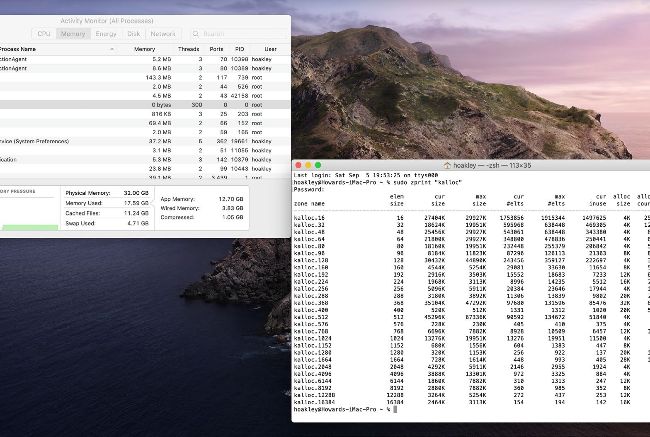
Activity Monitor gives you insufficient detail to help with kernel zone memory leaks; using zprint in Terminal provides clues but is complex.
Get official documentation at support.apple.com | Get help with hardware at support.apple.com/repair
New iPhone SE can’t sync photos
When I connect my new iPhone SE via USB to my late–2009 iMac running Mavericks, I can’t transfer my photos. The iPhone appears in iTunes, but it says Locked. Bluetooth pairing doesn’t work either.