HARDWARE KEYS
Understand and deploy security keys
Stuart Burns reveals how you can quickly boost your system’s protection using security keys and Multi Factor Authentication (MFA).
OUR EXPERT
Stuart Burns is a cloud-and security-focused administrator specialising in large-scale virtual implementations.
Usernames and passwords were originally designed to be proof that the person trying to log in is who they say they are. Interestingly, Richard Stallman famously ran his first systems with no passwords because “it hindered collaboration.” This was a brave choice even back before the evolution of the networks as we know them today.
The username/password combo used to be sufficient proof of identity to enable access. Things are different these days. With the vast array of password and account thefts that occur, a simple username and password combination is no longer sufficiently secure. This is especially so when considering the ability to brute-force stolen password hashes using powerful cloud GPU compute to reverse-engineer a password. Anything of any significant value – either financially or otherwise – should be protected by as much security as can be thrown at it.
Salty hashes
Most security-aware sites now use salted hashes. These are one-way functions (akin to physical trap doors if you will) that enable developers to encrypt passwords easily in terms of CPU time, but incredibly hard to decrypt. To reverse engineer all the password combinations would be a futile, expensive and lengthy undertaking in a properly salted and hashed environment. Salting refers to adding a second additional and unique value to the encryption key to make reversing the password hash more difficult, because it can’t be run against pre-built tables of hashes. More information about salts can he found at https://en.wikipedia.org/wiki/Rainbow_table.
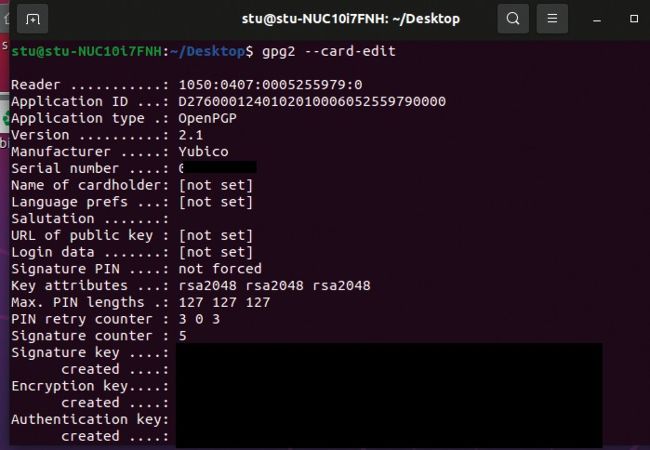
The command line tool GPG can be used to effectively manage the settings on the card, such as pins, identities and administration.
To enhance security, the concept of software and hardware tokens was introduced. These introduce a multiple factor of authentication alongside the password something you know – the password, the first factor; and something you own, a security token or even a phone with a quality TOTP (time-based one-time password) with a rotating set of numbers. They include the Google Authenticator, Authy and many others. Phone-based security can be fine for most users, but it still doesn’t do much for security beyond website logins. Hardware tokens take things a step further because they enable the usage of secure public/private encryption keys to extend the ability to prove an identity or even sign code, emails and so on.
If the Yubikey is just inserted and pressed (in a quick fashion) it will emit a static password. This is where a lot of people new to hardware keys trip up. It isn’t a magic secure password for everything. It’s purely a static password. It should be used where a strong password is required for some reason. However, never just use that password alone because if someone knew what it belonged to and stole it , they would have the entire password. Its ideal use case would be as the start or end of the password, with an additional portion of text making up the password. That makes it much harder for anyone to try and hack the password.