GENIUS TIPS
EDITED BY HOWARD OAKLEY
EXPERT ADVICE
Our resident genius solves your Mac and iOS problems
Contact us
Email your queries and your questions to genius@macformat.com
Stealers in disguise
Ask Google how to clear cache in macOS 26 (Tahoe), and you’ll get a sponsored link to an article in Medium or docs. google.com. That helpfully provides a command to copy and paste into Terminal, assuring you it’ll do the job. Only this is actually an attack to lure you into installing and running a nasty infostealer to make off with your credit cards, passwords, crypto wallets, the lot.
In the last few months Mac infostealers have been getting good with disguises. They now pose as ChatGPT conversations, ‘official’ Apple Support articles, and more. What they trick us into pasting into Terminal is carefully obfuscated using Base64 encoding to download its next stage without it being quarantined. We’re fooled into bypassing the security protection in macOS, authors of our own robbery. Don’t feed the stealers.
When to restart cold?
Q When should I shut my Mac down before starting it up ‘cold’, rather than simply restarting it?
by IVAN HASTINGS
A There are two situations where you have to shut down before starting up again, performing a cold start. To reset the SMC in an Intel Mac, you not only have to power it down, but may have to disconnect it from mains power for 15 seconds, as detailed by Apple at bit.ly/mac429macsmc. Apple silicon Macs have to be shut down before starting up into recovery, by holding the power button until its display confirms that. As they can only start up in safe mode via recovery, that too requires a cold startup. All modern Macs start up the same whether from cold, or from a restart using that Apple menu command. So, in theory, there shouldn’t be any difference between the two when all you want is to restart. However, memory can retain contents for several seconds after powering a Mac down, and some claim that can make a difference between the methods.
If you consider that restarting your Mac will sort a problem out, it’s best to perform a normal restart first. If that doesn’t work, shut down, wait at least 10 seconds for retained memory to clear, then start up using the power button as normal, to complete the cold restart.
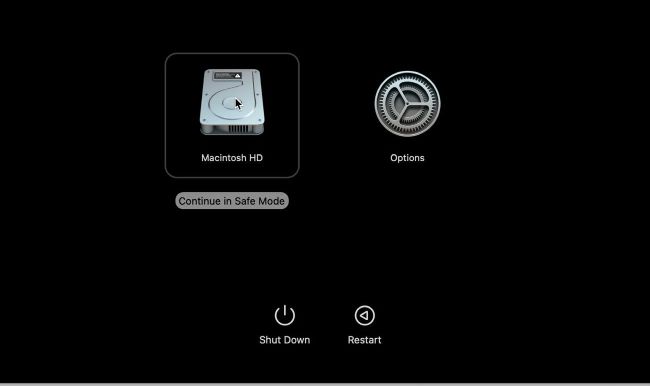
The only way to start up an Apple silicon Mac in safe mode requires starting from cold in recovery mode first.
Image credit: Apple Inc
Quick-fire questions
How to ensure all app updates are installed?
> First tap through to Settings > App Store > App Updates to check that’s enabled. Return to the Home Screen and locate the App Store icon. Tap and hold that to select the Updates menu command, and tap Update All in Upcoming Automatic Updates to download and install them all now.
Can I protect access to Files with my Face ID?
> Yes, although someone who knows your passcode can still see them. Tap and hold the Files icon on your Home Screen and select Require Face ID. Once you’ve confirmed that in the dialog, opening Files will require Face ID or your passcode, and their contents won’t appear in notification previews or Spotlight.

Image credit: Apple Inc