Sie sehen gerade die Germany Version der Website.
Möchten Sie zu Ihrer lokalen Seite wechseln?
14 MIN LESEZEIT
GENIUS TIPS

GENIUS TIPS

EXPERT ADVICE

Our resident genius solves your Mac and iOS problems

Contact us

Email your queries and your questions to genius@macformat.com

Stealers in disguise

Ask Google how to clear cache in macOS 26 (Tahoe), and you’ll get a sponsored link to an article in Medium or docs. google.com. That helpfully provides a command to copy and paste into Terminal, assuring you it’ll do the job. Only this is actually an attack to lure you into installing and running a nasty infostealer to make off with your credit cards, passwords, crypto wallets, the lot.

In the last few months Mac infostealers have been getting good with disguises. They now pose as ChatGPT conversations, ‘official’ Apple Support articles, and more. What they trick us into pasting into Terminal is carefully obfuscated using Base64 encoding to download its next stage without it being quarantined. We’re fooled into bypassing the security protection in macOS, authors of our own robbery. Don’t feed the stealers.

When to restart cold?

Q When should I shut my Mac down before starting it up ‘cold’, rather than simply restarting it?

A There are two situations where you have to shut down before starting up again, performing a cold start. To reset the SMC in an Intel Mac, you not only have to power it down, but may have to disconnect it from mains power for 15 seconds, as detailed by Apple at bit.ly/mac429macsmc. Apple silicon Macs have to be shut down before starting up into recovery, by holding the power button until its display confirms that. As they can only start up in safe mode via recovery, that too requires a cold startup. All modern Macs start up the same whether from cold, or from a restart using that Apple menu command. So, in theory, there shouldn’t be any difference between the two when all you want is to restart. However, memory can retain contents for several seconds after powering a Mac down, and some claim that can make a difference between the methods.

If you consider that restarting your Mac will sort a problem out, it’s best to perform a normal restart first. If that doesn’t work, shut down, wait at least 10 seconds for retained memory to clear, then start up using the power button as normal, to complete the cold restart.
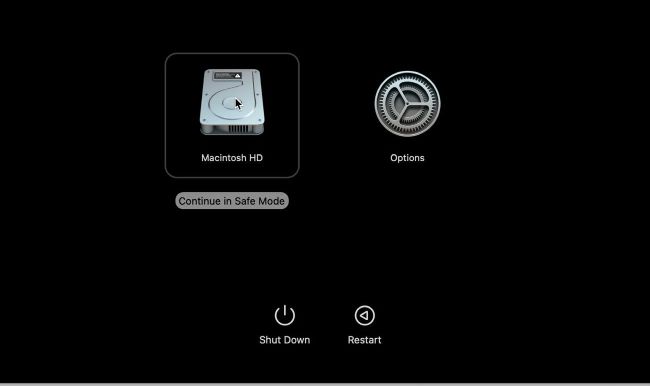
The only way to start up an Apple silicon Mac in safe mode requires starting from cold in recovery mode first.
Image credit: Apple Inc

Quick-fire questions

How to ensure all app updates are installed?

> First tap through to Settings > App Store > App Updates to check that’s enabled. Return to the Home Screen and locate the App Store icon. Tap and hold that to select the Updates menu command, and tap Update All in Upcoming Automatic Updates to download and install them all now.

Can I protect access to Files with my Face ID?

> Yes, although someone who knows your passcode can still see them. Tap and hold the Files icon on your Home Screen and select Require Face ID. Once you’ve confirmed that in the dialog, opening Files will require Face ID or your passcode, and their contents won’t appear in notification previews or Spotlight.

Image credit: Apple Inc
Schalten Sie diesen Artikel und vieles mehr frei mit
Sie können genießen:
Genießen Sie diese Ausgabe in voller Länge
Sofortiger Zugang zu mehr als 600 Titeln
Tausende von früheren Ausgaben
Kein Vertrag und keine Verpflichtung
Versuch für €1.09
JETZT ABONNIEREN
30 Tage Zugang, dann einfach €11,99 / Monat. Jederzeit kündbar. Nur für neue Abonnenten.


Mehr erfahren
Pocketmags Plus
Pocketmags Plus

Dieser Artikel stammt aus...


View Issues
MacFormat
May 2026
ANSICHT IM LAGER

Andere Artikel in dieser Ausgabe


MacFormat
hello (again)
If ever there was a month for Apple
APPLE CHOICE
The latest hardware and software – reviewed and rated!
MAC FORMAT
MacFormat, Future, Quay House, The Ambury Bath, BA1
APPLE CORE
Apple’s reveals new affordable MacBook during spring refresh
Say hello to the MacBook Neo, plus other Mac, iPad and display updates
MacBook Pro gets M5 upgrade
Apple’s M5 Pro and M5 Max chips finally arrive on Apple’s most powerful laptop
New Studio Displays
Studio Display and Studio Display XDR get a refresh
M4 iPad Air
New chips, new colours
APPLE NEWS ROUNDUP
MacBook Neo 2 predictions RUMORS RIFE ALREADY! >
iPhone 17e makes its debut
The next generation of Apple’s affordable iPhone range
Apple’s ‘HomePad’ may have an ingenious use for MagSafe
Snap-on functionality
Aeronaut for Bluesky Free (IAPs)
A better way to use Bluesky
Media Picks
What you should be playing and reading this month
John-Anthony Disotto…
THINKS THAT THE MACBOOK NEO WILL CONQUER THE BUDGET LAPTOP MARKET – AND WINDOWS SHOULD BE LOOKING CLOSELY AT ITS POSITION
NUMBERS
The M5 Max
The rising cost of memory & storage
Memory and storage prices are being driven through the roof thanks to artificial intelligence
FEATURE
126 time-saving tips for Mac, iPhone, iPad & Apple Watch
O ne of our very favourite things about
50 YEARS OF APPLE
As Apple turns 50, we take a look at the rise and fall, and rise again, of one the world’s most influential companies
LOCK DOWN YOUR iPHONE
Lower the odds of iPhone theft – and the cost of it
APPLE SKILLS
Master Apple shortcuts
The modifier keys enable you to use shortcuts
Import your vinyl collection
Keep your records pristine by making them digital with GarageBand
Improve portrait images
Turn a quick snap into a slickly graded portrait with background blur
Manage Mac windows with Moom
Use shortcuts and maximise buttons to move Mac windows – in a snap
Create a home inventory
Manage your home and catalogue all of your items on your Mac
Explore Reminders’ secret tricks
Stay on track with your tasks
Get fit anywhere and anytime
Put a personal trainer in your pocket
Find planes fast with Zephy
Follow aircraft routes with your very own radar tracker
Create an iPad weather station
Use Carrot Weather and never get caught out by a downpour again
AirTag 2 and Find My
Apple’s second-gen AirTag is here with some new and improved features
APPLE CHOICE
Password managers
Store your online passwords safely and securely
MacBook Neo
Apple’s most affordable laptop is revolutionary in more ways than one
Moment Pro Camera II vs ProCamera
Moment Pro Camera II £9.99 FROM shopmoment.com/gb
BenQ PV3200U
Slick Ultra HD display for wannabe YouTubers
TR-49
Looking for eureka moments despite ghosts in the machine
Edifier M90
Stylish compact active desktop speakers
DJI Mic Mini
Pro audio recording on a budget
Satechi OntheGo Bluetooth Keyboard with Stand
$79.99 (about £70 ) FROM satechi.net FEATURES Bluetooth 5.1, USB-C, rechargeable battery, three-device memory, scissor-switch keys
Tribit StormBox Mini+
£29.99 FROM tribit.com FEATURES 2x 48mm full-range drivers, 1x passive radiator, 12W output, Bluetooth 5.4 with AAC/SBC, True Wireless Stereo (TWS) support, up to 12 hours’ battery life, waterproof to IPX7, Aux input, built-in mic; 119x91x91mm, 545g
Sennheiser RS 275 TV
£219.99 FROM sennheiser-hearing.com FEATURES HDR 275 headphones, BTA1 Auracast transmitter with USB-C, Bluetooth 5.4, HDMI (ARC), 3.5mm jack, supports LC3, AptX, SBC, AAC and AptX Adaptive audio codecs, 6Hz-22kHz
iFi UP Travel
£99 FROM ifi-audio.com FEATURES Portable Bluetooth 5.2 transmitter/receiver, 1x USB-C port, 1x 3.5mm Aux, up to 10 hours’ battery life; 55x30x16.8mm, 25.7g
Making music on iPhone
Create great tunes anywhere!
MacBook Air
LAST UPDATED MAR 2026 › From £1,099 ›
Apple Magic Keyboard with Touch ID and Numeric Keypad
› From £179 › Apple’s extended keyboard boasts
Apple Magic Mouse
› From £79 › The Magic Mouse is
Apple Magic Trackpad
› From £129 › This Multi Touch glass
MacBook Neo
FIRST INTRODUCED MAR 2026 › From £599 ›
MacBook Pro
LAST UPDATED MAR 2026 › From £1,699 ›
TV 4K
› From £149 › Apple’s third-gen little black
Apple HomePod/HomePod mini
› £299 / £99 › Apple’s Siri-powered speakers
Watch Series 11/Ultra 3/SE 3
› From £219 › Launched in September 2025,
iMac
LAST UPDATED OCT 2024 › From £1,299 ›
Mac mini
LAST UPDATED OCT 2024 › From £599 ›
Mac Studio
LAST UPDATED MAR 2026 › From £2,099 ›
Studio Display
LAST UPDATED MAR 2026 › From £1,499 ›
iPad/mini
LAST UPDATED MAR 2025 LAST UPDATED OCT 2024
iPad Air
LAST UPDATED MAR 2026 › From £599 ›
iPad Pro
LAST UPDATED OCT 2025 › From £999 ›
Apple Smart Folio
› From £59 › Available in a range
Apple Pencil/Apple Pencil Pro
› From £79 › There are now four
Apple Magic Keyboard
› From £299 › Team your iPad with
iPhone 17
LAST UPDATED SEP 2025 › From £799 ›
iPhone 17 Pro/Pro Max
LAST UPDATED SEP 2025 › iPhone 17 Pro,
iPhone Air
LAST UPDATED SEP 2025 › iPhone Air, From
iPhone 17e
› From £599 › Released in March 2026,
Apple AirPods Pro 3/AirPods 4/AirPods Max 2
› £219 /From £119 / £499 › The
BEST BUYS…
EXTERNAL DRIVE SanDisk Desk Drive From £319.99 westerndigital.com
BEST BUYS… Third-party Mac apps
TEXT EDITOR BBEdit 15 $59.99 (about £60 )
BEST BUYS…
Third-party iPhone, iPad & Watch apps
One more thing MacBook Neo
Graham Barlow wonders if we’re all living in The Matrix now
Chat
X
Pocketmags Unterstützung