Problems Solved
Our experts solve all your tech problems
PROBLEM OF THE FORTNIGHT
Do I still need to defrag my hard drive?
Q Years ago, I remember obsessively using a tool to defrag my hard drive, which supposedly kept it fast. I can’t remember whether it did any good or not, but I must have believed it worked. It occurred to me recently that it’s something I haven’t done in years, perhaps because my current laptop performs really well. Out of curiosity, I typed defrag into the Start menu and was interested to find that this tool is still part of Windows. Is it something I should be using? If not, what’s the point of it?
Malcolm Hart
A The tool you’re talking about was called Disk Defragmenter, and it had been part of Microsoft’s operating system since Windows 95, although defragmenting tools existed back in the days of DOS, which predates Windows.
When most PCs used traditional hard drives with stacks of spinning magnetic platters as their main storage devices, defragmenting was a very good idea, if not exactly essential. The process gathered files whose data had been split up and scattered all over the drive. Moving the data on the magnetic platters (pictured below) so it was physically closer together meant the drive’s read/write heads had much less work do to access it. It wasn’t a placebo effect, either: defragmenting your hard drive really could speed up your PC.
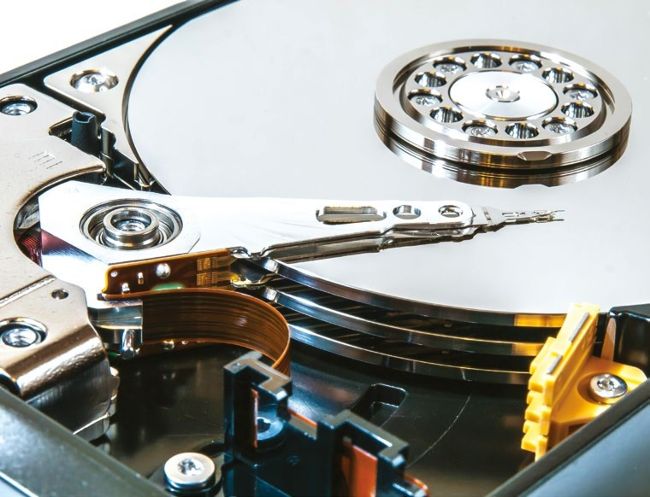
Defragging gathers data that’s been scattered across your hard drive’s magnetic platters
Credit: William Warby_pexels_dotcom
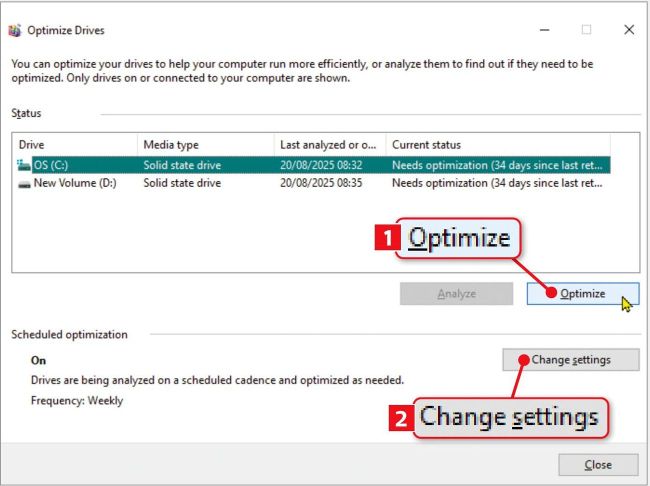
Windows’ Optimize Drives lets you get the best out of both SSDs and magnetic hard drives
The problem was that because of the way Windows and hard drives worked, files would quickly become fragmented again. So defragmenting was something you had to do regularly, like cleaning and tidying your house.
When solid-state drives (SSDs) replaced hard drives as the most common type of PC storage, the situation changed. SSDs don’t have any moving parts, so while files still become fragmented, it has no effect on how quickly the drive can retrieve data. There are no spinning platters or drive heads frantically darting about to locate the data. Instead an SSD is made up of memory chips, so it can read and write data to and from any part of the drive in the same amount of time. It doesn’t matter if a file is in one neat block or split into dozens of fragments, an SSD will take the same time to access it.
So why does Windows still have a built-in ‘defrag’tool? Well, actually it doesn’t. The tool is now called Optimize Drives but, perhaps sensibly, Microsoft knows people will try to access it by typing defrag into the Start menu. If your PC has a traditional hard drive, Optimize Drives still offers an option to defragment it. Otherwise clicking the Optimize button ( 1 in our screenshot above) on an SSD will run what’s known as a TRIM command, which marks empty blocks on the SSD where, for example, a file has been deleted. The SSD takes less time to write to these because it doesn’t need to erase the previous contents first, as it would if you hadn’t run the TRIM command.