HotPicks
Sweet Home 3D Duplicati VeraCrypt ImageMagick WhatSie Topgrade-rs Ark KTuberling PortProton MuseScore LosslessCut

Mayank Sharma
is disappointed that there are no more T20I cricket matches left in 2024, which leaves him with more time to hunt for useful apps and utilities.
INTERIOR DESIGN
Sweet Home 3D
Version: 7.5.2
Web: www.sweethome3d.com
Before you get down to renovating your castle, wouldn’t it be best if you couldvv isualise the changes?Sweet Home 3D is a nifty little app that you can use to map everything from a bathroom to an apartment or a multistorey mansion.
To get started, download the app and uncompress it with tar zxvf SweetHome3D-*.tgz . Then switch to the extracted directory and run the app with ./SweetHome3D .
The app’s interface looks like any other drawing app and is divided into four resizable panes. On the right you have the floor plan of the house. You draw the walls of your home using the mouse in this pane and place your furniture on the plan. The list of available furniture is in a categorised catalogue at the top-left, and the items used in the plan are listed in the bottom-left pane.
First up, you have to create walls. Click the Create Walls button in the toolbar, then in the home plan pane, click at the start point of the new wall, then double-click at its end point.
To add furniture to your home, drag and drop furniture from the catalogue to the home plan or furniture list. When you drop a door on a wall, the app automatically orientates and resizes it, depending on the orientation and the thickness of that wall. Similarly, when you add furniture, the app rotates it automatically so that its back face lies against the wall, though you can also manually adjust its location, angle and size.
Instead of starting from scratch, you can also use one of several demo plans. To do this, head to File > New From Demo. This displays a list of nine demo home designs. If you want more options, click Find More Demos, which takes you to the project’s website, from where you can download dozens of designs. You can then modify the demo plan as per your requirements.
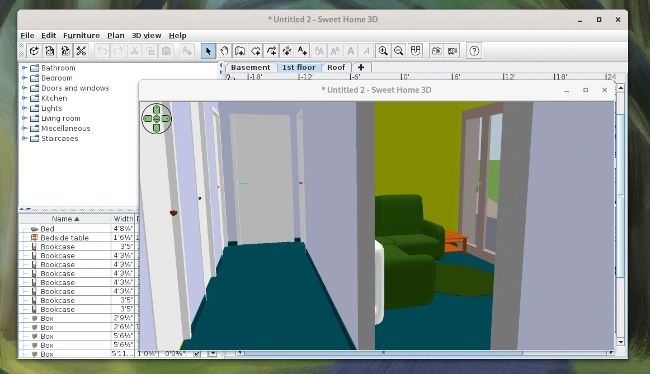
Once you’ve mapped your house, Sweet Home 3D can also render realistic images and let you move through the house. It also has the ability to customise lights and control sunlight.
LET’S EXPLORE SWEET HOME 3D...
1 Furniture catalogue Organised by categories, this contains all the furniture or objects you can add to a plan.
2 Main toolbar
The app’s main toolbar houses buttons for
commonly used functions, such as creating a
wall and more
3 Plan layout This pane displays your home as seen from above. You draw the walls of your home using your mouse in this pane, and lay out your furniture.
4 3D view This pane displays your home in 3D. You can see your home in this pane either from above, or from a virtual visitor’s point of view.
5 Added furniture This list contains the furniture of your home, along with various attributes, such as their size.
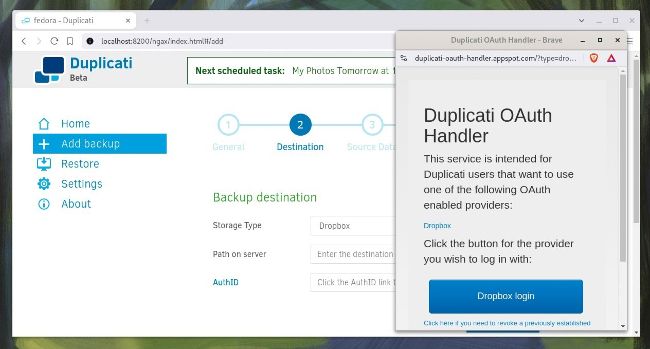
Duplicati has an OAuth handler service to help you sign into and work with virtually all the popular cloud storage services.
BACKUP APP
Duplicati
Version: 2.0.81
Web: https://duplicati.com
Duplicati is a dexterous backup app that you can use on the desktop to back up your personal files, as well as a bunch of computers over the network.
The project produces precompiled binaries for both Debian and Fedora-based distros. Grab the one for your distro and double-click to install it using your distro’s software management tools. Then follow its clear documentation to run through the rest of the process to anchor the app. When it’s installed, fire up a web browser and head to localhost:8200 to bring up the app.