U bekijkt momenteel de Netherlands versie van de site.
Wilt u overschakelen naar uw lokale site?
27 MIN LEESTIJD

iOS 15 SUPERGUIDE

iOS 15 is packed with new features and improvements. We’ll tell you about the best and show you how to use them

We’re now a year and a half into a pandemic, and with many of us still working remotely, the overarching theme of iOS 15 is communication. What may be a surprise – although perhaps not, given that this is Apple — is that the communication is social, rather than business focused.

As with macOS Monterey, the chief beneficiary of the iOS update is FaceTime. And, just like on the Mac, FaceTime in iOS gets SharePlay (although not until later in the year in an update to iOS 15), Grid View, and the ability to invite friends who don’t own Apple devices to join the conversation. Elsewhere, several of the other new features are the same as those on the Mac. So there’s a new Focus mode and Live Text. And, of course, the new iCloud+ features – Private Relay and Hide My Email – are incorporated into iOS 15.

There are some iOS-only new features too, including revamped notifications, which now look better and can be delivered en masse to a schedule you set. Read on to dig deep into iOS 15.

Which devices will work with

iOS 15?

The good news is that if your iPhone was compatible with iOS 14, it will run iOS 15. The list of devices on which Apple supports iOS 15 is identical to those for iOS 14. However, there is a caveat. Some features, such as Live Text and on-device Siri processing, need at least an A12 Bionic processor. In effect, that means iPhones made in 2018, such as the XR and XS, along with the iPhone 11 and 12 ranges, and the second-gen iPhone SE.

Here’s the full list of compatible devices

iPhone 12

iPhone 12 mini

iPhone 12 Pro

iPhone 12 Pro Max

iPhone 11

iPhone 11 Pro

iPhone 11 Pro Max

iPhone XS

iPhone XS Max

iPhone XR

iPhoneX

iPhone 8

iPhone 8 Plus

iPhone 7

iPhone 7 Plus

iPhone 6s

iPhone 6s Plus

iPhone SE (first generation)

iPhone SE (second generation)

iPod touch (seventh generation)

FaceTime, Messages and Memoji

FaceTime gets a social boost with SharePlay, photos are better in Messages, and there are new Memoji accessories

What’s new in FaceTime

What’s new in Messages

The headline new feature in FaceTime is SharePlay, which enables you to hold watching or listening parties on group calls with friends. When you watch a movie or TV programme, playback and controls are synced, and when someone on the call speaks, the video volume dips. SharePlay also enables you to share your screen with others on the call. However, SharePlay won’t be available at launch as planned and will now appear as an update.

Grid View enables you to see participants tiled on the screen, and spatial audio makes it sound like a person’s voice is coming from their position on screen. Portrait mode allows you to blur your background, and you can now invite friends who don’t have an Apple device, by sending them a link that opens the call in a web browser.

Portrait mode allows you to blur the background in FaceTime, so you can hide that messy bedroom.
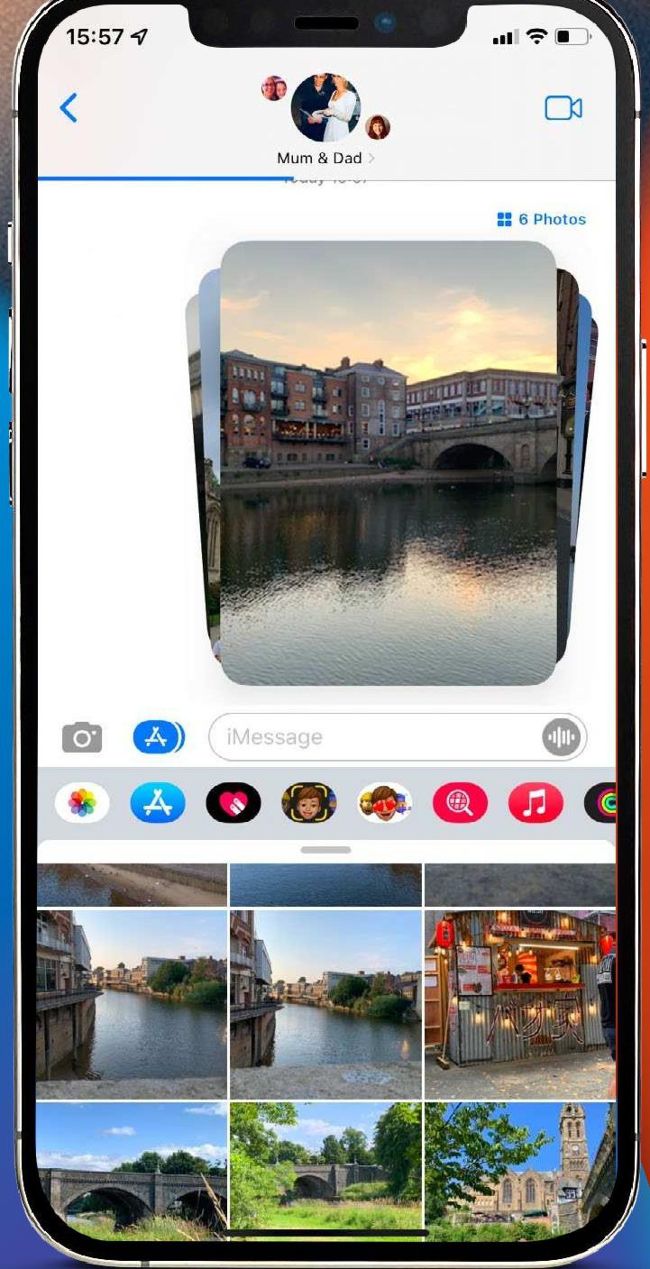
When multiple images are sent in a Message, they are now stacked like cards and you can swipe through them.

What’s new in Memoji

Memoji have become hugely popular since they were first introduced on the iPhone X, both in their animated form, where they change as your facial expression changes, and as stickers. In iOS 15, Apple has added customisable outfits in up to three different colours, accessibility options such as cochlear implants, oxygen tubes and soft helmets, and multi-coloured headwear. There are also new stickers that enable you to send gestures such as a hand wave or light bulb moment, and you can now select a different colour for each eye. There are also new options for spectacles including heart-and star-shaped glasses.

Animated Memoji can be used in FaceTime or Messages – where you create a video of up to 30 seconds to send to a recipient – and Memoji Stickers can be used in any app that takes text input.
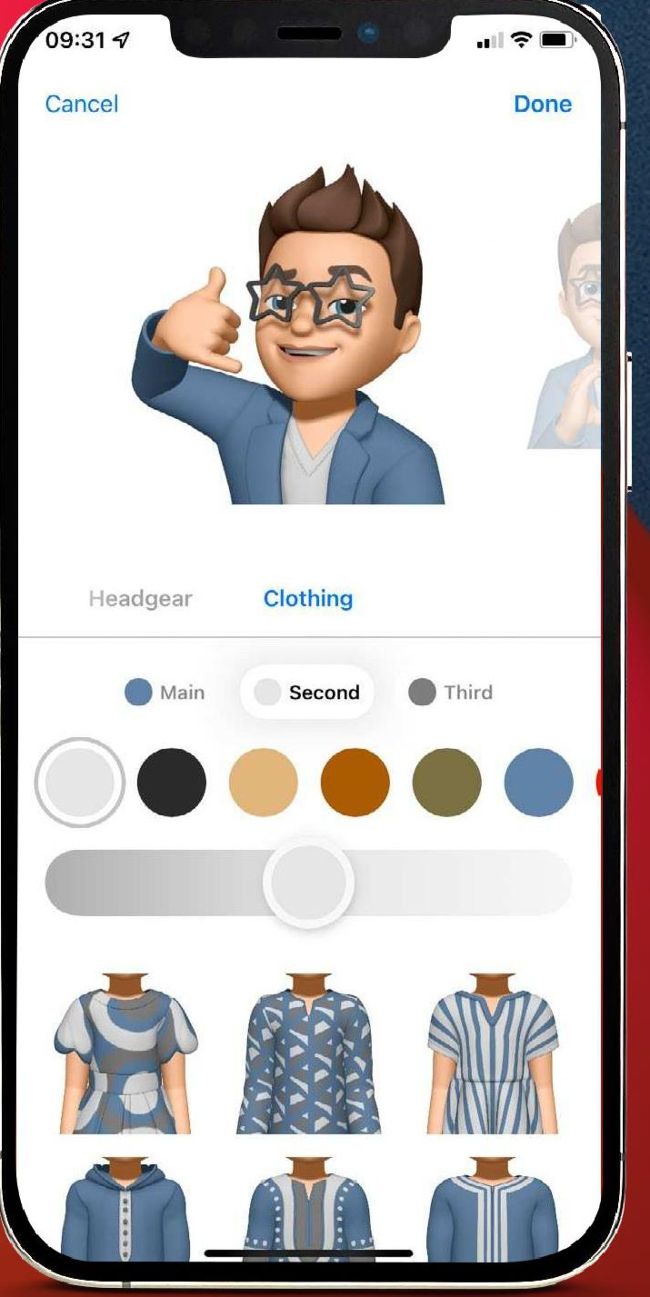
Memoji now has additional options for spectacles, as well as new gestures and clothing.

Messages got a hefty upgrade in iOS 14, and this time around the changes are more modest. Links, images and other content sent to you in Messages now appear in a Shared with You section in the relevant app.

For example, if the content is an Apple News story, it appears in Apple News. If it’s a web link, it will appear in Safari. And multiple photos sent in a message are now stacked. You can swipe through them, tap to view them as a grid, or save them to your Photos Library. The animation when you swipe through images is reminiscent of riffling through a deck of cards – emphasised by the rounded rectangular shape of the images. It’s a much more elegant way to deal with multiple photos than displaying them one above the other as they are sent.

Ontgrendel dit artikel en nog veel meer met
Je kunt genieten:
Geniet volledig van deze editie
Direct toegang tot 600+ titels
Duizenden oude edities
Geen contract of verplichting
ABONNEER NU
30 dagen proberen, dan gewoon €11,99 / maand. Op elk moment opzeggen. Alleen nieuwe abonnees.


Meer informatie
Pocketmags Plus
Pocketmags Plus

Dit artikel komt uit...


View Issues
MacFormat
Autumn 2021
IN DE WINKEL BEKIJKEN

Andere artikelen in dit nummer


Mac FORMAT
Meet the team
We love this time of year – every
APPLE CORE
Redesigned MacBook Pro on the horizon
And new MacBook Air and iMac coming later
Apple Watch to grow in size?
The Apple Watch could be getting larger… but
APPLE NEWS ROUNDUP
THE WINDS OF CHANGE
LOOK OUT FOR APPLE CAR
UNVEILING COULD HAPPEN THIS YEAR
More pressure on the App Store
Bad press and legislative action make tough reading for Apple
Will your next iPhone cost more
Rising supplier prices could be passed on to customers
TickTick 4 Free (IAPs)
Task management and reminders that will bring you up to speed
Budget Planner: Snoop Finance
FREE Want to be better at saving money?
What Remains of Edith Finch
£4.49 Discover the stories of Edith’s family as
Wildermyth
£19.49 In this brilliant game, every character you
Media Picks
What you should be playing and reading this month
Crave
THE GEAR WE’RE LUSTING AFTER
CONTACTS
Have your say on all things Apple!
MATT BOLTON…
IS MAKING THE iPHONE THE CENTRE OF OUR LIVES TOO RISKY WITHOUT SOME KIND OF REPLACEMENT SYSTEM?
Win
A huge bundle of Anker gadgets and accessories!
Apple’s photoscanning plans
Apple has dramatically paused plans designed to promote child safety and stop the spread of known Child Sexual Abuse Material. Here we explain what it had in mind, and why the new features proved so controversial…
APPLE SKILLS
NEW IDEAS Your in-depth guide to getting more
APPLE SKILLS
Get started with Markup
Add shapes, signatures and more with Markup magic
Create custom shortcuts
Get instant access to important apps and folders with HotKey
Take a tour from your Mac
Get where you need to go with these top Apple Maps tips
Make colour adjustments
How to adjust the hue, saturation and lightness of specific colours
Save money on food
Eat cheaply with Too Good To Go and help prevent food waste
Master the Files app
Use Files to sort, scan, share and scribble on your stuff
Make notes in your books
Use the free Highlighted app to save passages in any book you own
Bring order to chaos
Organise everything from dinners to playdates with FamilyWall
Virtual Private Networks (VPNs)
Discover how VPNs and Private Relay help make your connection secure
GENIUS TIPS
EXPERT ADVICE Our resident genius solves your Mac
iOS software
Swipe away your touchscreen troubles and rekindle your love of Apple’s mobile devices
Mac software
Resolving riddles and restrictions with what you want to run on your Mac
macOS
Shine a spotlight on the solutions to your most irritating Mac problems
Get set for Monterey
macOS 12 is coming to your Mac soon – here’s how to make sure you’re ready
Back up your Mac
Backups are vital in case you lose files or need to migrate
Refresh or reinstall?
There may be no benefit in wiping your old system and installing afresh
Welcome to macOS Monterey
Not all Macs get the same new features, and you need an M1 to get the lot
Play happy families with Apple’s Family Sharing
You have stuff! You have people! Let’s bring them together!
Share your stuff
Share your storage, your subscriptions and even your apps with the family
Make kids’ devices safer
Better bedtimes, healthier habits and clean content
APPLE CHOICE
XGIMI Horizon Pro
Premium projector with impressive 4K image quality (and Android)
Anker Apex Thunderbolt 4 Dock
Power and ports galore
Apogee Duet 3
High-end audio recording
Nothing Ear (1)
Nothing to write home about
OWC Travel Dock E
A great USB-C hub for your travels
Twelve South ActionSleeve 2
Tackle Apple Watch workout worries
GameSir F8 Pro Snowgon
Losing its cool with iPhone 12
Trust Smart LED Bulbs
Wi-Fi connectivity at a low price
THE BEST COMPACT STANDS FOR MACBOOK
Elevate your MacBook wherever you go
PORTABLE PRINTERS
We compare the best models for printing on the move
Parallels Desktop 17
Run Linux and Windows on your M1 Mac
WALTR PRO
Convert and copy any file from Mac to iOS
ScreenFlow 10
Record screens and video with flair
Stellar Commanders
Kill a planet in under seven minutes
Cardhop 2
Back with more for power users
Infuse 7
Easy network streaming for movies
STORE GUIDE
Your complete guide to the best Apple hardware and third-party accessories
MacBook Pro
EXPECTED OCT 2021 UPDATED NOV 2020 The MacBook
Mac Pro
From £5,499
MacBook Air
From £999
Mac mini
From £699
Apple TV 4K
Apple’s media streamer has been around since 2007,
iPhone
From £699
iPad
From £329
iPad Air
From £579
Watch
From £379 (Series 6)
AirPods Max
From £549
BEST BUYS… Curated picks of third-party kit
DESKTOP SPEAKER Ruark MR1 £32 9.99 ruarkaudio.com Winner
BEST BUYS… Curated picks of additional apps
PHOTO EDITOR (MAC) Luminar AI From £59 skylum.com
Apple IIGS
Charlotte Henry reflects on the Apple IIGS, the computer that brought new levels of sound and colour to Apple desktops
Chat
X
Pocketmags ondersteuning