Camera College
The complete guide to modern photography
Photo challenge!
You could win a copy of Affinity Photo
See page 79
Marcus Hawkins
Photographer and writer Marcus is a former editor of DigitalCamera
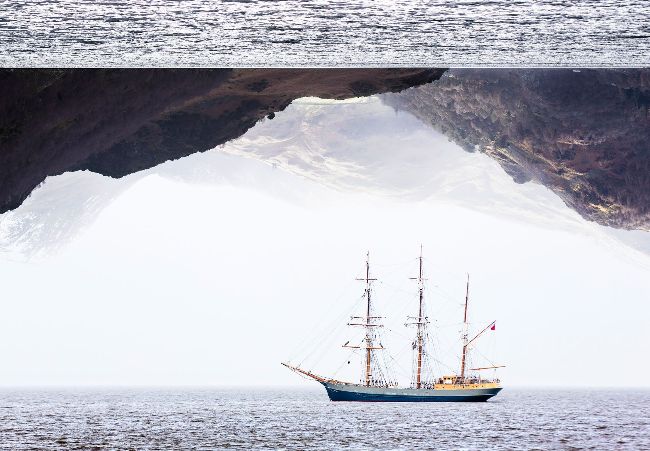
Planning for where elements are going to be positioned in a multiple exposure allows you to compose your source images with space in the right places.
How to get creative with multiple exposures
Sometimes, one exposure just isn’t enough… give a new twist to familiar scenes and subjects by taking advantage of your camera’s multiple-exposure mode
■ Multiple-exposure photography has been around since the days of film, but it didn’t actually become a widespread feature in digital cameras until relatively recently. Even now, it’s not available on all DSLRs and mirrorless cameras – which is surprising, as it’s such a versatile facility.
You can use multiple exposure as a creative workaround tool, for example superimposing a shot of the full moon taken on a long telephoto lens on a scene taken with a wide-angle lens. With a fast shutter speed and a high-speed drive setting, you could record an entire sequence of an athlete in motion, with each of their different positions exposed in a single image. Alternatively, as we highlighted in our motion blur guide in the last issue, you can combine a series of images taken over a longer timeframe to recreate the effects of a single, much slower exposure to blur white water and clouds.
To create any of these effects, you need to access your camera’s multiple-exposure mode. This isn’t an exposure mode in the same way that Aperture Priority and Shutter Priority are: rather, it’s a creative option that is usually found in the camera’s menu. With this function enabled, you can use any of the more advanced exposure modes to take your multiple exposure, as you would with any other picture.
If your camera is capable of recording multiple exposures, you’ll find that there is a number of options you need to specify to get the results you’re expecting. You can tell the camera how many shots you want to combine, for example, along with how you want them to be merged – and, in some cases, whether you want to save the source files you’ll be shooting as well as the final multiple exposure. Your camera is probably going to save the end result as a raw file, which gives you more scope for fine-tuning the image later when you process the file.
The way that the images are merged is an important consideration, as it will determine which parts of each image are visible. It can also affect the overall exposure of the final image. Each time you add an image to the multiple exposure, you’re essentially increasing the level of brightness registered by each pixel. To prevent the final multiple exposure being an overexposed, white-hot mess, each image has to have its exposure level lowered. The camera can do this for you, once it knows how many images you want to combine. But in some cases, you may have to reduce the exposure for each shot manually.