Which SMB version?
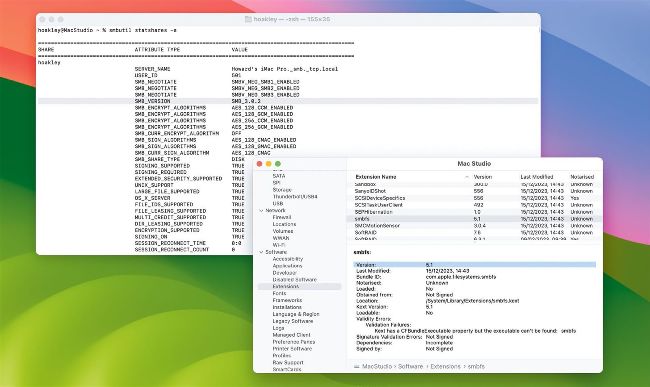
Checking which version of SMB is being used over a connection to a network share requires a command in Terminal.
QHow can I discover which version of SMB my Mac is using?
by JOHN GORDON
AThere are two different version numbers you might need: that of Apple’s SMB software, and the version used over a connection to a network share. The software version is given in System Information; select the Extensions item in the Software section, and scroll down to smbfs, where you’ll find the current version is 5.1. To discover which version of SMB is being used over a connection, ensure that share is connected to your Mac, then in Terminal type ‘smbutil statshares -a’ and press Return. You’ll be given a list of current SMB connections, within which is the line for SMB_VERSION. As of Sonoma 14.2.1 that’s likely to be 3.0.2, although older versions can be used. The version used for macOS as a server and that as a client may differ, and can be checked the same way – eg, macOS Sonoma appears happy to connect to a server using SMB 3.1.1, but may only be prepared to offer 3.0.2 when it’s the server.