SOFTWARE: ZBRUSH 2021
WHAT’S THE DIFFERENCE BETWEEN DYNAMESH AND SCULPTRIS PRO MODE?
Dan Boyle, Cheshire
Glen Southern replies
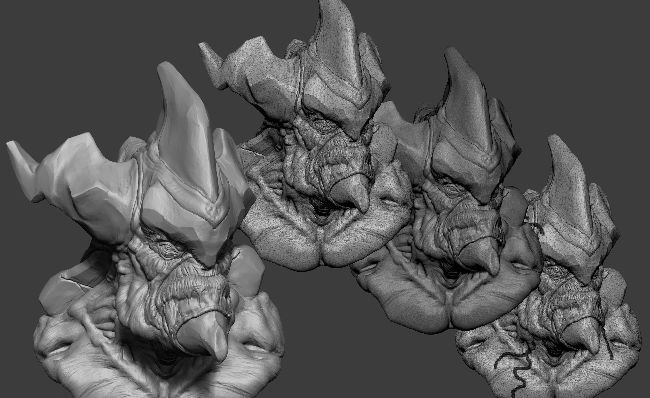
You will find that both methods can really help you in your sculpting once you understand their individual strengths and weaknesses
DynaMesh has been available in ZBrush since the mid 2000s and is a very well-established part of the digital sculpting process. Sculptris Pro on the other hand is a much more recent addition and was brought in as a new feature after the acquisition of Sculptris by Pixologic. Let's start by understanding each mode and how to use it.
DynaMesh is a feature you turn on once and then call repeatedly with the stroke of your stylus. It allows you to remesh your entire model with an averaged set of polygons across the whole surface, meaning that if you had stretched out a finger, for example, it would even out the polygons across the entire mesh, thus removing the stretched polygon issue. You can use it in a number of ways; firstly as you are blocking out your model, you can keep calling DynaMesh and regularly average out the surface of your sculpt as you progress. You can also combine two models (called SubTools) together and then call DynaMesh, and it will merge them together, leaving no internal geometry. It is also useful to combine all your SubTools into one before sending to a 3D printer, making it a less complicated model and fully watertight.