ARDOURCredit: https://ardour.org
Compose using the ultimate tracker
Michael Reed explores some common music-making workflows in Ardour 7, the premier Linux digital audio workstation application.
Part three!
Don’t miss next issue, subscribe on page 16! the ultimate tracker
OUR EXPERT
Michael Reed once simulated a reverb chamber by putting a guitar amplifier into an empty wardrobe with a microphone. Be aware of this if you are considering inviting him to your house.
Ardour
is an open source application for recording and composing music. It can work A with audio tracks such as recordings of instruments and it can also handle MIDI tracks, which are notes on a grid that trigger plugins. Speaking of plugins, it can handle all the major plugin formats both for instruments and effects. In the final stage of the process, it can output a finished audio file in a format such as WAV, MP3 or FLAC. It’s mainly seen as a music program, but it can also handle other types of audio projects, such as podcast recording and editing.
Ardour is capable of a lot, but it’s a complex piece of software. We’re going to take you through a few common workflows. And as we do, we’ll shine a light on some of the features that were introduced in Ardour 7.
If you notice that the audio output of Ardour is delayed, adjust the buffer size (Window > Audio/MIDI Setup) – 128 works well on most systems, but experiment.
Launching Ardour
Every time you launch Ardour, you are presented with the Session Startup dialog. From here, you can select a session to load, choose from a list of recent sessions or create a new session. Click on New Session to create a blank session. The next dialog gives the project a temporary name based on the date.
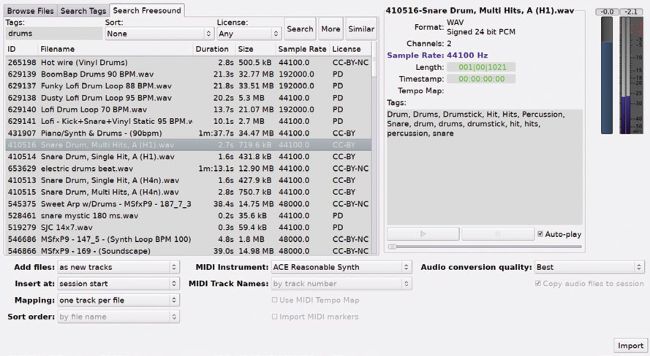
Browsing the Freesound library thanks to Ardour 7’s integration of it.
The next dialog is concerned with the audio system you want to use, and some experimentation might be needed here. ALSA connects you directly to the soundcard, but it means that you can’t use other sound applications at the same time (this includes the web browser). JACK is usually the better option, but it sometimes requires some extra setup. Whichever option you choose, click Start to begin using Ardour.
CONFIGURING ARDOUR
As a collection, the Linuxsound systems have areputation for beingcomplicated, but thingsmight be set to calmdown in that area thanksto the introduction ofPipeWire, a system thataims to replace someof the others. It offersemulated interfaces forsystems such as JACKand ALSA, and youcan route audio aroundbetween programs andhardware inputsand outputs.Ardour is open sourcesoftware, but there is acatch as the developersexpect you to makeeither a regular or a oneoff payment if you wantto download a premadebinary. To be fair, to getthe program and all thepoint updates until thenext major release, youcan pay what you like.To get Ardour for free,you can build it from thesource code, and that’sour preferred option asdistribution builds tendto be out of date. It usesthe WAF build systemand the website providesbuild instructions(https://ardour.org/development.html). Weregard it as a mediumdifficulty build, andyou’re probably going tohave to spend sometime hunting aroundyour distro’s packagerepository for theneeded dependencies