Answers
Got a burning question about open source or the kernel? Whatever your level, email it to answers@linuxformat.com

Neil Bothwick eats Linux desktop problems for breakfast!
Q Kustomising wallpaper
I recently installed Ubuntu 22.04 on my computer and for the most part I really like it (compared to my older computer running 12.04). I prefer KDE to Gnome, so I switched to that desktop, but there are a few annoying issues I have with this new version that don’t affect the older version. First, they somehow broke the desktop wallpaper. I have two monitors with four virtual desktops; on the old computer that means I have eight unique wallpapers to look at. But this current version reverts to Windows 10 functionality. Every virtual desktop shares the same wallpapers, which means all four desktops have the same two wallpapers. From what I’ve read, they prefer that everyone uses Activities and those allow for unique wallpapers. Is there any way to fix this for the main desktops, or at least convince them to fix what wasn’t broken?
Second, I like my desktops to have the same layouts each time I boot. My Bash shells cooperate, my Firefox windows cooperate, but my Dolphin windows all stack on top of each other each time I start my computer, regardless of where they were when I shut down, so I manually reposition them knowing they’ll all clump together next session. I’ve tried setting new rules in System Settings (Window Management > Window Rules), but no joy.
Third, when my PC goes to sleep and I log back in, the audio is switched to the right monitor’s speakers every time even though I have explicitly set audio to the superior left monitor’s speakers (and usually I get no sound, anyway). Each time, I’m forced to open Audio Playback Devices and pick Digital Stereo (HDMI 2) Output for the left monitor, even though the left monitor is set as primary, so it should be HDMI 1. I believe it’s because when I move the mouse to wake up the PC, the right monitor always activates first and KDE assigns that one to HDMI 1 (both monitors are connected via HDMI to my oldish Nvidia 1070 GPU). Is there no way to tell KDE to stop resetting the audio? It works fine when I first log in.
Alfred Urrutia
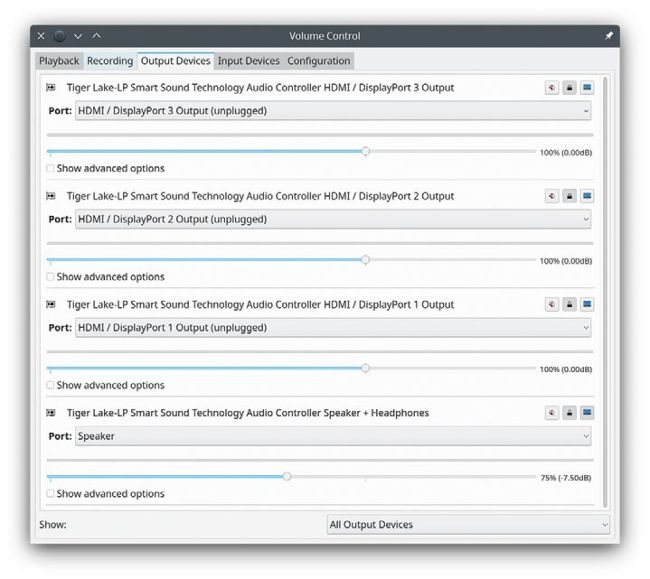
Use pavucontrol, or its Qt alternative, to change audio output devices and set defaults.
A Separate wallpapers are no longer supported, and there is little chance of this feature ever being re-introduced. The reason given being that there were insurmountable problems with the implementation, which is probably why other desktop environments have the same restriction. Activities can be used to do this, it is just a matter of using Activities instead of Virtual Desktops. In use, there is little difference, and it does give you the flexibility of having multiple virtual desktops on each activity. You can add a pager to the task bar for switching between activities, although it would be better if it did not look almost the same as the one for virtual desktops. You can also go into System Settings > Shortcuts and set keyboard shortcuts for switching activities. There is already one to walk through activities with Meta-Tab in the same way that Alt-Tab walks through windows.