ZX SPECTRUM
Emulate the classic ZX Spectrum range
Les Pounder shows us how to emulate the classic ZX Spectrum range of computers using any model of Raspberry Pi.
Les Pounder
OUR EXPERT
Les Pounder is associate editor at Tom’s Hardware and a freelance creative technologist. He blogs about his discoveries at www.bigl.es.
Sir Clive Sinclair is an English entrepreneur and inventor. You may know him for his quirky Sinclair C5 battery powered “velomobile”, which was set to solve commuters problems in 1985 (it didn’t). But he’s most famous for a range of consumer electronic products that bear his name.
Sinclair Radionics was formed in 1961 and produced cost-effective electronic products such as pocket calculators and portable televisions. But in 1980 Sinclair released its ZX80 computer for £99.95 (£432 adjusted for inflation in 2020). It was marketed as the “first personal computer for under £100” and proved a cost-effective means to get your first computer and learn how to code.
The ZX80 did have a few quirks, but the ZX81 released in 1981 and retailing for £49.95 (£216 in 2020) addressed these issues while providing a solid base for learners eager to code. An agreement with Timex saw the ZX81 hit the US market as the Timex Sinclair 1000, and an unauthorised clone, the TK85, was released in Brazil via Microdigital Eletronica.
The ZX81 was a success and from that initial success more “ZX” machines were released with better graphics and infamous rubber keys. The first ZX Spectrum, released in 1982, introduced the rubber keys and diminutive size of the iconic classic computer. It’s here where we start our journey on emulating the ZX Spectrum machines, chiefly the 48K and 128K (also known as the Toastrack).
Can emulation give us the same nostalgic glow? Can we create BASIC code projects? What’s the best way to emulate a ZX Spectrum? Hint: to answer ‘yes’ to any of these questions, you’ll need a Raspberry Pi.
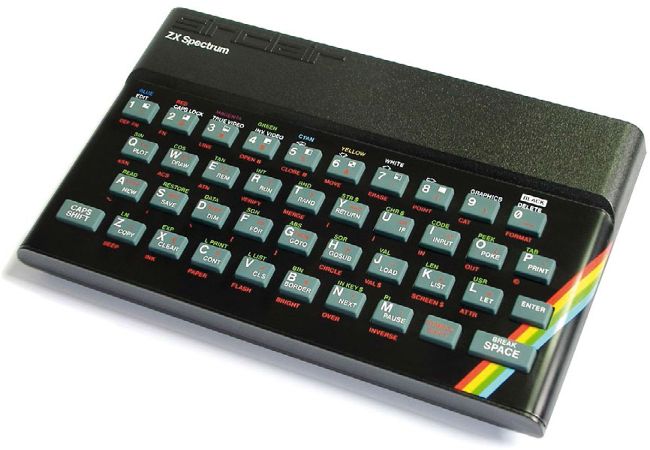
The ZX Spectrum 48K is an iconic British computer that kick-started the career of many budding coders.
CREDIT: Bill Bertram, Wikipedia,CC BY-SA 2.5.
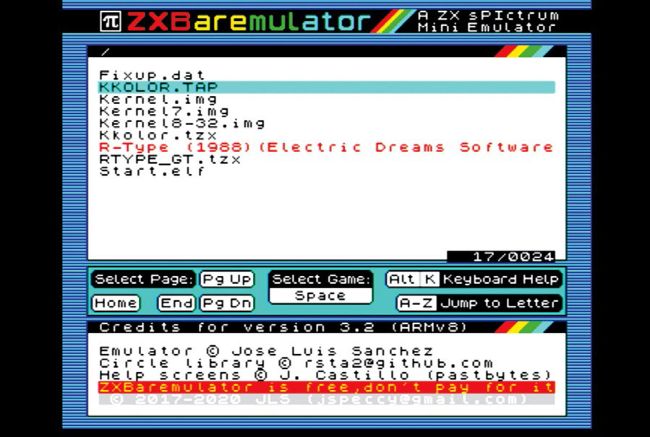
ZXBaremulator has a great built-in help system. The main menu, accessible by pressing F1. provides a means of loading virtual tapes containing games.
Emulating the Spectrum
We don’t need much computing power to emulate a Spectrum and so even your oldest Linux machine should be up to the job. There are emulators available for Windows, macOS, smartphones and even Nokia’s range of Linux Internet Tablets from the late 2000s.
If hardware emulation is your thing then here are two ways to get your fix. First is a bare metal ZX Spectrum emulator called ZXBaremulator(http://zxmini.speccy.org/en/index.html) for the Raspberry Pi, but note that it’s not Pi 4 compatible yet. This bare metal emulation runs directly on the Pi hardware and provides precise emulation of the Z80 processor. It can also be used with real hardware thanks to the Raspberry Pi GPIO. This means that we can embed a Pi inside the shell of a broken Speccy and reuse the original keyboard.