CA
  
You are currently viewing the Canada version of the site.
Would you like to switch to your local site?
14 MIN READ TIME

STORE GUIDE

Your guide to the best Apple hardware and third-party accessories
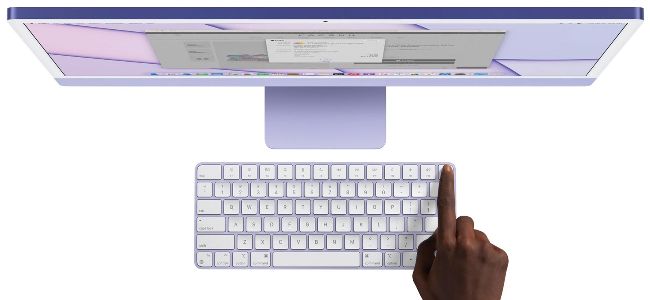
Mid-range and top-tier iMacs comes with a Magic Keyboard with Touch ID. The entry-level has a standard Magic Keyboard.

iMac From £1,249

> Ever since the Bondi Blue iMac debuted in 1998, Apple’s all-in-one desktop computer has been setting standards for design and performance.

The current 24in model is certainly Apple’s finest yet – thanks to its 4.5K (4480x2520) Retina display and the Apple-designed M1 chip, which is available with either an 8-core CPU/7-core GPU at the entry-level, or an 8-core CPU/8-core GPU on the mid-range and top-tier versions. All models come with 8GB of memory as standard (upgradeable to 16GB), with solid-state drive (SSD) storage ranging from 256GB on the entry-level and mid-range versions to 512GB on the top tier, although you can add more – up to 1TB on the entry-level and up to 2TB on the mid-range and top-tier models if you wish via Apple’s build-to-order options.

Available in a choice of seven gorgeous colours (Green, Yellow, Orange, Pink, Purple, Blue and Silver), each M1 iMac also comes with a 1080p FaceTime camera, a six-speaker sound system and support for Spatial Audio. You’ll also find two Thunderbolt/USB 4 ports on each model, with mid-range and top-tier options gaining two additional USB 3 (USB-C) ports. Prices start at £1,249.

iMac 24inch £1,249

(Entry level)

Display: 23.5in 4.5K Retina (4480x2520) with True Tone

Chip: Apple M1 with 8-core CPU (4 performance cores, 4 efficiency cores), 7-core GPU, 16-core Neural Engine

Memory: 8GB (upgradeable to 16GB)

Storage: 256GB (upgradeable to 512GB or 1TB)

Ports: 2x Thunderbolt/USB 4, 1x Gb Ethernet (option)

iMac 24inch £1,449

(Mid-range)

Display: 23.5in 4.5K Retina (4480x2520) with True Tone

Chip: Apple M1 with 8-core CPU (4 performance cores, 4 efficiency cores), 7-core GPU, 16-core Neural Engine

Memory: 8GB (upgradeable to 16GB)

Storage: 256GB (upgradeable to 512GB, 1TB or 2TB)

Ports: 2x Thunderbolt/USB 4, 2x USB 3, 1x Gb Ethernet

iMac 24inch £1,649

(Ultimate)

Display: 23.5in 4.5K Retina (4480x2520) with True Tone

Chip: Apple M1 with 8-core CPU (4 performance cores, 4 efficiency cores), 8-core GPU, 16-core Neural Engine

Memory: 8GB (upgradeable to 16GB)

Storage: 512GB (upgradeable to 1TB or 2TB)

Ports: 2x Thunderbolt/USB 4, 2x USB 3, 1x Gb Ethernet

Apple Magic Keyboard with Touch ID and Numeric Keypad

> From £179

> This extended keyboard is a great upgrade option for any Mac and comes with Touch ID for faster Mac logins. The black version costs £199.

Apple Magic Mouse

> From £79

> Design quirks aside, (we’re looking at you, Lightning Port) the Magic Mouse is a great pointing device, thanks to its Multi Touch support. The black version costs £99.

Apple Magic Trackpad

> From £129

> This Multi Touch glass trackpad is a thing of beauty, giving you lots of control over macOS and it’s rechargeable too. The black version costs £149.T

TV 4K

> From £149

> Apple’s third-gen little black box with A15 Bionic chip now adds HDR10+ to the mix. Prices now start at just £149 (Wi-Fi only); the standard version now comes with 64GB of storage, while paying £20 extra gets you 128GB and Ethernet support.

Apple HomePod/ HomePod mini

> £99/£299

> Apple’s Siri-powered speakers sound great, you can link two for stereo sound, and use them as smart home hubs. The mini comes in five colours, while the new Midnight/White HomePod (£299), offers higher spec and spatial audio.

Watch Series SE, 8 and Ultra

> From £259

> The 8 and SE are water resistant to 50m, but the new titanium Ultra is water resistant to 100m. The 8 and the Ultra boast an always-on display, and all three offer Emergency SOS and Crash Detection.

Unlock this article and much more with
You can enjoy:
Enjoy this edition in full
Instant access to 600+ titles
Thousands of back issues
No contract or commitment
Try for $1.39
SUBSCRIBE NOW
30 day trial, then just $13.99 / month. Cancel anytime. New subscribers only.


Learn more
Pocketmags Plus
Pocketmags Plus

This article is from...


View Issues
MacFormat
April 2023
VIEW IN STORE

Other Articles in this Issue


Mac FORMAT
Mac FORMAT
Scan here to get the latest tech news
APPLE CORE
Apple planning mega spring event
VR headset, Mac Pro and more all expected
APPLE WATCH TO GET MICROLEDS
NEW TECH FOR BETTER DISPLAYS
REVERSE WIRELESS CHARGING
FEATURE IS STILL IN DEVELOPMENT
A costly iPhone Ultra could be coming soon
New flagship phone may sit above the Pro Max
Apple’s clever VR headset plans
You might be able to paint in virtual reality, according to patents
MarsEdit 5Free (offers IAPs)
Prepare and publish blogs in the blink of an eye
Seven: 7 Minute Workout
Image credits: Red Sweater Software LLC, Vertigo Berlin/Universal
Frozen City
FREE (offers IAPs) The world has collapsed into
Castle Crumble
£4.99/month (Apple Arcade) On the surface, Castle Crumble
Media Picks
What you should be playing and reading this month
MATT BOLTON…
IS WONDERING WHETHER CHATGPT IS A DANGER TO APPLE, SIRI’S SAVIOUR, OR JUST JUST ANOTHER API TO SUPPORT
“peak iPhone”?
Charlotte Henry explores whether Apple’s key product is starting to lose its magic
108 iCLOUD TIPS
From humble beginnings as MobileMe, Apple’s iCloud service has grown into an excellent facility, But what is iCloud, and what can it do for you?
What is iCloud?
In a nutshell, it’s a range of services made possible by connecting your computer or mobile device to Apple’s servers. Here’s a breakdown of these services
iCloud Photos
You can keep all your snaps and clips synced across your Apple devices, and more
Files, Documents & iCloud Drive
iCloud Drive is great for storing and syncing files and documents, and collaborating
Get started with iCloud.com
The iCloud website recently had an overhaul. How does it work and what can it do?
Backups, syncing and security
Find out how to sync your data across your Apple gear, and how to keep it secure
Family Sharing
Share your apps and media with your family, and enjoy theirs too
APPLE SKILLS
NEW IDEAS Your in-depth guide to getting more
APPLE SKILLS
Collaborate with Freeform
Freeform is the ideal tool for brainstorming with colleagues remotely
Boost your productivity
Use Notion to help you organise both work and play acitivities
Edit your PDFs
Easily adjust, sign and annotate PDFs with PDF Expert
How to use Continuity Camera
Why buy a separate webcam when you can use your iPhone?
Get started with Mastodon
Fed up with Twitter? Mastodon offers a billionaire-free alternative
Master iPhone video controls
How to use different shooting modes and file formats in the Camera app
Use external devices
Connect your iPad (or iPhone) to almost anything via the power of USB-C
Make and take calls
Use your Apple Watch to chat with friends – it’s so easy and versatile
Spatial audio and dynamic head tracking
Create immersive effects for music and video
GENIUS TIPS
EXPERT ADVICE Our resident genius solves your Mac
iOS software
Swipe away your touchscreen troubles and rekindle your love of Apple’s mobile devices
Mac hardware
We help to solve your hardware hassles, from interrupted upgrades to running diagnostics
macOS
Shine a spotlight on the solutions to your most irritating Mac problems
HOMEKIT: THE COMPLETE GUIDE
HomeKit is better than ever – now’s the time to get your smart home in order with help from your Mac or iPhone
How HomeKit works
One app to rule them all (with some help from Siri)
HOME HIERARCHHY
The smart home market is a mess of competing – and incompatible – technologies
MATTER AND THREAD
M atter is a communications protocol enabling a
Setting up devices in the Home app
The HomeKit software is built into macOS, iOS,
Controlling your devices
How to take full control of your smart home
Hidden HomeKit
HomeKit has some powerful features – here’s how to find and make the most of them
HOMEKIT ROUTERS
How to provide additional security for your smart devices
BEYOND HOMEKIT
Going where the Home app fears to tread
Smart home products
Some of the best HomeKit gear for making life easier
Lights, action!
Build a smart lighting system with these HomeKit bulbs
HOMEKIT SECURITY
A smart security camera is a good investment for any home
MANAGE YOUR MONEY ON MAC, iPHONE & iPAD
These apps enable you to keep track of your finances in multiple accounts
MoneyWiz 2023 Finance Tracker
Mac, iPhone and iPad apps, a clean interface, and tons of reports make it our top pick
APPLE CHOICE
BUYING ADVICE Our authoritative reviews help you make
RANDOM APPLE MEMORY
iPod Hi-Fi With a new HomePod on the shelves, Graham Barlow looks back at Apple’s first venture into home audio
APPLE CHOICE
MacBook Pro 16-inch (2023)
The world’s best laptop is now even better – and how!
HomePod (2023)
Apple’s original smart speaker is back – and better than ever
Mac mini (2023)
Apple’s most affordable Mac goes Pro – and about time too
Lenco LBT-188
Jump on the vinyl revival bandwagon with this Bluetooth turntable
THE BEST NOTE-TAKING APPS FOR MAC
Apple may have improved its Notes app, but there are plenty of other options if it’s not the one for you
Agenda.
A note-taking app that will keep you focused and help with managing your day
Affinity Photo 2
Serif’s powerful editing app gets a serious update
CrossOver 22
Run (some) PC apps on your Mac without Windows
6 apps to help with your spring cleaning
Clear out the clutter and keep your home organised
Mac FORMAT
To email, enter firstname.surname@futurenet.com
Chat
X
Pocketmags Support