CA
  
You are currently viewing the Canada version of the site.
Would you like to switch to your local site?
27 MIN READ TIME

Upgrade your apps

Choosing alternatives to Apple’s built-in apps and tools can take your Mac workflows to the next level. Whatever you’re planning on doing, our pick of the best will help get your projects done

Your Mac comes bundled with apps and tools to achieve all sorts of things from making music to conference calling and, while they’re great, there are plenty of alternatives on the market. But why, if you have Apple’s apps already, you may ask? As well as providing different ways to do things, third-party apps often go beyond the capabilities of your Mac’s built-in tools, giving you expanded control over your files and folders in the Finder for example, more powerful reminders and scheduling, or giving you access to more professional movie-making features.

In fact, for every one of the Mac’s built-in tools there’s at least a couple of alternatives, sometimes free and sometimes paid for, but always offering a different take on the task at hand. You might find, for example, that you want more sharing options or crossplatform compatibility in your cloud service than iCloud can offer, or a more advanced mail client than Apple’s own, for managing heavy email loads. It could be that Apple’s Photos app doesn’t cut it when it comes to your image-editing needs, and you want to try something like Luminar Neo or Adobe Lightroom to take your pics to the next level. Whatever your requirements for alternative apps for your Mac, our guide has you covered.
Image credit: Bombich Software Inc, Ginger Labs, Flexibits Inc, Pixelmator Team, Microsoft, Running with Crayons Ltd, Electronic Team Inc, Houdah Software sàrl, Readdle Inc, Doist Inc, Amazon.com Inc, Mozilla Corporation, Luma Touch LLC, Flexibits Inc, Skylum, Adobe, pCloud AG, Microsoft, Firecore LLC, Apple Inc

1 Full info

Dual panel views show separate directories in whatever view mode, also file path locations.

2 View files

View hidden files and folders in any directory or hide them again with a simple flick of a switch.

3 Function buttons

Common commands are mapped to Function buttons for quick and easy access..

4 Integrate services

Many major cloud services like Google Drive or Dropbox can be integrated for quick usage.

A faster Finder

Power up your files and folders with this app that’s perfect for demanding users

Commander One

Free (Pro Pack £25.99)

FROM mac.eltima.com

FEATURES Dual panel view, expanded file and folder info and management, powerful cloud integration

The macOS Finder is the face of your Mac, the means by which you launch applications, manage files and folders, and you generally just use it every day.

Since Apple gives you the same Finder regardless of whether you’re a beginner or a power user, it is tailored more towards being friendly and usable than providing a million options. For those that do want to go deeper, Commander One is an app that both taps into the hidden features of the Finder and adds many more of its own, to give you a remarkable level of access to your stuff.

Its most noticeable feature is a dual panel view of your files and folders where you can view two different directories at once in different view modes, with extensive information than would normally require several clicks to get visible on the main screen. Common commands like view, edit, copy or delete are mapped to function keys for easy access, and there’s even a switch for viewing hidden files with a single click. The two panels can also contain as many tabs as you like.

Power finder

You can compress groups of files easily and in all major formats with variable compression levels, whereas the Finder allows you only the ZIP format, with no options. There’s a very powerful search function that can even see inside compressed files, and any actions can be assigned to customisable hotkeys. The Pro Pack adds some cool features like direct access to a number of cloud services including Dropbox, Google Drive and Backblaze, the ability to directly mount iOS and Android devices as volumes and a built-in Terminal emulator.

While you can find many of these tools in other third-party apps and sometimes by digging into macOS’s hidden features, Commander One brings them all together into one superpowered file manager that puts them all at your fingertips. The Finder is still running of course, but this app unlocks the full power of macOS while adding quite a few features of its own that Apple simply doesn’t give you. For anyone dealing with files, folders and cloud storage that needs quick and easy access to every aspect of their data, it’s worth checking out.
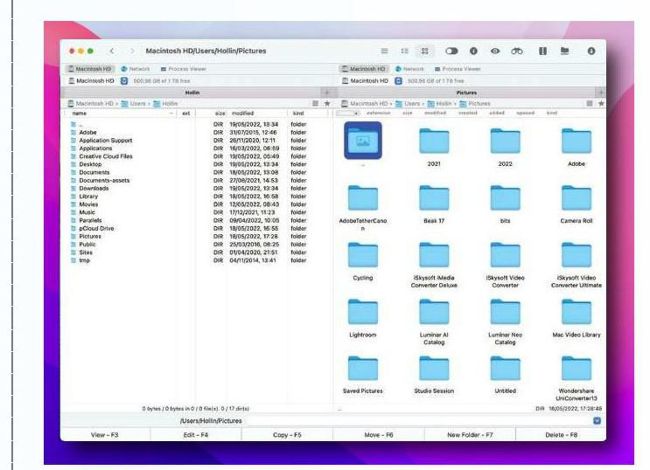
Get total control over your files and folders in a way the Finder doesn’t allow.
Image credits: Electronic Team Inc

Drill down deeper

Deep search of your Mac’s files and folders

HoudahSpot

£34 FROM houdah.com

FEATURES Deep search of Mac files and folders, search templates, text and file preview, Applescript support
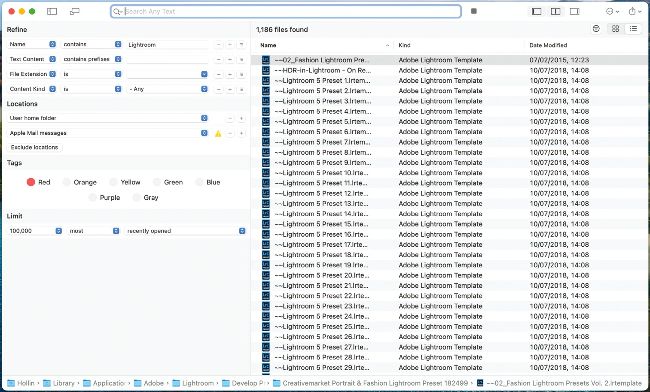
Run advanced and deep searches for files on your Mac with granular control.
Unlock this article and much more with
You can enjoy:
Enjoy this edition in full
Instant access to 600+ titles
Thousands of back issues
No contract or commitment
Try for $1.39
SUBSCRIBE NOW
30 day trial, then just $13.99 / month. Cancel anytime. New subscribers only.


Learn more
Pocketmags Plus
Pocketmags Plus

This article is from...


View Issues
MacFormat
August 2022
VIEW IN STORE

Other Articles in this Issue


Mac Format
Mac Format
On 6 June, Apple set out its stall
APPLE CORE
WWDC makes a splash
Jam-packed keynote brings updates galore
New MacBooks revealed
Meet the revamped Air and tweaked Pro
NEXT-GEN M2 CHIP ARRIVES
APPLE SILICON CONTINUES ITS FAST-PACED EVOLUTION
STAGE MANAGER
BANISH APP CHAOS FOR GOOD
macOS Ventura
Extensive updates for the Mac
THE POLL
WE ASKED…
LOCK SCREEN
THE LOCK SCREEN GETS A NEW LOOK
New tools for iOS/iPadOS 16
From productivity to fitness, there are plenty of changes on the way
CarPlay Drives Forward
NEW ADVANCES FOR THE IN-CAR SYSTEM
Collaboration in Freeform
MAKES WORKING TOGETHER EASIER
APPLE NEWS ROUNDUP
APP STORE FRAUD PREVENTED $1.5 BILLION OF SCAMS
Time to check in with watchOS 9
Building on the wearable’s face options, complications and more
Health and fitness
The Apple Watch is your personal trainer and more
BusyCalFree (IAPs)
Stay on top of even the most hectic schedule
Media Picks
What you should be playing and reading this month
Crave
THE GEAR WE’RE LUSTING AFTER
CONTACTS
Have your say on all things Apple!
APPLE SILICON M2 IN NUMBERS
We take a closer look at the second-gen chip inside the new MacBook Air and 13in MacBook Pro
MATT BOLTON…
IS WORRIED FOR THE APPLE TV’S FUTURE AFTER THE LIMP tvOS 16 UPDATE THAT WASN’T EVEN MENTIONED AT WWDC
Win
A pair of Audioengine’s brilliant A2+ speakers
Apple AirPort – ready to take off again?
After nearly two decades in service, Apple discontinued its AirPort line of devices in 2018. Charlotte Henry looks into whether the company could be looking to bring it back…
APPLE SKILLS
NEW IDEAS Your in-depth guide to getting
APPLE SKILLS
Make a newsletter in Pages
Pages makes it easy to create your own eye-catching newsletter
Go further in Luminar Neo
How to use AI-assisted tools to quickly enhance your people pics
Take control of emails with Spark
Need an easy way to manage incoming emails? Try Spark
Spotlight and Siri tips
Spotlight and Siri make it easy to find anything on your Mac and beyond
Kid-proof your devices
Protect your personal things from small people and party guests
Create an iOS sleep timer
Listen to soothing sounds without draining your iPhone battery
Translate on your device
Bad at languages? Don’t worry, your Apple kit can help you converse
Enjoy music on Apple Watch
How to get the perfect soundtrack wherever you are
iPhone sensors
The versatility of the iPhone depends on a powerful array of built-in sensors
GENIUS TIPS
GENIUS TIPS
EXPERT ADVICE Our resident genius solves your Mac
iOS software
Swipe away your touchscreen troubles and rekindle your love of Apple’s mobile devices
Networking
We help to solve your Wi-Fi woes and connection conundrums
macOS
Shine a spotlight on the solutions to your most irritating Mac problems
Evolution of the MacBook
How Apple changed the way we use computers – not just once, but again and again
From Portable to Pismo
From the first mobile Mac to one of Apple’s most-loved models
From TiBook to MacBook
The millennial Macs that introduced Apple’s metal years
From Touch Bar to M2
The end of the road for Intel and a whole new world of Macs
Get started with Maps
From turn-by-turn directions to curated travel guides, Apple’s Maps app has your back
How to get directions
Find your way whether you travel on foot, by car or by public transport
Do more with Maps
Consult travel guides and conduct virtual tours of cities
APPLE CHOICE
BUYING ADVICE Our authoritative reviews help you make
APPLE CHOICE
OWC Mercury Pro U.2 Dual
A super-speed SSD solution for your desktop
Eufy Video Doorbell Dual
Are two cameras better than one?
Naenka Runner Diver Bone Conduction Headphones
Enjoy your music whatever sport you’re into
Belkin BoostΩCharge Pro Portable
This portable MagSafe charger is ideal for travel
Ugreen Nexode 100W Charger
Charge up to four devices at once
BEST BUDGET MONITORS
Get a great screen for under £375
Dell C1422H
The best overall monitor under £375
SOFTWARE
Sparkle Pro 4
Create stunning fully-featured websites with this easy-to-use app
eM Client 9.0
Switch up your email routine
Hazel 5.1.1
Create an automated system
Hydra 2 > AI Camera
Get your iPhone to perform more like a DSLR
6 apps to… Watch free streaming TV
See your favourite shows wherever you are
STORE GUIDE
Your guide to the best Apple hardware and third-party accessories
RIP(od)
As Apple bids farewell to the iPod touch, Graham Barlow remembers a more dedicated kind of music player
Chat
X
Pocketmags Support