Bench test your security software
YOU’LL NEED THIS
VIRTUALBOX
Download it from www.virtualbox.org.
IN THE LATE 16TH CENTURY,
King Philip II of Spain submitted a formal complaint to His Holiness Pope Gregory XIII. The complaint concerned an encrypted letter that had been intercepted and decoded by the legendary mathematician François Viète.
The king accused Viète of deploying black magic. Pope Gregory, whose own cryptographers had been reading encoded Spanish letters for decades, quietly shelved the complaint.
Philip’s hubris was an excellent illustration of Schneier’s Law, usually phrased as, “Any person can invent a security system so clever that she or he can’t think of how to break it.”
This is particularly true for Windows users who deploy security-in-a-box solutions, believing installing certain software will protect their system for any manner of attacks.
In this guide, you’ll discover how to test your PC security features to ensure they truly are effective against online threats. If any vulnerabilities are present, you’ll also learn some best practices to bolster your cyber defenses against would-be hackers.
While none of the steps are actively harmful to Windows, whenever making any major changes to your system, it’s always a good idea to run backups.
This is also a good first step to take in protecting your system security, given that if the OS is compromised, you can roll it back to a date before this happened.
–NATE DRAKE
© CG SECURITY
1 KEEP UP WITH UPDATES
While there’s no single solution to protect against all cyberthreats, one of the most important steps you can take is to keep your system up to date.
»
For instance, a serious vulnerability (CVE-2024-21302) was disclosed at Black Hat USA 2024 involving an attack that forces Windows 11 to use outdated system components, because they’re easier to exploit.
»
Double-check your update preferences by going to’ Settings > Windows Update > Advanced options’. From here you can also allow restarts immediately as necessary to apply updates, as well as enable updates for other Microsoft products.
»
Microsoft Defender also relies on Windows Update to receive the latest threat definitions. If you use a third-party antivirus program, you need to schedule updates manually.
»
There are plenty of online vendors who claim their particular antivirus and/or software suite will solve all your security woes. Still, last year, when evaluating 18 mainstream antivirus programs for TechRadar, we found that Defender was able to immediately detect and quarantine harmful files unassisted.
»
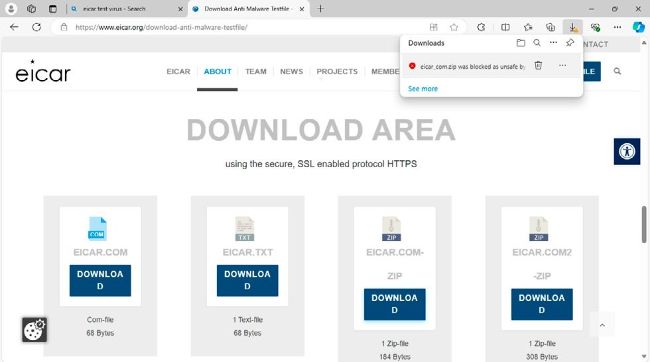
You can test your chosen antivirus program’s detection for yourself safely by downloading a test file from EICAR [Image A]. The file is harmless but is included in the signature database for all major antivirus programs.