cover feature / cm guide to modular synthesis
The guide to MODULAR SYNTHESIS
Modular, aka Eurorack, synthesis has taken the production world by storm. Here’s your complete guide on how to get going, as we go from zero to modular hero…
Eurorack has taken the music production world by storm over recent years. The hardware modular synth format essentially lets you create your own custom synthesiser by assembling modules that control various aspects of the synth signal flow yourself. The idea is that you might well end up with a collection of sounds that no other musician on the planet has. But how can you safely explore this phenomenon from the comfort of your own computer? Well, you’ve come to the right place, as this feature is designed to cover everything Eurorack!
Introduction
Eurorack is a truly creative beast, and it’s one that has many heads and viewpoints. Many of these are specific to the sort of music you may wish to make, but we have to address the modularelephantine-beast in the room and discuss why anyone might want to go down the path of modular, when there are perfectly good software modulars available? The answer to this is often down to your experiences to date with synthesisers. Like any hardware music-making device, it’s the tactile approach that can feel more rewarding, and unlike off-the-shelf hardware synths, Eurorack grows with you.
We eluded to the fact that Eurorack has many uses; these can range from the most basic scenario of providing a single synth voice, to acting as an effects processor, with the ability to sample, capture and manipulate audio in realtime, or as a stand-alone system which is akin to a good old-fashioned groove box. Your direction of travel will be informed by the music you produce, but Eurorack has the uncanny knack of delivering the odd mishap and mistake, which might also dictate your next musical direction.
As a form of music technology, Eurorack’s is very much linked with the musical past – although not perhaps as far back as you might think. The format was brought to prominence in the mid- 90s by German inventor and musician Dieter Doepfer, with the release of a fully-formed system called the A-100. This module configuration became the standard for the format we now call Eurorack. Drawing upon the modular synth traditions inspired by synth pioneers such as Bob Moog, the Eurorack form is compact and slightly smaller than most previous modular formats, with a module height of 3U (133.4mm), and a horizontal unit measured in HP (horizontal pitch) which equates to 5.08mm to 1HP. Many modules will be 4, 6, 8 or 12 HP in width, with some even wider. This allows Eurorack users to decide on modules, based upon space available. Many modules can feel condensed, with the plus-point being that you can squeeze large amounts of functionality into a small space.
Power and control
Power is also standardised, with modules being connected to power boards which are normally fitted into Eurorack cases. It’s not uncommon to find power boards with around 12 connection points per row of modules, which is an indicator of how many modules you might be able to squeeze in a line. The system itself runs on low voltages, normally powered via an external 12v DC power supply.
A word of warning here! Some power boards will allow users to connect modules incorrectly, with the positive and negative polarity the wrong way around. Some companies get around this with the use of ‘shrouded headers’, which mean that modules cannot be connected incorrectly. However the most commonplace mantra for all Eurorack users is ‘Red Stripe Down’ , which relates to the negative connection being indicated by a red stripe, which will normally also run along the power connection ribbon cable. Keep the red stripe low and you’ll not blow any of your modules; however if you do find yourself with a module that goes up in smoke, it’s normally an easy and cheap fix, by anyone who can solder efficiently.
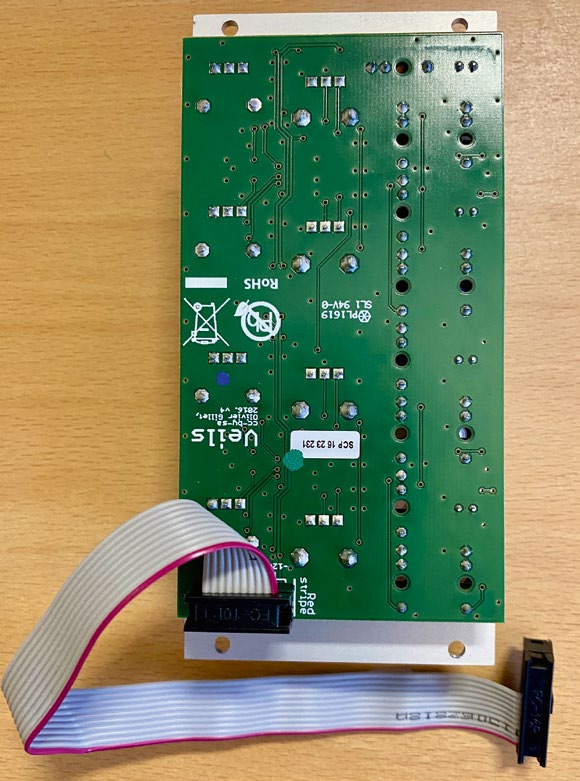
‘Red stripe down’ – keep the red stripe low on your power cable and you won’t blow up your modules
Another throwback to music technology’s past is with the control of the Eurorack. While it is the ideal to connect your modular via MIDI, the format itself relies heavily on Control Voltages (CVs) and Gates. This was the convention pre-MIDI, as a simple and effective way of triggering notes using a gate to dictate note length, and CV for determination of pitch. Helpfully, Eurorack conforms to the standardised 1v per octave format, with most modules allowing control over five octaves, with some allowing up to ten octaves. The CVs may also be employed elsewhere in the system to do other cool things, such as realtime modulation.
But why?
All this talk of formats is probably not exactly selling the prospect of modular, so let’s go back to the initial question; why go modular? Think of Eurorack as a system, in which you hold the control. You can start with a basic system and add to it on a regular basis to introduce different sounds, tones, functionality and processing. While it is electronic, it’s an organic process, as many modules can help inspire through their ability to generate notes and sequences randomly. It’s also possible to employ onboard and external sequencers, allowing programming of music within the modular, which can then be synchronised with your computer, either to run alongside or capture for further enhancement within your DAW.
However, for us, the biggest coup for modular is the physical concept of signal flow, where you literally have to pick up a patch cable and route your sound or signal. There’s nothing quite like that element of control, which is so satisfying, a little like the musical equivalent of Lego bricks!
In the spirit of this launching point, we’re going to start with the absolute basics and build a single voice mono-synth, paying particular attention on how we connect it to our existing computers and hardware, and start making cool sounds!
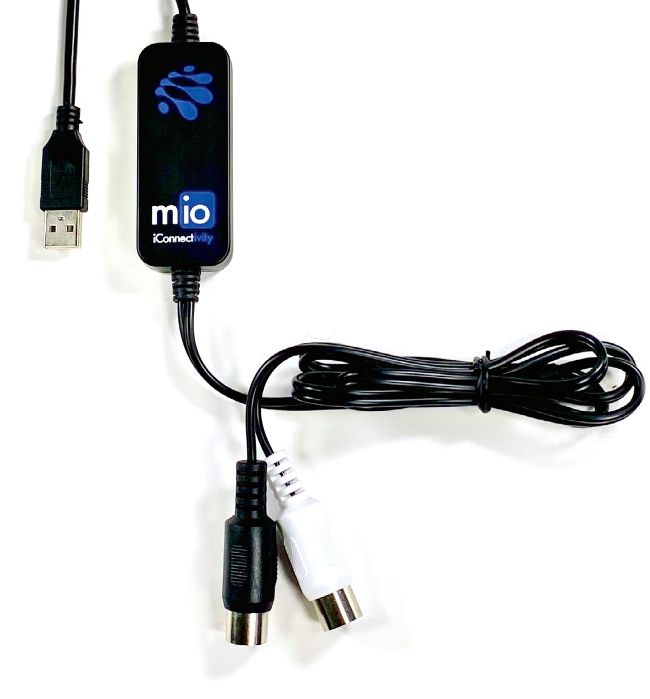
Audient iD4, Steinberg UR22 MkII, and iConnectivity Mio – just three great i/o options
What you need
Let’s begin with the computer side of business; in order to connect any external synth, you’re going to need two points of connection, namely MIDI and audio.