YOUR COMPLETE AI GUIDE
Don’t waste time and money on rubbish and overpriced AI. Robert Irvine reveals 20 superb tools you must use, and 20 to avoid, to make the most of the new technology
From AI-written articles on news websites to deepfake videos on social media and fake songs on streaming services, the web is awash with content created using artificial intelligence. The trouble is that a large proportion of this is, frankly, rubbish. There’s even a term for it: ‘AI slop’, AI tools that provide reliable information, produce high-quality content and perform genuinely useful tasks. Although you sometimes need to pay for their premium features, you’ll be surprised and impressed by how much you can now do for free.
Here, we round up 20 of the best examples of AI technology done properly. These include clever new options in popular chatbots, fantastic free image and video generators, superior search engines to Google and innovative ways to boost your online security.
We also reveal 20 awful AI tools you should avoid, whether because of their rip-offprices, dubious privacy policies or poor-quality results. Stick with our recommendations to make the most of the new technology – without the slop.
WHAT YOU CAN DO
• Hold natural conversations with ChatGPT’s Advanced Voice Mode
• Generate high-quality images from text prompts
• Create AI videos without paying for a subscription
• Compose your own music in your defined as “filler content produced by AI tools that prioritise speed and quantity over substance and quality” (www. snipca.com/54137). Now that anyone can generate text, pictures, video and audio at the click of a button, the slop floodgates are well and truly open.
Thankfully, there are still lots of good
browser using AI
• Scan emails and text messages for phishing scams
• Upscale photos and videos without losing quality
• Convert documents and web pages into a podcast
BEST PAID-FOR AI TOOLS
THAT ARE NOW FREE
1
ChatGPT Advanced Voice Mode
www.snipca.com/54046
ChatGPT’s Advanced Voice Mode lets you hold natural voice conversations with the chatbot through its website and apps
(www. snipca.com/54047). Previously, the feature was only available to ChatGPT Plus and Pro subscribers, though free users could try it for 10 minutes each month before being reverted to standard voice mode.
In February, OpenAI launched a new version of Advanced Voice Mode based on its GPT-4o mini model. This means everyone can now interact with ChatGPT like they’re chatting to a real person.
Advanced Voice Mode mimics the rhythm and even some of the emotions inherent in a human voice. It tailors ChatGPT’s responses based on the speed you’re talking and when you interrupt it mid-sentence, it won’t forget what you were discussing.
The free version of Advanced Voice Mode has a 10-minute daily limit. It tells you how many minutes of usage remain ( 1 in our screenshot below), and ends the conversation once the limit is reached – you can then start another chat in standard voice mode.
To use Advanced Voice Mode, click or tap the ‘Use voice mode’ button in the message box. Choose your preferred voice using the Settings button in the top-right corner 2 . In the ChatGPT mobile app, you can keep chatting while using other apps. Select ‘Voice’ in your account settings and switch on Background Conversations.
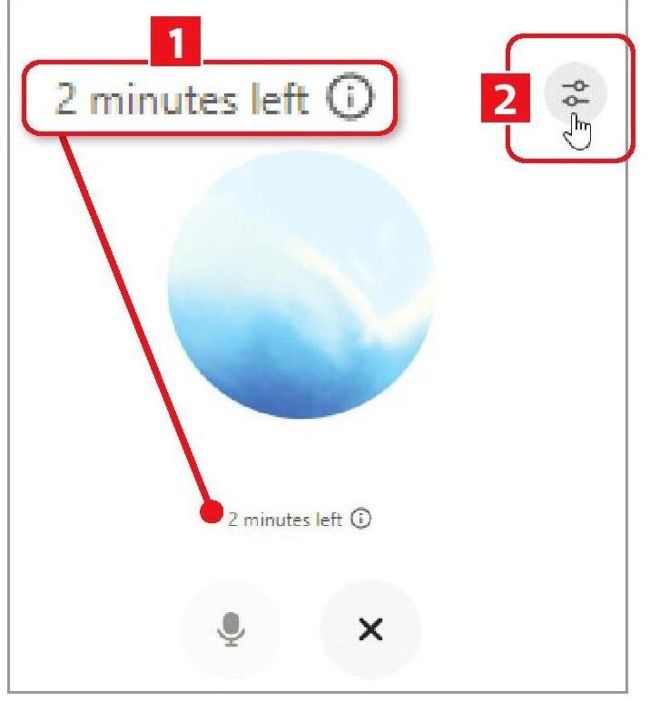
ChatGPT’s Advanced Voice Mode is now available for longer for free
DON’T USE
Replika
www.snipca.com/54048
Replika takes the ‘talk to a real person’ concept to extremes. It lets you create your own animated AI chatbot, whose personality develops based on your interactions. It’s impressive technology and has been praised for its mental-health benefits – some users claim to have fallen in love with their characters. But there are also privacy concerns about Replika sharing your data – see Mozilla’s report at
www. snipca.com/54049.
2
Google Gemini’s ‘Saved info’ tool
www.snipca.com/54051
Since our How To feature on Google Gemini in Issue 705 (page 35), the free AI assistant has added a ‘Saved info’ option, which was previously only available to Advanced subscribers. Similar to ChatGPT’s Memory feature, this ‘remembers’ information you tell the chatbot about yourself to make its responses more personal and relevant.
To access ‘Saved info’, visit the link above while signed into your Google account. Click the Add button (see screenshot below) to enter details you want the AI tool to remember. Google’s examples include ‘Use simple language and avoid jargon’ and ‘I’m vegetarian, so don’t suggest recipes with meat’.