HotPicks
THE BEST NE W OPEN SOURCE SOF T WARE ON THE PL ANET
Index QDirStat VokoscreenNG Atop Sleek SimpleX Chat RustDesk UnCiv Naikari Nyxt Pin It!

Mayank Sharma
is worryingly efficient at finding ways to waste time online, especially after he’s rummaged through repos to find open source gems.
Index
FILE MANAGER
Version: 3.0.2 Web: https://mauikit.org/apps/index/
File managers are an integral part of any desktop, and although your distro ships with one, it might not be suited for your workflow. In case you’re on the hunt for alternatives, MAUI’s Index is a very capable option.
The MAUI project churns out stunning-looking apps that are designed to work across desktop and mobile devices. It isn’t the first project to attempt a convergent user interface, although it is one of the first to actually make it work.
Index is available as an AppImage, so all you need to do is download it from the official website and turn it into an executable, either from your existing file manager or with the chmod +x command.
At first glance, Index doesn’t look very different from your existing file manager. It can create, move and delete files and folders, and supports all the basic functions of a file manager.
It has a tabbed interface, and can display files and folders in a list (which is toggled by default) or an icon grid. You can use the file manager to browse other internal disks, and plugged-in USB sticks and SD cards, as well as network folders. There’s also an integrated search feature that you can use to hunt for files, both locally and across the network.
In addition to all this, Index also helps you organise your content by using tags and bookmarks. You can add tags to files, and favourite them, and even bookmark folders for quicker access. Additionally, you can also choose custom colours for folders for easier identification.
Index also has an embedded file previewer that works with music, text, images and video files, and helps you view these files in a pop-up without using an external app. The previewer also displays several bits of essential information about the file. One of the file manager’s best features is the ability to share files with others, via Bluetooth, email or Nextcloud, or via Imgur if it’s an image.
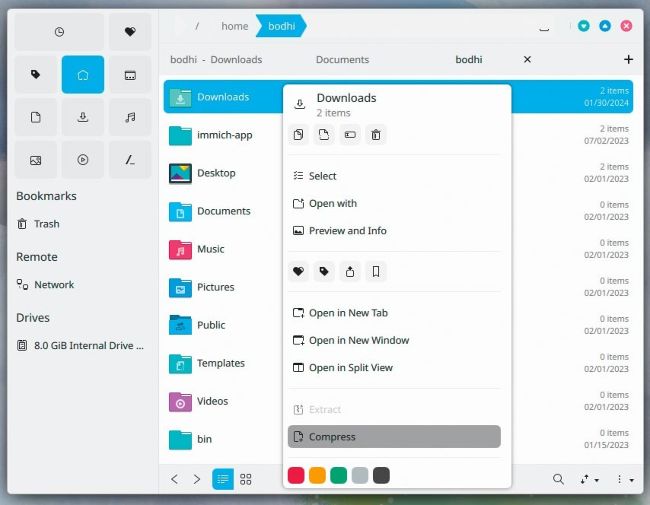
While Index works on Android devices as well, on the desktop it doesn’t look as elegant on non-KDE desktop environments such as Gnome.
LET’S E XPLORE INDEX...
1 Quick access Use this panel to browse though your favourite folders and tags, or quickly jump to bookmarked folders, remote locations and other drives.
2 Tab bar Index can open folders and locations in multiple tabs, and gives you the option to close the active one.
3 Split views and more You can use Index to look at two locations side by side with split view, and even get a fullfeatured embedded terminal.
4 Actions bar When you select multiple files, Index displays an actions bar at the bottom with useful options that you can apply on the selection collectively.
QDirStat
DISK STATISTICS
Version: 1.9 Web: https://github.com/shundhammer/qdirstat
Wondering what’s eating up your disk space? QDirStat can help you visualise your disk usage to better keep track of large files and delete them if required. Unlike some of its peers, QDirStat doesn’t report its findings in numbers and percentages, but instead uses a graphical map.
The app is available in the official repos of popular distros. Ubuntu users can use sudo apt install qdirstat to install it, while sudo dnf install qdirstat installs the app in Fedora.