Photo Answers
Crazed by CMOS? Mixed up over memory cards? Send your technique and camera questions to digitalcamera@futurenet.com
Andrew James
Andrew is a highly experienced writer and photographer – if you have a problem, he is here to help.
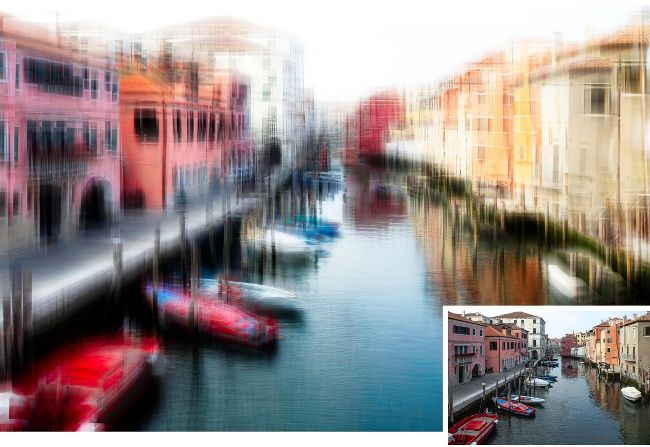
Superimposing different frames of the same scene can help you craft a distinctive take on the subject.
Andrew James
Layers on layers
Q
I’ve seen Intentional Camera Movement images that create a painterly look in images. Are there any other arty techniques I can try?
Chrissie Parkes
A There’s a fun technique you could try, which involves overlapping a series of images one on top of the other so the final ‘flattened’ image has a strong graphic look to it –a bit like a drawing created with crayons. There are two different ways you can do it.
The first is to shoot a series of frames of the same scene, each taken from varying angles and positions. For example, if you were shooting a tree in a landscape, you could walk around the main subject and capture as many images as you want. You’d then stack these images as layers in Photoshop and blend them together, creating a single image that looks strongly textured and artistic.
The other option is to take one frame, then alter the composition slightly using Photoshop’s Transform option. You then repeat and blend the image as many times as you want. Sometimes it works and sometimes it doesn’t, but that’s half the fun. As the style is quite graphic, I think urban scenes are well-suited to it, but finding what you like best is all part of the adventure.
The image example here has been created from a single starting frame, with each alteration slightly enlarging and sometimes tilting the scene, until the build-up of blended layers gives it the signature textured appearance. See Jon Adams’ guide to creating this look, on page 94.