EU
  
You are currently viewing the European Union version of the site.
Would you like to switch to your local site?
4 MIN READ TIME

SOFTWARE: GAEA 1.2.8

I’M NEW TO GAEA. HOW CAN I GET FAST LOOKDEV RESULTS?

Common user question across the boards

Practical tips and tutorials from pro artists to improve your CG skills

Speed up your look development in Gaea

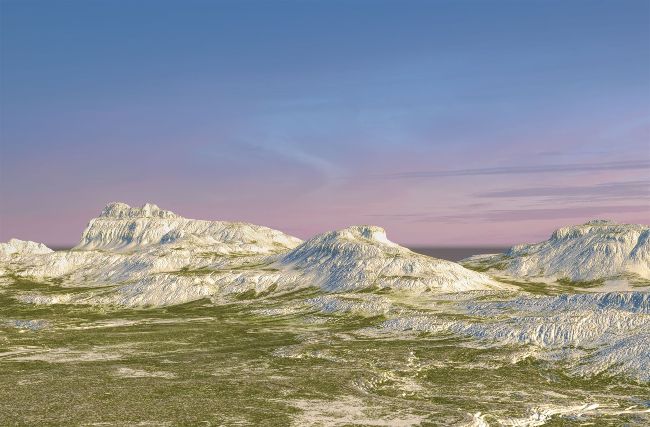
Before we start exploring look development in Gaea 1.2.8 via the LookDev nodes, let’s take a quick peek at how you work with the application’s procedural workflow. Like Substance Designer, Gaea is node-based. You have the node menu (the Toolbox) on the bottom left, the node graph view in the middle, the node properties display on the right when you click a node, and the viewport shows your terrain and your tweaks, as well as a toolbar enabling you to adjust lighting and add water. Finally, the file menu lets you change resolution, save, open, undo as well as the usual file menu commands.

Creating a terrain is simple: a new project will always start with basic Mountain and Erosion nodes unless you’ve defined otherwise. Should you want to generate terrains from scratch, it’s worth remembering you always need a starting point. You will find those in the Toolbox by either grabbing a Primitive or GeoPrimitive node and dropping it in the node graph view. The Primitives are a mix of fractal noise, drawing, cracks, and constant nodes, while the GeoPrimitives are basic terrain types like mountains, hills, craters, dunes or islands. And you can, of course, mix these together in as many ways as you’d like, but the important thing to remember is that you can’t Erode, Filter, Adjust, LookDev or anything else if there’s nothing to do that on. You add nodes in the node view by right-clicking a connection point on a node or dragging and dropping one onto another node.

Unlock this article and much more with
You can enjoy:
Enjoy this edition in full
Instant access to 600+ titles
Thousands of back issues
No contract or commitment
Try for €1.09
SUBSCRIBE NOW
30 day trial, then just €11,99 / month. Cancel anytime. New subscribers only.


Learn more
Pocketmags Plus
Pocketmags Plus

This article is from...


View Issues
3D World
December 2021
VIEW IN STORE

Other Articles in this Issue


WELCOME
WELCOME
Images courtesy of Apple Isaac Asimov’s classic sci-fi
ARTIST SHOWCASE
IRA AND AMINA
ARTIST Obafunso Sylvester Dorgu SOFTWARE PureRef, ZBrush, xNormal,
COZY ZANGIEF
ARTIST Darío Riquelme Fernández SOFTWARE ZBrush, Maya, Polypaint,
THE ASPIRE TOWER
ARTIST Ramees Muhammed SOFTWARE 3ds Max, Corona Renderer
DRAGON NOSUKE
''MAKE MATERIALS IN SUBSTANCE PAINTER, ALSO SCULPTING CUSTOM
SUPREMACY
ARTIST Mehdi Hadi SOFTWARE Cinema 4D, Octane Render,
NIGHT ELF
ARTIST Nikolay Demencevich SOFTWARE ZBrush, Photoshop, Corona Renderer
LUCH4-B0T
ARTIST Soy Kiddo SOFTWARE Blender, Substance Painter, Cycles,
MEDUSA
The Rookies The Rookies is a platform to
Technlque focus
Incredible 3D artists take us behind their artwork
Technique focus
Incredible 3D artists take us behind their artwork
Technique focus
Incredible 3D artists take us behind their artwork
FEATURES
Blue Zoo
In the final part of our series on Blue Zoo, we explore how real-time technology and other advancements are shaping animation’s future
LAYING THE FOUNDATION
Trevor Hogg discovers how David Goyer and his visual effects team helped adapt the epic sci-fi novel series Foundation into an Apple TV+ production…
THE PIPELINE
GET STARTED WITH ADOBE SUBSTANCE
Adobe has created a unique end-to-end 3D workflow with the Substance 3D Collection; let’s take a look
STAGE AND COMPOSE A SHOT WITH PIXAR
Sunguk Chun, layout artist in the camera and staging department at Pixar, takes us through the workflow of one of the shots he worked on for Luca
CONVERT A CORONA PROJECT RENDER TO UNREAL ENGINE
Discover the fantastic world of real-time rendering that is revolutionising the industry
TOP TIPS FOR CREATING IN VR
Get started with virtual reality and learn how to make the most of this intuitive and exciting creative tool
ANIMATE A CG CLOTH SIMULATION
VFX artist Enrico Lambiase demonstrates how to create and animate a cloth simulation in a few simple steps
ARTIST Q&A
CAN I PREPARE A MODEL FOR 3D PRINT IN ZBRUSH?
A resin print from a ZBrush model can
HOW DO I CREATE A TEXTURE FOR REDSHIFT IN ADOBE SUBSTANCE 3D SAMPLER?
Find out how to convert a Substance material,
WHAT ARE PROXY ATTRIBUTES AND HOW DO I USE THEM?
Antony Ward replies Adding custom attributes to our
HOW CAN I CREATE A FABRIC MATERIAL USING SUBSTANCE DESIGNER?
The cool thing about working with procedural materials
THE HUB
David Williams
MEET THE ARTIST
Creative director
Sam Lazarus, Rokoko’s creative director, gives us the lowdown on his day-to-day work life
Avant-garde aesthetics
Slide guitarist Geiger von Müller and art director Pál Varsányi discuss their surreal new music video project
Photon Ultra
HARDWARE REVIEW
REGULARS
FREE RESOURCES
Follow the link to download your free files
Chat
X
Pocketmags Support