GB
  
You are currently viewing the United Kingdom version of the site.
Would you like to switch to your local site?
16 MIN READ TIME

Mac VS iPad

Do you need a laptop or a tablet? We help you discover which Apple device is best suited for your needs
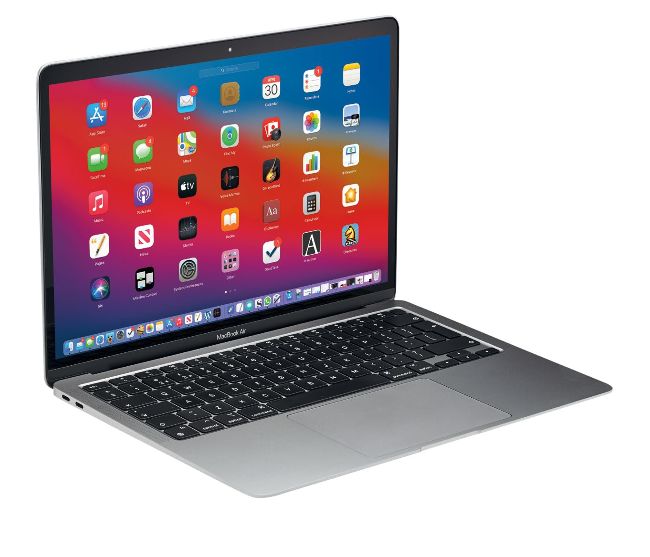
It used to be the case that choosing between a MacBook and an iPad was easy, but Apple has started to blur the lines between the two in ways that few of us could have expected. In terms of power, we have now reached parity thanks to the new iPad Pro which uses the same M1 chip as the MacBook Air and when you start to look at the storage onboard the comparisons become even closer. For example, you can buy a 12.9” iPad Pro for only £100 more than the equivalent 256GB MacBook Air, but if you opt for the 11” iPad Pro then you can pay only £50 more for 512GB of storage. This makes the cost analysis almost moot, which is then exacerbated by the fact that the M1 chipped MacBooks can run most iOS apps and games as well. With so many titles now available on macOS and iOS in separate versions as well, it can come down to how each will work for you in terms of the physical forms. We will try to help you decide which device will be best for you, but there is little doubt that Apple is making this a tricky question to answer.
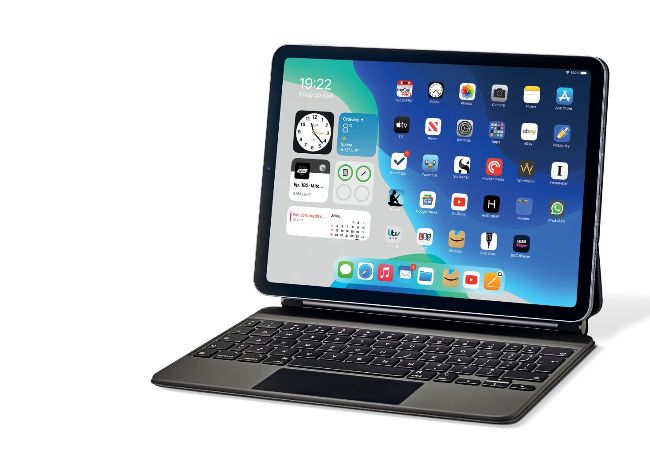
 The flat iPad keyboard

Many people will quite rightly presume that a physical keyboard is best for long periods of typing and data entry, and in many ways this assumption makes sense, but there is more to the story. A software keyboard like the one on the iPad can be customised to work in specific ways, which can make it as efficient as real keys.

Pro iPad apps

The belief that a ‘proper’ computer is needed to undertake professional tasks is still strong, but the developers of some of the better-known titles have created equivalents that work just as well on the latest iPads. Some of these apps work identically as a way of proving that mobile computing is no longer the poor relation of Windows PCs and Macs.

Adobe Photoshop

Most people are aware of Photoshop, but are likely less aware of just how powerful the iPad version is. You can now undertake complex image manipulation wherever.

2 GarageBand

Apple makes GarageBand, and has not scrimped on features when it comes to the iPad. In this app the Apple Pencil arguably gives you greater control than on the Mac.

Affinity Photo

Whether you need unlimited layers, brushes or smart object importing, Affinity Photo offers it all on the iPad. Again, the Apple Pencil offers near perfect control.

Code Editor

If you have a data input system you are happy with, either an external keyboard or the iPad screen, Code Editor gives you every coding tool you could possibly need.

Luma Fusion

Video editing on an iPad? Yes indeed. With the later iPads and the Pro models you will notice little difference in performance compared to a Mac. A big leap forward.

6 AutoCAD

AutoCAD lets you view and edit CAD drawings wherever you are with just your iPad. This is perfect for when you’re on site and the need is there to make instant adjustments.

Unlock this article and much more with
You can enjoy:
Enjoy this edition in full
Instant access to 600+ titles
Thousands of back issues
No contract or commitment
Try for 99p
SUBSCRIBE NOW
30 day trial, then just £9.99 / month. Cancel anytime. New subscribers only.


Learn more
Pocketmags Plus
Pocketmags Plus

This article is from...


View Issues
iCreate
Issue 226
VIEW IN STORE

Other Articles in this Issue


Welcome
iCreate 226
“Since the advent of iPadOS, using Apple’s  tablet has felt more Mac-like”
regulars
Apple and Facebook clash over privacy
The big story
5 Things we learned this month
New iPad Pro Apple launches lossless audio via Apple Music
iCandy
Apple TV (2007)
Genius Bar
Our Apple devices and the software on them are some of the finest products on the planet, but even they have their moments. We’re here to give you expert advice and get you back up and running in no time
MacBook Pro (15-inch)
Release date October 2006
Creative Tutorials
Turn a snap into a studio-style portrait with Photos
We show you how to use your iPhone’s Portrait mode to achieve a pro studio’s high-key lighting look
Make money from your video clips on stock sites
Process your clips to perfection with iMovie’s post-production tools, so they’re suitable to sell as stock
On your bike: shooting and editing a moving subject
How to creatively shoot and edit cycling sequences using Final Cut Pro’s HDR Tools effect 
How to reverse audio and MIDI regions
Learn the methods for flipping tracks to achieve backwards effects by following our GarageBand tutorial
Using Creative Fades in Logic Pro
Use the fade tool to smooth out audio edits and create special fx – we’ll show you how to sort out any audio issues easily
macOS Tutorials
Plan meetings and gettogethers worldwide
You can now organise your colleagues and friends, no matter where they are in the world
Become an Info master in Finder on the Mac
There is more to the file Info window in Finder than you might think. Use it to the full extent of its capabilities
Discover the secret features and functions of Pages
Most features in Pages are obvious, but some are not. Here are the great ones you may have overlooked
Get started with the Console app in macOS
Check your Mac is running okay, read system logs and track down problems using the Console app
Advanced Time Machine tweaks for your Mac
There is more to Time Machine than you might think. Access these advanced features and customise it
Top 10 apps for bloggers
If you have a blog or website, you’ll need these tools to help you to build and maintain it
iOS feature
HOME COMFORTS
The complete guide to customising and personalising your iPhone’s Home Screen in iOS 14
Track items using Apple AirTags with the Find My app
Worried about losing your everyday items? Clip AirTags to them and you’ll find them with greater ease
Set your preferred music streaming service
Tell Siri which audio apps you want to use and it will remember
Download and save individual podcast episodes
Apple has introduced the ability to save individual podcast episodes so you can listen to them offline
What’s new in Siri on the iPhone? Find out here
Siri has new features and capabilities. In case you missed them, here is a roundup of what’s changed
iOS Tutorials
How to block anything on the iPhone
iOS has ways to block what you don’t want to see, hear or access
Simulate the Android operating system on an iPhone
Samsung is giving iOS users a taster of Android…
Use Google Assistant to find your iPhone
You can now locate your iPhone using a Google Nest smart speaker or display
iPadOS Tutorials
Sketch in style with Tayasui Sketches on your iPad
An iPad, an Apple Pencil and the Tayasui Sketches app can help you create great things
Sort and print lists in the Reminders app
Update your iPad, and the Reminders app will allow you to sort your lists and print them out
watchOS Tutorials
Unlock your iPhone with Apple Watch
Here’s how to access your iPhone with Face ID when you’re wearing a mask
10 best watchOS secrets
Hidden features and settings that you need to know!
tvOS Tutorials
Improve your Apple TV’s picture using Colour Balance
Use your iPhone to enhance the picture quality of a television connected to an Apple TV device
reviews
Technics Ottava F SC-C70MK2 Music System
“An elevated, seethrough plastic disc in the middle can be pushed to either side to reveal the CD tray”
Apple AirTag
“AirTags come equipped with the Appledesigned U1 chip that uses  Ultra Wideband technology”
AirPulse A80 Active Speaker System
“High frequencies from the ribbon tweeter are pushed straight down the throat of the listener”
Apple iMac (24-inch, 2021)
£1,249/$1,299
Accessories
X2 Bluetooth Mobile Gaming Controller £59.99/$69.99 amazon.co.uk If
Remixlive 6.1
The intuitive music maker comes to the Mac
Wonderbox: The Adventure Maker
Price Arcade subscription Requirements iOS 13.5 or later
Delicious Library 3
Price £37.99/$39.99 Requirements macOS 10.10 or later Learn
PopMaster
BBC Radio 2 We love downing tools at
Origin of Symmetry (XX Anniversary RemiXX)
Muse £10.99/$10.99 To mark 20 years since the
Yearbook
Seth Rogan £7.99/$8.99 We’ve never forgiven him for
Chat
X
Pocketmags Support