GB
  
You are currently viewing the United Kingdom version of the site.
Would you like to switch to your local site?
13 MIN READ TIME

CATALOGUE YOUR COLLECTIONS

How to use apps to compile, maintain and manage the things you’re passionate about
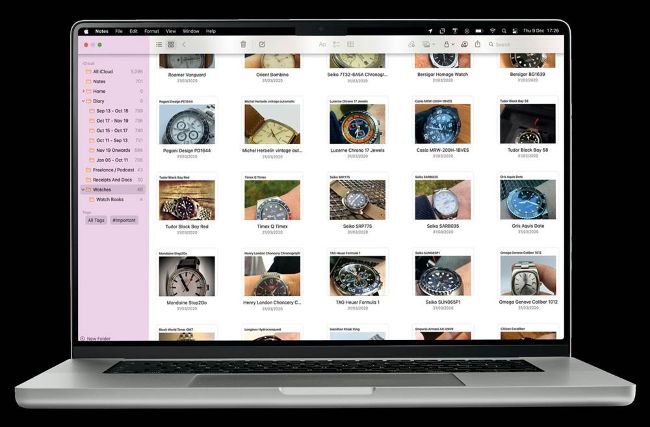
You would think that managing collections, no matter what they are, would be a straightforward part of any tech product or software. It feels as though it fits within the natural database structure of many apps and operating systems, but the choices are surprisingly varied and at times overly complex and hard to use for the majority. It can make finding the best way to catalog your collections a time consuming process, but we can help with that as we detail a variety of methodsthat will suit collections of different types. The choice will be yours as to if you want an all-in-one solution that can manage many different aspects of your life or tools that are aimed at particular objects or areas of collection, but there is definitely enough choice for anyone to find a solution. If you are working with collections where timeliness will be a factor, you will want to look at solutions that can work on Macs, iPads, iPhones and even the Apple Watch. For some collections, flexibility, and also security, will be a deciding factor.

Multiple choice

Searching for ‘collection’ in the iOS or Mac App Stores will bring back a huge list of apps, many of which are games, so you will need to tweak your search. Try using ‘manage your collections’ and the results will be much more specific to your requirements. The next step is the hardest bit, however, because the choice is almost endless.

Capture your collection

You can easily insert images into your collection that will define each object in great detail, but the best method is to snap your own photos and to use them so that you are listing the exact item in your collection. The condition of each piece can play an important part when creating a collection so try to avoid stock images.

1 The best detail

Whatever the object is that you collect, you should make an effort to capture it in the best possible detail. Your iPhone should be able to handle this with ease.

2 The full set

Some items are more valuable or meaningful if they have the packaging and peripherals. It is worth detailing the extra parts if you have them to complete the collection.

3 The exact number

You should include the serial number or at the very least the model number of an item. This can differentiate it, if it is a product that is upgraded from time to time.

Unlock this article and much more with
You can enjoy:
Enjoy this edition in full
Instant access to 600+ titles
Thousands of back issues
No contract or commitment
Try for 99p
SUBSCRIBE NOW
30 day trial, then just £9.99 / month. Cancel anytime. New subscribers only.


Learn more
Pocketmags Plus
Pocketmags Plus

This article is from...


View Issues
iCreate
Issue 234
VIEW IN STORE

Other Articles in this Issue


Welcome
Welcome
iCreate 234
iCreate regulars
What has Apple got planned for 2022?
The big story
5 Things we learned this month
Apple news Apple wins Future Tech awards Each
iCandy
PowerBook G4 (2003)
TURBO CHARGE YOUR MAC
Proven ways to speed up your iMac or MacBook
Genius Bar
Our Apple devices and the software on them are some of the finest products on the planet, but even they have their moments. We’re here to give you expert advice and get you back up and running in no time
Time Machine
iMac G5
Creative Tutorials
Go ProRAW with Apple’s Photos app
Learn how to shoot and edit in Apple ProRAW format to produce better quality images
Shoot, edit and share your footage in iMovie
How to edit footage of a fun family activity into a slick social media sequence
Learn how to use Special Effects in Final Cut Pro
Creatively combine layered clips using both split screen and green screen effects
Reverb options for users of all levels
Give your sounds a sense of space with these reverberation effects
Master Group Audio Editing in Logic Pro
Discover how to edit multiple audio tracks at the same time using Logic’s groups feature
Get to know the new & improved Books app
The Books app on the Mac has been updated and refreshed. Dive in and explore the new features
Customise Quick Note and change corners
Change how Quick Note is activated and change corners. You can even use all corners if you prefer
Use and schedule Downtime in Screen Time
Use Downtime to avoid distractions and get more work done by wasting less time on your Mac
Create professional logos the easy way
You can quickly build original logos for almost any purpose using an intuitive macOS app
macOS Tutorials
Master Monterey’s new window management
Work with tiled windows more easily, swap windows and move them with new menus and features
Use the iCloud Shared folder in Finder
See your shared files and folders and the documents you are collaborating on all in one place on your Mac
Create Smart Lists using the Mac Reminders app
Organise your tasks, lists and to-dos in Reminders into Smart Lists that show only what you need
iOS Tutorials
Record all of your app activity in iOS 15.2
Discover the data being collected by your iPhone
Explore the globe with the iOS 15 Maps app
There are new views in Maps – see the Earth from space!
Explore the Maps Guides Home feature
Apple updated Maps and created a new Guides Home section. Use it to read and explore the world
Reduce the bass on your HomePod device
Appease the neighbours by turning things down a notch
Find and install apps from the Spotlight search bar
You don’t need to launch the App Store if you already know which apps you want to manage
Create a Legacy Contact in iOS 15.2
Ensure your loved ones can access your Apple data
Send messages between devices using Intercom
Communicate with members of your family by using an Intercom network
10 Best Apps for Valentine’s Day
Need a little romantic inspiration or a partnerpacifying gift idea? Then help is at hand…
iPadOS Tutorials
View and manage your month in one screen
Managing your time in a way that feels suitable for your needs can be tricky, but this solution may work well for you
Master the new Apple TV app design
As of iPadOS 15.2, the Apple TV app looks a little different, making it even easier to find and watch content
Get to grips with Apple Watch’s new Qwerty keyboard
The new Apple Watch Series 7 lets you make use of a full set of keyboard keys
Find misplaced devices on your Apple Watch
With watchOS 8, it’s now possible to locate any missing Apple devices from your wrist
tvOS Tutorials
Create organised app folders on Apple TV
Make it easier to find apps by placing those that are similar into their own folders
iCreate reviews
Denon AH-C830NCW Noise Cancelling Earbuds
£139/$159
Casio G-Shock GBD-H100BAR
£469/$479
Syntronik 2
Setting the standard in modern, virtual synthesizers
Chat
X
Pocketmags Support