GB
  
You are currently viewing the United Kingdom version of the site.
Would you like to switch to your local site?
13 MIN READ TIME

POWER UP your Mac, iPad & iPhone

Optimise your devices & improve performance
The notion of spring cleaning is a term that has been in use for hundreds of years and it is not merely a practical activity. It is seen as a way to cleanse the mind as well as a space, and to this day it is seen as purely beneficial around the world. For tech, the idea of spring cleaning does not tally at first, but when you consider that we all hoard files, data, media and much more that we rarely interact with, it makes perfect sense to spring clean as many of your devices as you can. The practical advantages are that your devices will likely last longer and that you will be able to use your devices more efficiently, but ultimately you should consider a hefty spring clean as merely the start of a new personal tradition. If you can reach a point where you are cleaning up vital areas regularly, the benefits will come to you every single day when you interact with your Apple devices. There is no downside to a thorough tech spring clean and all you will lose is a little bit of time, and even this can be gained back because your tools are streamlined. You have nothing to lose.

Manage your battery

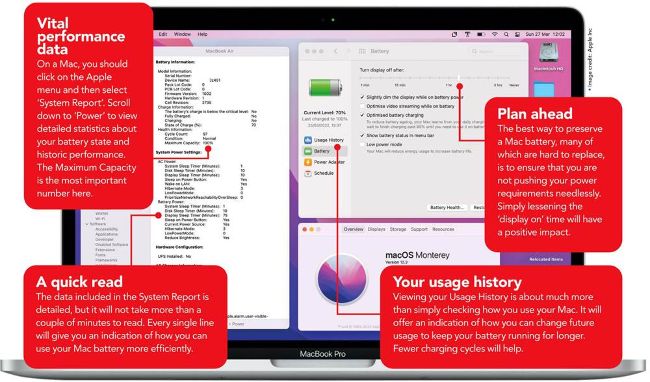
For many Apple devices, the battery is the most likely component to need attention first. The power inside modern iPhones, iPads, Macs and Apple Watches ensures that they will be usable for many years into the future, but they of course need efficient batteries to continue working. At the very least, you need to keep a close eye on your batteries.
Manage your mobile batteries

iPhones and iPads can have their batteries replaced by Apple for a relatively low price, when compared to the original cost of the devices. It is more difficult with a Mac or Apple Watch, but you should still keep an eye on the usage data and do what you can to prolong the battery performance over time.

1 Power hungry apps

In Settings>Battery you can check which apps use the most battery power and the list will often throw up surprising culprits. Games, in particular, can use a lot of power.

2 Manage iPhone battery

The health percentage is crucial on an iPhone and if it drops below a certain level, you will be advised to get it replaced. Also, you should ‘optimise’ the charging.

3 Watch batteries can last

You can check the battery health on your Apple Watch as well, and also optimise the charging. Go to Settings>Battery to quickly check your Watch’s power level.

Unlock this article and much more with
You can enjoy:
Enjoy this edition in full
Instant access to 600+ titles
Thousands of back issues
No contract or commitment
Try for 99p
SUBSCRIBE NOW
30 day trial, then just £9.99 / month. Cancel anytime. New subscribers only.


Learn more
Pocketmags Plus
Pocketmags Plus

This article is from...


View Issues
iCreate
Issue 238
VIEW IN STORE

Other Articles in this Issue


Welcome
“We’ll help you get your iPhone as ‘off-grid’ as you are prepared to go”
There’s something about a spring clean that is
iCreate regulars
iPhone 14 could mark the end of ‘mini’ models
A shrinking market for mini-mobiles means the end of the road for small handsets
5 Things we learned this month
iPhone news Apple updates iMovie on iOS •
iCandy
MacBook (2006) The original MacBook featured the first
Genius Bar
Our Apple devices and the software on them are some of the finest products on the planet, but even they have their moments. We’re here to give you expert advice and get you back up and running in no time
iPod Classic (U2 Edition)
Release date: October 2004
Creative Tutorials
Styles and filters to simplify your photo editing
How to ‘grade’ your shots’ colours and tones with the minimum of effort
Capture your fun day out in a sophisticated sequence
Shoot and edit a family activity to create a slick movie sequence that you can share on social media
Get the Hollywood look with a slick cinematic sequence
Create an atmospheric cinematic sequence using cinematic shooting and editing techniques
Rock-out with the Wham and Wah FX units
Discover how to use Automation curves to tilt expression pedals with our GarageBand tips and tricks
Work with Apple Loops in your Logic Pro projects
Tap into a library of pre-recorded parts played by pros to enhance your Logic Pro tracks
macOS Tutorials
Get started with the Console app in macOS
Check your Mac is running okay, read system logs and track down problems using the Console app
Use the DuckDuckGo browser and get more privacy
The non-tracking search engine now has a Mac-only privacy-focussed browser
Create and store secure private notes in Keychain
Browse websites and services, then add extra information with peace of mind
Create public calendars and subscribe to them
Calendar Developer Apple Inc Difficulty Time needed 15
Print calendars straight from your Mac’s Calendar app
Calendar Developer Apple Inc Difficulty Time needed 10
Rediscover past versions of the Mac’s system software
Go retro and run old versions of Apple Mac operating systems, software and games in through your Safari browser
Create interactive experiences using RichCast
This free app lets you produce and publish voice-activated adventures and more without any coding knowledge
MAKE YOUR iPHONE COMPLETELY PRIVATE
The complete guide to locking down your iPhone and protecting all of your sensitive data and images
iOS Tutorials
Use Visual Lookup to get info on photos
Identify objects, plants, animals, buildings and more using Visual Lookup in the iOS Photos app
Turn recipes into shopping lists on the iPhone
Use the iPhone’s ability to read text in photos to create lists from printed items, such as recipes
Access your account features in Maps
Customise the settings and report incidents on the iPhone
Digitise handwritten messages in the Notes app
Scan printed or handwritten text before selecting the bits you want
Set Apple TV & YouTube video quality on iPhone
Improve picture quality or save mobile data and storage space
Create your own unique GIFs in Twitter
The latest version of Twitter lets you use your iPhone’s camera to record your own GIFs
Create manga characters using machine learning
You don’t have to be an amazing artist to draw your own manga
Instantly identify songs using Shazam
Need to know the name of a song and who recorded it? Then utilise the Music Recognition button in iOS
iPadOS Tutorials
Make your iPad read out text for you
Enable the text-to-speech feature in iPadOS and you can listen to what’s written on the screen
The best widgets for your iPad
Widgets are a relatively new addition to iPadOS, but they offer excellent utility when chosen wisely
watchOS Tutorials
Translate languages on your Apple Watch
If you need to communicate with someone in a different language, raise your wrist and speak
Control your heating from your wrist
Here is yet another use for your Apple Watch, that will come in handy every single day
tvOS Tutorials
View live video in Apple TV’s Picture in Picture mode
It’s now possible to view footage in Picture in Picture mode while you’re doing something else
iCreate reviews
Technics A800 Wireless Headphones
£299/$349
Nanoleaf Shapes Limited Sonic Edition
£299.99/$299.99
JOBY Wavo Air Wireless Microphone
£215/$249
Harman/Kardon Citation Amp
£529/$720
MODO Bass 2
The physically modelled electric bass goes next level
Chat
X
Pocketmags Support