Master your iPad’s Music app
Enjoy tunes anywhere, at home or on the go, with Apple’s Music app
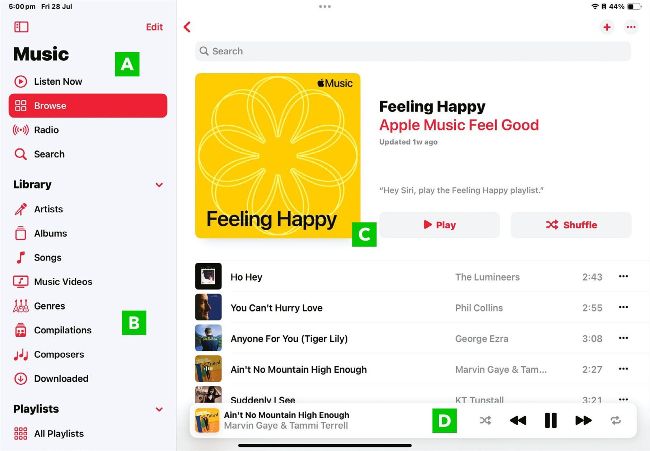
Image credits: Apple Inc.
A
APPLE
MUSIC
Tap Listen Now, Browse or Radio to access the thousands of tracks available on Apple’s music service.
B
LIBRARY
The songs you own arranged by Artist, Songs, etc. Downloaded contains the songs stored on your iPad.
C
MAIN
WINDOW
What you see here depends on whether you’re looking the Apple Music or your personal music library.
D
PLAYBACK
This floating window shows the currently playing track. Tapping here invokes the fullscreen view.
Of all the versions of the Music app available on
Apple devices, the iPad version is our favourite. It’s simpler to use than the Mac app, and less cramped than the one on iPhone, and it offers the best features of both. Better still, the Music app on iPad makes the most of your tablet’s bigger screen with a great-looking interface that puts all the key features easily at your fingertips.