EASY MAC UPGRADES
What can you do to upgrade your Mac without opening it up and attacking the logic board with a soldering iron? We take an in-depth look
Written by Ian Osborne
O
n
e of the most common criticisms of the Mac is that it’s not upgradeable. This is not true. While modern Macs have integrated memory and storage chips soldered to the logic board, there are a lot of other things you can do to upgrade and enhance your Apple computer. You don’t have to open the casing and swap out internal parts to turn your Mac from wheezy to whizzy.
In this feature, we explore the many ways you can power up your Mac, from teaming it with a high quality external display to make using it easier and more fun, to increasing the amount of available storage by connecting an external drive. You can even easily connect more peripherals by doubling the number of available ports — and we’ve lined up some amazing add–ons and accessories that will will enable you to do just that.
You’ll also discover some of the cool things you can do in macOS to make all of these things perform better and smarter — such as tweaking your display resolution in System Settings and customising your mouse and keyboard, or teaming your Mac with an iPad via Sidecar for a handy second screen.
By the time you’ve finished, your Mac will be running like a race car with an F1 engine. Let’s hear that baby roar!
UPGRADE YOUR DISPLAY
Get more done by upping your available workspace
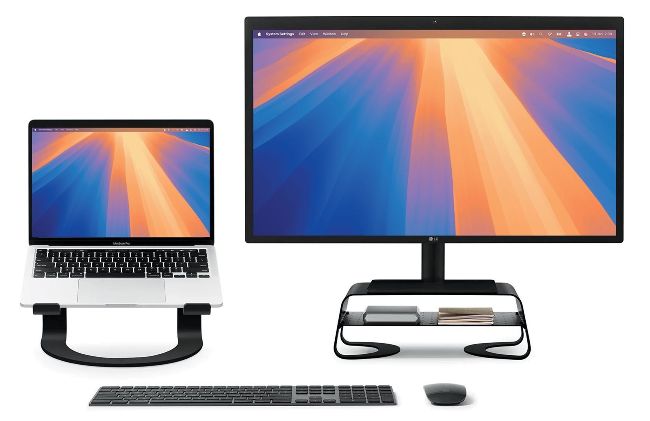
Increase your display space and you’ll find most tasks a whole lot easier.
M
o
dern monitors have come on a long way in the last few years. These days, you can get a display with 4K resolution for under £200, and even the largest display sizes are becoming more affordable. If the monitor you use with your headless Mac is getting long in the tooth, or you want a second screen for your iMac or notebook Mac, perhaps it’s time to upgrade.
Having two displays is great for productivity. You can put menus, reference documents and other such windows on the second display, while you work on your primary screen. Or if you like to listen to music while you work, open the Music app on your secondary monitor, where it’s out of the way but still accessible. According to tech marketing, research, and management consulting firm Jon Peddie Research, having more than one monitor can increase your productivity by around 42%.
And don’t forget other peripherals. A Twelve South Curve Riser (£39.99,twelvesouth.co.uk) can lift your second screen to the same height as your iMac, or your Mac notebook sitting on a Twelve South Curve for MacBook (£59.99, see image above). The Curve Riser also gives you shelf space for a hub, odds and ends or even a Mac mini. A regular M1, M2 or M3 Mac (as opposed to a chip suffixed with a term like ‘Pro’ or ‘Max’) can only support one external screen out of the box, but if you get an OWC USB-C Dual HDMI 4K Display Adapter with DisplayLink (£139.99, owc.com), or a Sonnet USB-CDual 4K 60Hz HDMI Adapter (£139.99, sonnettech.com), you can get around this limitation and use two.
Jargon buster
4K screen
Sometimes called ‘UHD’ (Ultra High Definition), a 4K screen is one that has around 4,000 pixels across its long edge. A typical consumer 4K screen has a resolution of 3840x2160 pixels, making it rich in detail.
DisplayLink
As mentioned earlier, Macs with standard M1, M2 or M3 series chips can only support one external monitor.
DisplayLink technology can get around this limitation and give you an extra screen for your setup.
Hertz (Hz)
Hertz, usually abbreviated to Hz, is a measure of the screen’s refresh rate, that is, how many times it updates in a second. 60Hz is the usual rating for a monitor, though gaming screens can offer 120Hz, 144Hz or 165Hz.
HDR
HDR stands for High Dynamic Range. It’s a feature that allows more intense colours on the screen, with brighter, more detailed highlights and darker, more intense shadows. It’s a good thing to have in a monitor.
TOP 3 4K monitors
Dell UltraSharp U2723QE
£540 FROMdell.com Dell’s UltraSharp U2723QE has a great screen and excellent throughput options. It has KVM (Keyboard, Video, and Mouse) and PiP (Picture in Picture) features, and if you want more screen space, you can daisy chain a second screen.
Philips 27E1N1900AE
£249.99 FROMphilips.co.uk If you’re looking for a second screen at a low price, look no further than this one. It’s very versatile, with height adjustment and a rotatable screen you can turn 180° into portrait mode. Screen quality is perfectly good.
BenQ EX321UX
£999.99 FROMbenq.eu Gamers will appreciate this MOBIUZseries gaming monitor from BenQ. It has a refresh rate of 144Hz, a meaty 31.5-inch screen size and HDMI, DisplayPort and USB-C connectivity. It’s great for your consoles as well as your Mac.