Content caching
Speedier updating for all your devices
Carrie Marshall
Software updates can be very big. The direct download of the macOS Catalina 10.15.4 update was three gigabytes, while the same month’s iOS download was a whopping 4.17GB. That’s a lot when you just have one device to update, let alone multiple Macs or iOS devices. Wouldn’t it be great if you could download something once and then share it with all the other devices that need it? And wouldn’t it be great if you could do the same for app updates, iCloud data and Apple Books?
Say hello to content caching.
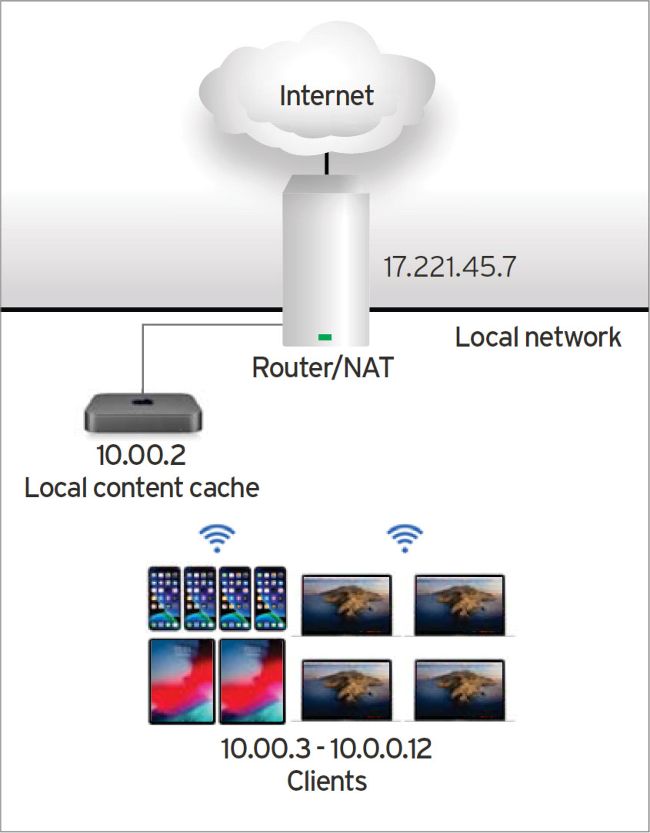
Here’s a simple content cache: the cache gets content from the internet and shares its copy with local clients.
Your Mac caches data like a squirrel stores its nuts!
What is content caching?
Content caching speeds up software updates and iCloud downloads by keeping a local copy of data you’d normally have to download from Apple. The term caching comes from the French word cacher, which means ‘to hide’. When a squirrel creates a store of nuts to last through the winter, that’s a cache. On your Mac, the nuts are the data you want to share.