Say hello to... macOS Sequoia
What’s new in macOS 15? What is Apple Intelligence, and what can it do for you? Will my Mac be able to run it? We tell you all this and more
Written by Ian Osborne
Your
next free Mac operating system upgrade is here.
To help you make the most of it, we walk you through its major new features, tweaks and enhancements and show you how to make the most of them. We also look at some of the features that haven’t quite arrived yet, and take a deep dive into the more minor changes that help make your Mac easier, more fun and more productive to use. macOS Sequoia was announced at the Worldwide Developers Conference (WWDC) in June 2024.
Once again, the name is taken from a geographical feature found in Apple’s homeland, California. This time it’s the Sequoia National Park, named after its giant trees.
The operating system is a similarly giant update, with Apple Intelligence features integrated throughout; improvements to Siri; iPhone Mirroring, which allows you to control your iPhone from your Mac; improved Window Tiling to make it easier to view multiple windows on a single desktop; and improvements to key Mac applications such as Safari, Messages, Maps, Notes and more.
macOS Sequoia works with…
✓ iMac: 2019 and later
✓ Mac Studio: 2022 and later
✓ Mac mini: 2018 and later
✓ Mac Pro: 2019 and later
✓ iMac Pro: 2017 and later
✓ MacBook Air: 2020 and later
✓ MacBook Pro: 2018 and later
NOTE: Apple Intelligence features, which are to be rolled out throughout the year, require Macs with an M1 chip or above.
Apple Intelligence
Exciting new features that are coming soon
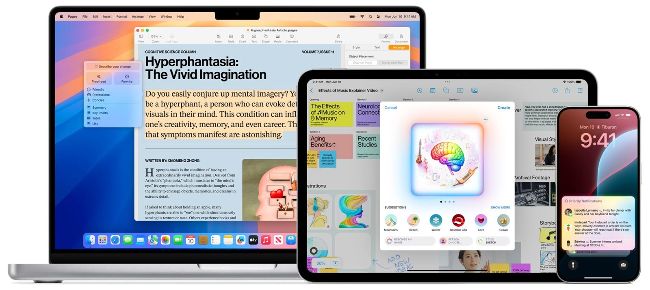
Apple Intelligence is integrated system-wide into all of Apple’s gear, including the Mac, the iPad and the iPhone.
Although arguably the most important announcement to come out of this year’s Worldwide Developers Conference, Apple Intelligence won’t be released in its entirety with macOS Sequoia.

Tell mum she’s a hero, and send a picture of her wearing a cape, created in Messages using Apple Intelligence and her Contacts photo.
The new artificial intelligence platform that powers a series of new features and is integrated system-wide into the iPhone, iPad, Vision Pro and Mac, is to be released with later OS updates over the next year. So let’s take a look at what we can expect…
Apple Intelligence is very focused on the user and what they need from their Apple devices. Drawing on your personal context, it’s customised to be relevant to you and your wishes, and is privacy protected at every stage.
Writing Tools can not only proofread your writing, but can also rewrite it to make it more formal, personal or succinct. Available system-wide, you can use the tools when writing an email, updating your blog in Safari, making a note in Notes, or indeed almost anywhere that you write. Apple Intelligence can produce useful images too, making communications more fun. And again, this feature integrated throughout the system, and is also available in a forthcoming new app; Image Playground.
Apple Intelligence in Siri
From humble beginnings in 2011 with the iPhone 4s, Siri is featured across Apple’s device range. Users make over 1.5 billion Siri requests per day. With the integration of Apple Intelligence, it becomes even more powerful, relevant and personal. You can speak to Siri more naturally. It even copes if you hesitate, stumble over your words or correct yourself mid-sentence.
An Apple Intelligence feature coming soon to Siri is Screen Awareness, whereby Siri knows what’s on your screen. If, for example, someone texts you their address, you can tell Siri to add it to Contacts, and it happens.
HOW TO
Use Writing Tools >
1 Proofreading
You can use Writing Tools to check your writing for grammar, syntax and spelling. Edits are suggested along the way, and reasons for those edits given. You can accept or reject a suggested change, and revert where needed.
2 Rewrite
With the powerful Rewrite function you can have Apple Intelligence redo your writing, changing the tone if needed. Make it more friendly if it sounds stuffy, more professional if it’s too chatty or more succinct if too long.
3 Summarise
If you’ve written a long piece of text, you can have Writing Tools summarise it for you, into a short paragraph, bullet points, a list or a table. You can then replace or augment your text with this summary
HOW TO
Use Image Playground >
1 Create an image
Image Playground is an app that lets you play with Apple Intelligence’s image-creating capabilities. It’s coming soon, and its functionality will also be built into apps such as Messages, Keynote, Pages and more.