Answers
Got a burning question about open source or the kernel? Whatever your level, email it to answers@linuxformat.com

Neil
Bothwick thinks he was an Enigma machine in a past life.
Q Fast font fiddling
Is there any quick single-click way to switch between two fonts (with different sizes) when writing LibreOffice documents? I normally use Liberation Serif (12pt) but often switch into Liberation Mono (11pt) to clarify things like program output or user commands used in the middle of other text. Some kind of single-click method would make the writing more fluent.
Yrjö Seppä
A There are two ways to approach this. One is to use the macro recording facility to record the font change, then bind that to a key. First enable macro recording under Tools > Options > Advanced. Then select Tools > Macros > Record Macro, perform the actions you want, click Stop Recording and save the macro. Now you can assign this to a hotkey by selecting Tools > Customise and going to the Keyboard tab. Go to Application Macros in the Category list and choose your macro. Click on an unused key in the Keys list and press Assign. Now you should have a hotkey to depending on your screen and font do just what you want. Recording and running macros in LibreOffice relies on a compatible version of Java being available. If this does not work for you, try the following alternative.
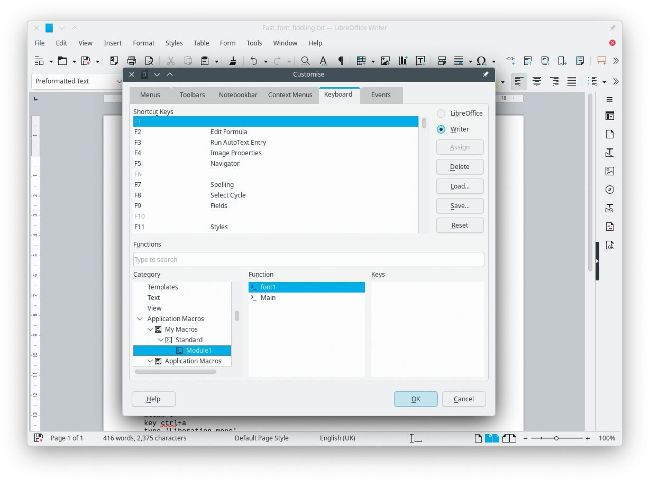
Once you have recorded a macro in LibreOffice, you can attach it to a hotkey for rapid access.
The other way is to use xdotool (or an equivalent). Xdotool sends mouse and keyboard events directly to the system. This means it will only work reliably for your needs if the selection boxes for the font are always at the same screen coordinates, which would be the case if you run LibreOffice in a full-size window. Then you can write a short xdotool script and save this in a file – say, mono.xdo:
mousemove --sync 480 150
click 1
key ctrl+a
type ‘Liberation mono’
key Enter
mousemove --sync 750 150
click 1
key ctrl+a
type ‘11’
key Enter
You have to determine the exact positions to click on by trial and error, depending on your screen and font settings. Bind xdotool /path/to/mono.xdo to a hotkey and you are good to go. Make a copy of the script and change the font name and size to select your serif font.