Create a Time Capsule
Discover how to set up a shared Time Machine folder on your network
Nick Peers
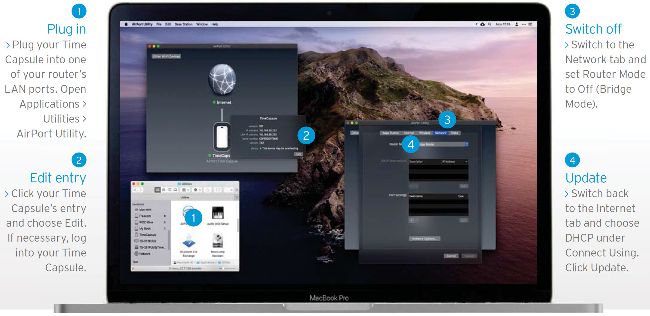
You can convert your Time Capsule into a standalone network drive following the steps above.
IT WILL TAKE
15 minutes
YOU WILL LEARN
Set up a shared Time Machine folder accessible to all your Macs
YOU’LL NEED
NAS device with Time Machine support or large USB hard drive
Are you looking to replace your AirPort Time Capsule? If you’ve been relying on it as a network router, then it’s long overdue an upgrade. Choose a router with Ethernet ports, such as the Eero (reviewed in the July issue), and convert your Time Capsule into a standalone network drive to retain Time Machine support - the annotation above summarises the steps you need to follow.