Apple Magic Trackpad
Apple mice may not be perfect — but the Magic Trackpad is the future
YOU WILL LEARN
How the Magic Trackpad works, and how to use Multi-Touch gestures
SIMPLE
TWO–FINGER GESTURES ARE EASY
TO REMEMBER AND USE
KEY FACT
Apple is increasingly pitching the iPad as a device that can be used for serious work, and the iPad has been able to use mice and trackpads since iOS 13.4. Multi–Touch gestures work well on iPad too, such as swiping up with three fingers to go to the Home screen, and swiping sideways with three fingers to switch between apps.
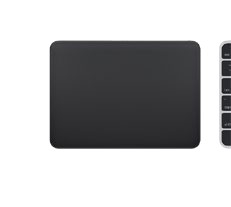
FOR ALL ITS LEGENDARY DESIGN SKILLS, Apple has made some truly terrible mistakes with its mice (and keyboards) over the years. The infamous ‘hockey puck’ mouse was a laughing stock back in 1998, and even today the current Magic Mouse is marred by Apple’s bizarre decision to put the charging port on the underside of the mouse — which means that you can’t actually use the darn thing while it’s charging. However, Apple has also come up with a really attractive alternative to the traditional computer mouse in the form of its Magic Trackpad. Of course, the MacBook range and other PC laptops have been using trackpads since the mid–90s, but these early trackpads were quite small and still had to provide separate buttons that worked like the buttons on a conventional mouse. It was only in 2008 that Apple introduced the MacBook Air with a larger, button– free trackpad that also supported Multi– Touch gestures, such as pinch–to–zoom.